
Hi,
I'm fairly new to Linux. I'm running Linux Mint. After installing SH3D via Synaptic, I can't find the plugins folder, to copy plugins to.
What am I missing?
PhotoVideoRendering-1.6 installation in Linux
This topic has been viewed 10382 times and has 10 replies
-
UbuntuBirdy

- Posts: 421
- Joined: Thu Aug 31, 2017 10:31 pm
- Country: Switzerland
- Contact:
Re: PhotoVideoRendering-1.6 installation in Linux
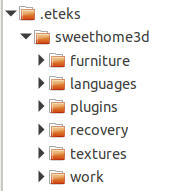
I guess that Mint handles the same as Ubuntu (especially if you have the Ubuntu-based version). Then in your home directory there is a hidden folder called ".eteks". In this folder you will find another called "sweethome3d" and in it you will find the directory you are looking for: "plugins".
Pascal
SH3D 6.6 / Ubuntu 22.04 (Mainline-Kernel) / Radeon RX580 / Ryzen 7 5800x
SH3D 6.6 / Ubuntu 22.04 (Mainline-Kernel) / Radeon RX580 / Ryzen 7 5800x
Re: PhotoVideoRendering-1.6 installation in Linux
Hi,
I've been looking, and turned on "Show hidden files". No .eteks folder though.
I've been looking, and turned on "Show hidden files". No .eteks folder though.

Re: PhotoVideoRendering-1.6 installation in Linux
If the folder "plugins" doesn't exist, create it yourself in ./eteks/sweethome3d.
Then copy your plugins into that folder.
When you start SH3D it will load the plugins it finds in that folder.
Hans
Then copy your plugins into that folder.
When you start SH3D it will load the plugins it finds in that folder.
Hans
Re: PhotoVideoRendering-1.6 installation in Linux
Thank you, that did the trick. But now SH3D tells me, that the plugin is not compatible with this version of SH3D. I went on, and downloaded the 32 bit version instead. But... Running the terminal script, in the SH3D folder does nothing. A terminal window flashes, and closes. No more.
What can I do?
What can I do?
Re: PhotoVideoRendering-1.6 installation in Linux
OK, i now have the right x64 bit version. I can click the "PhotoVideoRendering" meny item in SH3D, but nothing happens, when I click it.
Re: PhotoVideoRendering-1.6 installation in Linux
From the top menu choose Photo-video rendering -> Simple photo rendering (v1.6) and a pop-up window appears that's slightly different from the "normal" rendering window.
Check your settings, and GO. (Normally that should work)
Check your settings, and GO. (Normally that should work)
Re: PhotoVideoRendering-1.6 installation in Linux
Oh yes, I understand. But when I click the "photo video rendering" menu-item, the window doesn't pop up. Nothing happens.From the top menu choose Photo-video rendering -> Simple photo rendering (v1.6) and a pop-up window appears that's slightly different from the "normal" rendering window.
Check your settings, and GO. (Normally that should work)
Re: PhotoVideoRendering-1.6 installation in Linux
Now I have made an Ubuntu USB stick, instead of Linux Mint. Exact same thing. Clicking the Video rendering menu-item, then nothing happens, at all.

Re: PhotoVideoRendering-1.6 installation in Linux
Run Sweet Home 3D from a Terminal window. If the plug-in is incompatible some way, an error should appear in the Terminal window when you select one of its menu items.
Emmanuel Puybaret, Sweet Home 3D creator
Who is online
Users browsing this forum: No registered users and 1 guest