
This doesn't work...
- right-click on the Windows logo
- select Run
- java -Xmx8g -jar C:\Users\hans\Downloads\SH3D-6.2_derived.jar
- nothing happens
Any suggestions?
Photo-video rendering plug-in
This topic has been viewed 841407 times and has 225 replies
-
UbuntuBirdy

- Posts: 421
- Joined: Thu Aug 31, 2017 10:31 pm
- Country: Switzerland
- Contact:
Re: Photo-video rendering plug-in
Not sure if it works on Windoof, but go to your SweetHome3D directory, open the lib folder, rename the SweetHome3D.jar to anything else, rename the JAR-file from Enko to SweetHome3D.jar and copy it to the lib folder in your SweetHome3D directory.
Then start your SweetHome3D as usual...
Then start your SweetHome3D as usual...
Pascal
SH3D 6.6 / Ubuntu 22.04 (Mainline-Kernel) / Radeon RX580 / Ryzen 7 5800x
SH3D 6.6 / Ubuntu 22.04 (Mainline-Kernel) / Radeon RX580 / Ryzen 7 5800x
Re: Photo-video rendering plug-in
You can launch the JAR fileThis doesn't work...
- right-click on the Windows logo
- select Run
- java -Xmx8g -jar C:\Users\hans\Downloads\SH3D-6.2_derived.jar
- nothing happens
Any suggestions?
- from a terminal:
Code: Select all
java -Xmx8g -jar "C:\Users\hans\Downloads\SH3D-6.2_derived.jar"Code: Select all
java -Xmx8g -jar SH3D-6.2_derived.jarEnkoNyito
Re: Photo-video rendering plug-in
This beta version 1.8 of the photo plug-in will allow you to test the new shininess shaders and Sunflow standard options from version 1.2 of this other plug-in (Tools menu).
[Note: Updated download links to include video rendering and bug fixes in standard options.]
[Note: Updated download links to include video rendering and bug fixes in standard options.]
- Attachments
-
- AdditionalSunflowOptions-1.2a.sh3p
- (69.33 KiB) Downloaded 994 times
-
- PVR-1.8_betaTest2a.sh3p
- (345.51 KiB) Downloaded 437742 times
-
- AdditionalSunflowOptions-1.2.sh3p
- (69.27 KiB) Downloaded 945 times
-
- PVR-1.8_betaTest2.sh3p
- (345.57 KiB) Downloaded 373446 times
EnkoNyito

Re: Photo-video rendering plug-in
Perfect!
After some testing, I have found that a buffer size of 48 is marginally faster than 64 and 32.
Is it automatically detecting the number of threads available?
Quite oddly, it seems that choosing different bucket orders has an impact on the rendering time.
This is rendered with column.
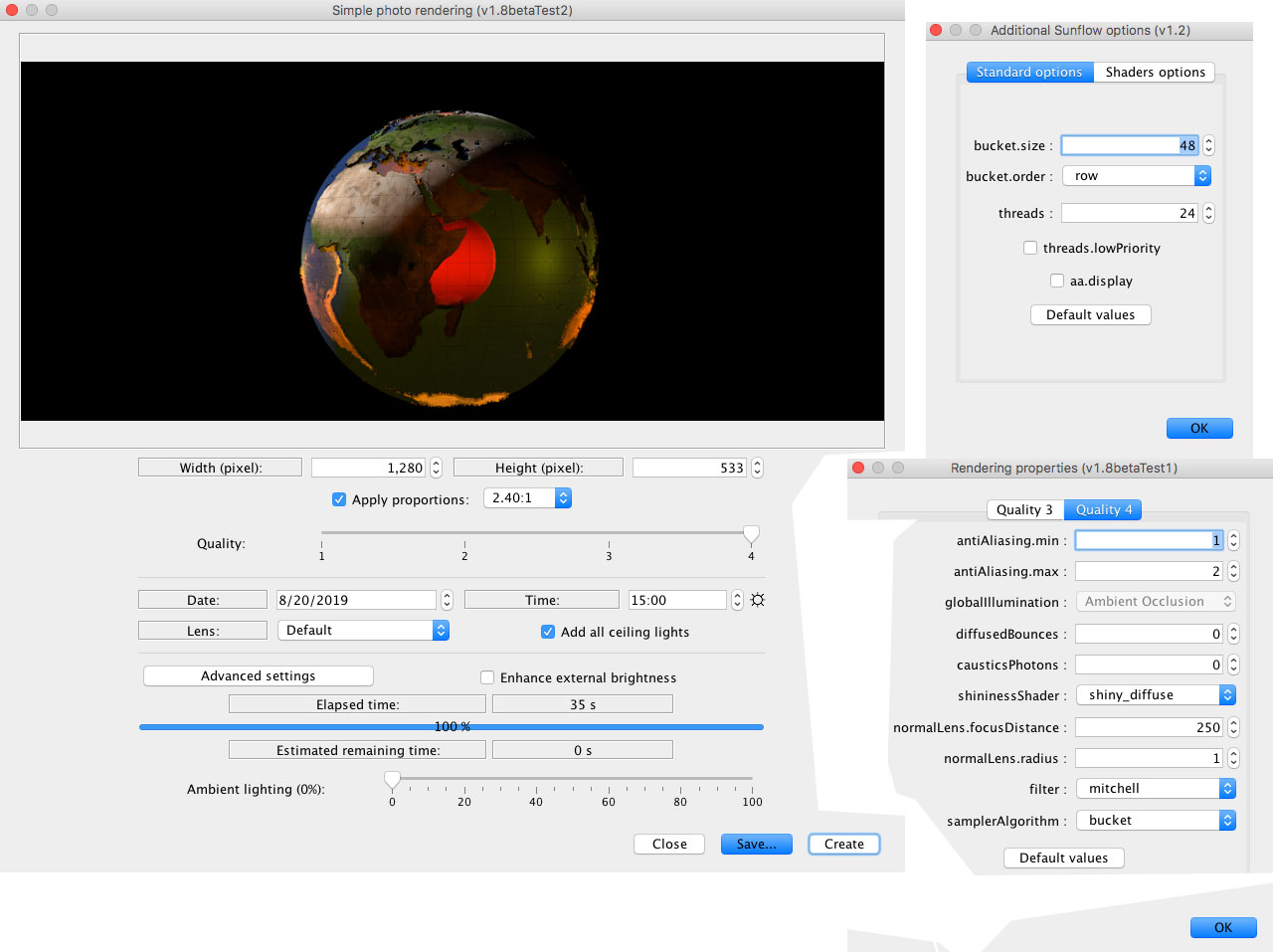
Hilbert : 39 s
Spiral : 39 s
Row : 38 s
Column : 35 s
Diagonal : 35 s
Random: 48 s
I didn't try the reverse options – but I must admit I was somewhat curious about the reverse random...
I noticed no difference with the threads.lowPriority activated.
The project file is meant as an illustration of the rather hot inner core of the earth (intended for the education of my daughters),
and I wanted it to spin, so I tried making a video.
It seems the video will not render in Q4, but stops about half way.
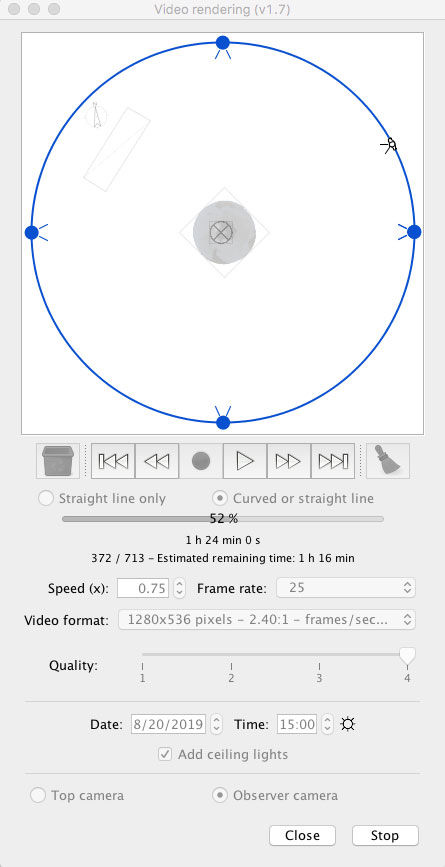
I'm including the project file, in case anyone wants to give it a try ( 1280 x 536 )
Project file
Cec
After some testing, I have found that a buffer size of 48 is marginally faster than 64 and 32.
Is it automatically detecting the number of threads available?
Quite oddly, it seems that choosing different bucket orders has an impact on the rendering time.
This is rendered with column.
Hilbert : 39 s
Spiral : 39 s
Row : 38 s
Column : 35 s
Diagonal : 35 s
Random: 48 s
I didn't try the reverse options – but I must admit I was somewhat curious about the reverse random...
I noticed no difference with the threads.lowPriority activated.
The project file is meant as an illustration of the rather hot inner core of the earth (intended for the education of my daughters),
and I wanted it to spin, so I tried making a video.
It seems the video will not render in Q4, but stops about half way.
I'm including the project file, in case anyone wants to give it a try ( 1280 x 536 )
Project file
Cec
Re: Photo-video rendering plug-in
@Ceciliabr
With yours where the subject is central and the background black, the order has an influence especially on the calculation of the remaining time.
I will test with different video format because the lighting significantly increases the duration of the rendering.
Enko
Yes, the number of threads by default is the number of available processors (CPU) that will be the maximum value because I noticed a bug by opening your file on my computer which has only 4 cores.Is it automatically detecting the number of threads available?
I think it depends on the scene.Quite oddly, it seems that choosing different bucket orders has an impact on the rendering time.
With yours where the subject is central and the background black, the order has an influence especially on the calculation of the remaining time.
The "reverse random" bucket order will be removed.I didn't try the reverse options – but I must admit I was somewhat curious about the reverse random...
This is what I also found but I do not do any action in the plan or the 3D view during a rendering.I noticed no difference with the threads.lowPriority activated.
Version 1.7 of the plug-in uses only the default values of the new options.It seems the video will not render in Q4, but stops about half way.
I will test with different video format because the lighting significantly increases the duration of the rendering.
Enko
EnkoNyito
Re: Photo-video rendering plug-in
I have tested, and tested, and tested again, and again, and I have found nothing wrong.
PVR-1.8_betaTest2, in companion with Additional Sunflow options (v1,2), works like a charm, and the combination is surely a blessing for everyone concerned with advanced rendering.
Myself, I would rather that the semi-transparent part of an uncompleted rendering could be completely transparent, but it works perfectly well like it i is!
In my opinion, PVR-1.8_betaTest2 is a release candidate (if it hasn't already been released without my knowledge)
Thank you for your great work!
Cecilia
PVR-1.8_betaTest2, in companion with Additional Sunflow options (v1,2), works like a charm, and the combination is surely a blessing for everyone concerned with advanced rendering.
Myself, I would rather that the semi-transparent part of an uncompleted rendering could be completely transparent, but it works perfectly well like it i is!
In my opinion, PVR-1.8_betaTest2 is a release candidate (if it hasn't already been released without my knowledge)
Thank you for your great work!
Cecilia
-
waleedfahmy

- Posts: 28
- Joined: Mon Aug 05, 2019 11:23 pm
- Country: Egypt
Re: Photo-video rendering plug-in
I wish if one of experts make a detailed tutorial about rendering and setting . I get good results but after many trials and not totally satisfied with results
Re: Photo-video rendering plug-in
@Ceciliabr
On my side it's random for a new simple project: a single object and a linear or circular camera path.


The next big innovation will be the addition of the YafaRay rendering engine when its beta phase is over.
Enko
Regarding the problem of video rendering, everything works correctly?I have tested, and tested, and tested again, and again, and I have found nothing wrong.
On my side it's random for a new simple project: a single object and a linear or circular camera path.
It is possible but I did not propose it because we do not see the size of the image.Myself, I would rather that the semi-transparent part of an uncompleted rendering could be completely transparent, but it works perfectly well like it i is!
If everything is good on your side, I think that [font=courier new]version 1.8[/font] will soon be published.In my opinion, PVR-1.8_betaTest2 is a release candidate (if it hasn't already been released without my knowledge)
The next big innovation will be the addition of the YafaRay rendering engine when its beta phase is over.
Enko
EnkoNyito
Re: Photo-video rendering plug-in
@waleedfahmy
Ceciliabr has created a detailed tutorial explaining his techniques and tips for a photo-realistic rendering.
For the description of the Sunflow rendering parameters, you can consult this document.
VeroniQ has created a blog tutorial "How to create a nice photo rendering" and a video tutorial "How to create nice photo renderings".I wish if one of experts make a detailed tutorial about rendering and setting . I get good results but after many trials and not totally satisfied with results
Ceciliabr has created a detailed tutorial explaining his techniques and tips for a photo-realistic rendering.
For the description of the Sunflow rendering parameters, you can consult this document.
EnkoNyito
Who is online
Users browsing this forum: No registered users and 1 guest