Hi,
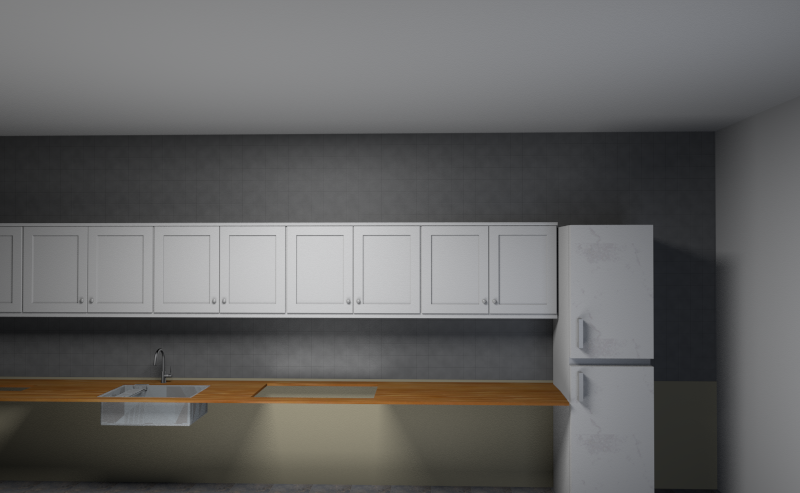
Im trying to put a sink in a cabninet and the countertop.
But the sink is filled with the countertop when I do it
.
I also tried with out the countertop but its same problem.
I guess somehow its due to its different objects and I need to priortize the sink to be sunken into the cabinet/countertop?
Can any guide me how to to proceed?
thanks in advance!
See 2 examples below,
https://pasteboard.co/JI03WvS.png
https://pasteboard.co/JI073AA.png
problem with placing / mergering objects
This topic has been viewed 7807 times and has 13 replies

Re: problem with placing / mergering objects
you could try checking this project file:
Counter-tut.sh3d
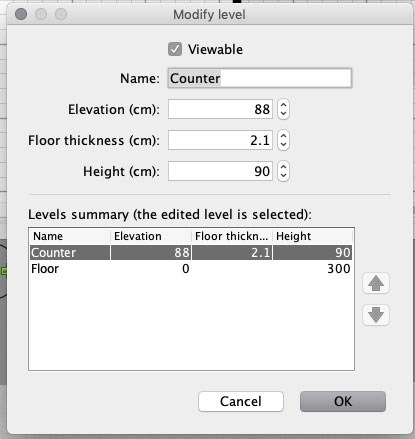
Create a level @88 cm ( or at whatever height your preferred counter might be) :
Draw your counter with the [font=courier new]Create rooms[/font] - tool
Modify your sink:

Configuring an object as a staircase, it will always make a cut-out in any floor or ceiling.
Study the project file. There are several ways to do this.
Cecilia
Counter-tut.sh3d
Create a level @88 cm ( or at whatever height your preferred counter might be) :
Draw your counter with the [font=courier new]Create rooms[/font] - tool
Modify your sink:
Configuring an object as a staircase, it will always make a cut-out in any floor or ceiling.
Study the project file. There are several ways to do this.
Cecilia
Re: problem with placing / mergering objects
Hej!
Thanks for you answer, its better, but still not good.
its the counter which is the problem.
any good tip?

Thanks for you answer, its better, but still not good.
its the counter which is the problem.
any good tip?



Re: problem with placing / mergering objects
If you don't explain what your problem is, you won't get many tips.
If you want your countertop thicker/thinner, just change the floor height.
H
If you want your countertop thicker/thinner, just change the floor height.
H
Re: problem with placing / mergering objects
Hej!
Thanks for you answer, its better, but still not good.
its the counter which is the problem.
any good tip?
sorry the image was not attached correcly I can see..
see link below to understand my problem with the filled sink
https://pasteboard.co/JIhKXu7.png
Re: problem with placing / mergering objects
SH3D does not automatically remove, or make invisible, intersecting parts. Only exception are stairs inserted into floors/ceilings. So, remove the top of the cabinet before inserting the sink,eg by making topless cabinets, or making the top invisible using the Modify Furniture dialogue.
H
H
Re: problem with placing / mergering objects
Hi everyone,
New user here also. Saw this thread and this is exactly what i am looking for as well.
I opened the project that Ceciliabr posted but i simply cannot that replicate to my project. I can do the countertop as level 2, but then i add the sink as a staircase and it doesnt cut through the countertop. Tried copying and pasting invisible box to my project but it does nothing. What am i doing wrong?
And in general, how do you make kitchens in SH3D? Do you make countertop as level 2 floor and then add counters on the level 1 floor? How do i make proper kitchen?
New user here also. Saw this thread and this is exactly what i am looking for as well.
I opened the project that Ceciliabr posted but i simply cannot that replicate to my project. I can do the countertop as level 2, but then i add the sink as a staircase and it doesnt cut through the countertop. Tried copying and pasting invisible box to my project but it does nothing. What am i doing wrong?
And in general, how do you make kitchens in SH3D? Do you make countertop as level 2 floor and then add counters on the level 1 floor? How do i make proper kitchen?
Re: problem with placing / mergering objects
Hi. Take a look at THIS file, it may help.
Re: problem with placing / mergering objects
Thanks! It helped, i finally managed to create a half decent kitchen.
But i still don't understand how can i create or modify my own countertop with a customizable hole in it.
Please, is there a detailed tutorial somwehere? Would very much appreciate it.
But i still don't understand how can i create or modify my own countertop with a customizable hole in it.
Please, is there a detailed tutorial somwehere? Would very much appreciate it.
Re: problem with placing / mergering objects
From the image you posted it looks to me that the counter is ok, but the cabinet is a solid block and that it what can be seen in the sink. to check this, change the colour of the cabinet.
then look at option 3 in the file i shared
then look at option 3 in the file i shared
Who is online
Users browsing this forum: No registered users and 1 guest