What is the correct html for the new version?
Later this works for me:
<div id="progress">
<div id="progress-bar" style="width: 0%;"></div>
</div>
<div style="width:100%;height:100%;">
<div id="home-pane" style="width:100%;height:600px;position:absolute;top:75px;left:0">
<div id="home-pane-toolbar"></div>
<canvas id="home-3D-view" style="display:none" tabIndex="1"></canvas>
<div id="home-plan" style="background-color: #FFFFFF; color: #000000" tabIndex="2"></div>
<div id="furniture-catalog"></div>
</div>
</div>
Installing Sweet Home 3D JS Online on my server
This topic has been viewed 8379 times and has 17 replies
-
kingoftailor
- Posts: 21
- Joined: Wed Jan 13, 2016 2:28 pm
Re: Sweet Home 3D JS Online
How can I set the drawing canvas to appear (full size) but not the 3d view?
On earlier version this worked:
The largest problem is that the buttons seems disabled:
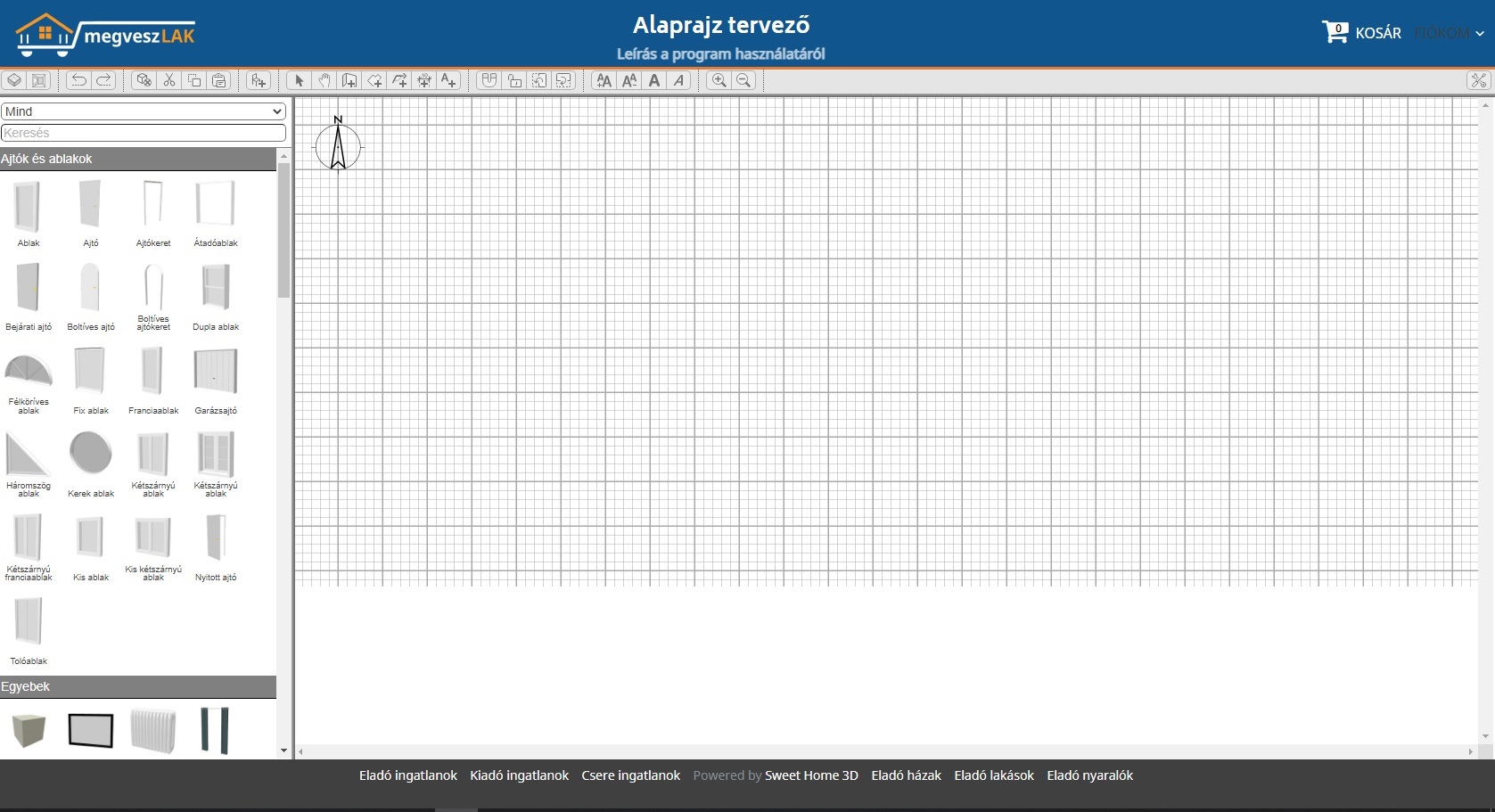
The 3. problem is that there are no right mouse context menu (sweethome online vs megveszLAK.hu test page)
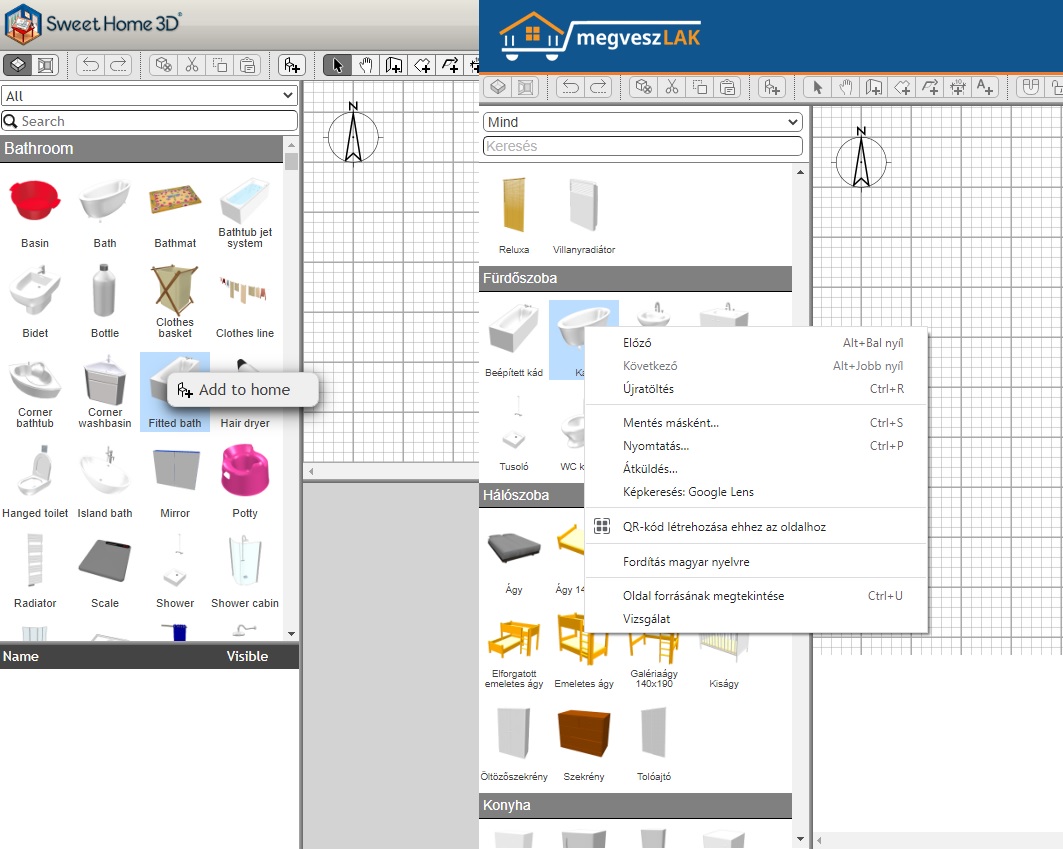
The test page html:
The JavaScript:
Thank You
On earlier version this worked:
Code: Select all
#home-3D-view {
  display: none
}

#home-plan {
  height: 100%;
  width: 100%;
}
The 3. problem is that there are no right mouse context menu (sweethome online vs megveszLAK.hu test page)
The test page html:
Code: Select all
<div style="width:100%;height:100%;">
    <div id="home-pane" style="width:100%;height:600px;position:absolute;top:75px;left:0">
        <div id="home-pane-toolbar" style="height:30px"></div>
        <div id="plan-3D-view-splitter" class="pane-splitter horizontal" style="display: block; width:100%"></div>
        <div id="catalog-furniture-pane">
            <div id="furniture-catalog" style="height:100%;width:100%">
                <div id="furniture-catalog-list" class="furniture-catalog-list"></div>
            </div>
        </div>
        <div id="furniture-plan-splitter" class="pane-splitter vertical" style="display: block; left: 330px;"></div>
        <div id="plan-3D-view-pane" style="position:absolute; left: 332px; width: calc(100% - 334px);height: calc(100% - 34px)">
            <div id="home-plan" style="background-color: rgb(255, 255, 255); color: rgb(0, 0, 0); width:100%;height:100%" tabindex="2">
                <canvas id="home-3D-view" tabIndex="1" width="1" height="1" style="width:100%;height:1px"></canvas>
            </div>
        </div>
    </div>
</div>Code: Select all
<script>
        var homeName = "emptyHome";
        var urlBase = "https://alaprajz.megveszlak.hu/";
        var application = new SweetHome3DJSApplication(
            {
                readHomeURL: urlBase + "homes/" + homeName + ".sh3d",
                furnitureCatalogURLs: [urlBase + "lib/resources/DefaultFurnitureCatalog.json"],
                furnitureResourcesURLBase: urlBase
            });

        application.getUserPreferences().setNewRoomFloorColor(0xFF9999A0);
        application.getUserPreferences().setAerialViewCenteredOnSelectionEnabled(true);

        application.getHomeRecorder().readHome(homeName,
            {
                homeLoaded: function (home) {
                    home.setName(homeName);
                    application.addHome(home);
                    application.getHomes()[0].setCamera(application.getHomes()[0].getTopCamera());
                    window.addEventListener("unload", function () {
                        application.deleteHome(home);
                    });
                },
                homeError: function (err) { },
                progression: function (part, info, percentage) { }
            });
    </script>
Re: Sweet Home 3D JS Online
The CSS and HTML parts in the main page index.jsp changed a lot between versions 6.4 an 6.6, and you should probably add the changes carefully in your page.
Emmanuel Puybaret, Sweet Home 3D creator
-
kingoftailor
- Posts: 21
- Joined: Wed Jan 13, 2016 2:28 pm
Re: Sweet Home 3D JS Online
Thanks, I've already done it based on index.jsp.
There are two things I haven't found a solution to. I was unable to resize the drawing surface and the furniture selector jumps too wide from the initial width.
How can I set the width of the furniture selector?
How can I hide/remove the 3d view?
How can I hide/remove the furniture view?
There are two things I haven't found a solution to. I was unable to resize the drawing surface and the furniture selector jumps too wide from the initial width.
How can I set the width of the furniture selector?
How can I hide/remove the 3d view?
How can I hide/remove the furniture view?
-
kingoftailor
- Posts: 21
- Joined: Wed Jan 13, 2016 2:28 pm
Re: Sweet Home 3D JS Online
I resolved to hide 3d view and furniture details view:
The right click menus work perfectly.
Code: Select all
#catalog-furniture-splitter {
            display: none;
        }

        #furniture-view {
            display: none;
        }

        #furniture-view .tree-table {
            display: none;
        }

#home-plan {
            width: 100%;
            height: calc(100% - 2px);
            font-family: sans-serif;
            border-top: 1px solid gray;
            border-bottom: 1px solid gray;
        }

        #plan-3D-view-splitter {
            display: none;
        }

        #home-3D-view {
            display: none;
}-
kingoftailor
- Posts: 21
- Joined: Wed Jan 13, 2016 2:28 pm
Re: Sweet Home 3D JS Online
I figured it out.
The furniture selector width was sette in the sh3d file (initial width).
I created another emptyHome.sh3d with the windows version and the problem is resolved.
The furniture selector width was sette in the sh3d file (initial width).
I created another emptyHome.sh3d with the windows version and the problem is resolved.
Re: Sweet Home 3D JS Online
Great that you could find out by yourself. Sweet Home 3D JS Online version uses CSS with well named styles for this purpose.
Please share a link to the final version when it's ready.
Please share a link to the final version when it's ready.
Emmanuel Puybaret, Sweet Home 3D creator
-
kingoftailor
- Posts: 21
- Joined: Wed Jan 13, 2016 2:28 pm
Who is online
Users browsing this forum: No registered users and 1 guest