
I just released the version 7.0.2 which makes room ceilings more transparent and fixes some issues in transparency handling in SVG exported files.
Thanks sjb007 for your help!
Sweet Home 3D 7.0
This topic has been viewed 123217 times and has 32 replies
Re: Sweet Home 3D 7.0
Emmanuel Puybaret, Sweet Home 3D creator
-
bdfd

- Posts: 2614
- Joined: Sat Mar 29, 2014 7:17 am
- Country: LILLE, Les Hauts de France, Western Europa
Re: Sweet Home 3D 7.0
Hi,
bug appeared (at 90%) on 7.0 (after the 6.x versions):
Walls 1 and 2 are joined.
I modify the room and after validation, a piece of triangular wall appears between walls 1 and 2!
The vertical wall does not change the bug.
Why ?
Up of the picture : before update
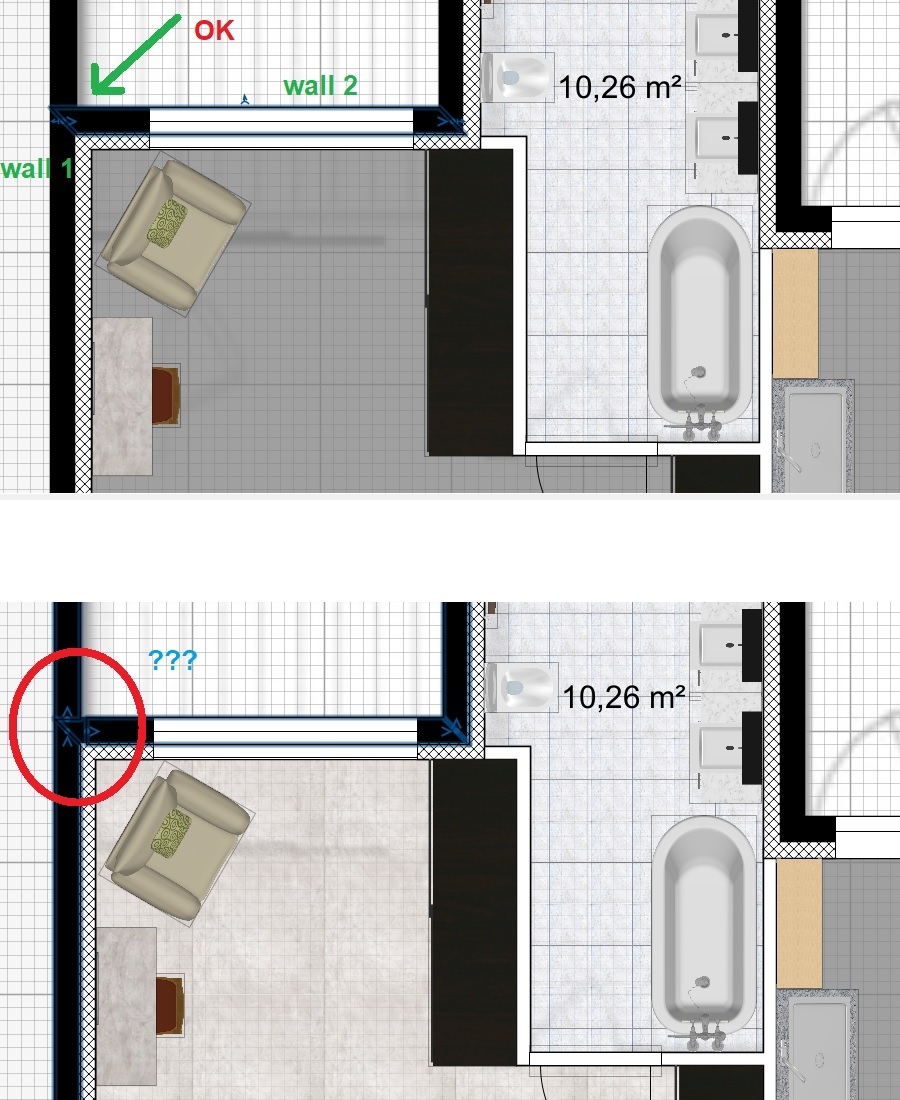
Down of the picture : after update
----------------
bug apparu (à 90%) sur les post 7.0 (après les versions 6.x) :
Les murs 1 et 2 sont joints.
Je modifie la pièce et après validation, un bout de mur triangulaire apparait entre les murs 1 et 2 !
Le mur vertical ne change rien au bug.
Pourquoi ?
[;)]
.
bug appeared (at 90%) on 7.0 (after the 6.x versions):
Walls 1 and 2 are joined.
I modify the room and after validation, a piece of triangular wall appears between walls 1 and 2!
The vertical wall does not change the bug.
Why ?
Up of the picture : before update
Down of the picture : after update
----------------
bug apparu (à 90%) sur les post 7.0 (après les versions 6.x) :
Les murs 1 et 2 sont joints.
Je modifie la pièce et après validation, un bout de mur triangulaire apparait entre les murs 1 et 2 !
Le mur vertical ne change rien au bug.
Pourquoi ?
[;)]
.
Evil progresses when good people do nothing!
---
SH3D 7.1 and nothing else - W11 64b in 4K
---
SH3D 7.1 and nothing else - W11 64b in 4K
Re: Sweet Home 3D 7.0
I am a beginner, someone would be available to help me understand how to put light on an object?
Re: Sweet Home 3D 7.0
What didn’t you understand in the description and the examples given in the first post of this thread?
Emmanuel Puybaret, Sweet Home 3D creator
Re: Sweet Home 3D 7.0
I had updated these light libraries to be compatible with the new version of Sweet Home 3D based on the provided library LightShapes.sh3f.
While doing some tests recently, I discovered an intriguing operation.
When I create a new file and save it with my new lights, the model material is [font=courier new]light[/font] and the object emits light in the default photo panel.
When I close this file and open it again, the model material is [font=courier new]default[/font] and the object does not emit any light in the default photo panel although its power is > 0.
Here is the information contained in the Home.xml file after saving the project:
With lights from the LightShapes.sh3f library, the model material is [font=courier new]light[/font] and the object emits light in the default photo panel after reopening a project.
Its Home.xml file contains this information:
While doing some tests recently, I discovered an intriguing operation.
When I create a new file and save it with my new lights, the model material is [font=courier new]light[/font] and the object emits light in the default photo panel.
When I close this file and open it again, the model material is [font=courier new]default[/font] and the object does not emit any light in the default photo panel although its power is > 0.
Here is the information contained in the Home.xml file after saving the project:
Code: Select all
<light id='light-1422e91d-a799-41fe-ad90-dc46b39de09e' catalogId='EnkoNyito#opaquePanel' name='Opaque panel' creator='Enko Nyito' model='1' icon='0' x=' 25.0' y='0.05' elevation='10.0' width='50.0' depth='0.1' height='100.0' modelSize='342' description='permanent_TriangleMeshLight type' dropOnTopElevation='-0.01' power='0.05'>
     <lightSourceMaterial name='light'/>
</light>Its Home.xml file contains this information:
Code: Select all
<light id='light-35ed9266-e2f8-4413-b267-4e2b292bf9bc' catalogId='Puybaret#lightPanel' name='Light panel' creator='Emmanuel Puybaret' model='1/lightPanel.obj' icon='0 ' x='25.0' y='0.0' elevation='10.0' pitch='1.5707964' width='50.0' depth='100.0' depthInPlan='0.0010043712' height='0.001' heightInPlan='100.0' modelSize='1096 'dropOnTopElevation='-999.99994' power='0.05'>
     <lightSourceMaterial name='light'/>
   </light>
EnkoNyito
Re: Sweet Home 3D 7.0
When a project is opened, the program calls the OBJLoader.java file to load the 3D scene.
With my new lights, the material of the first geometry is 'light' but the appearance of it is [font=courier new]null[/font] so the function getAppearance(String material) returns 'default'.
With my new lights, the material of the first geometry is 'light' but the appearance of it is [font=courier new]null[/font] so the function getAppearance(String material) returns 'default'.
EnkoNyito
Re: Sweet Home 3D 7.0
You forgot to add the property [font=courier new]multiPartModel#[/font] set to [font=courier new]true[/font] in [font=courier new]PluginFurnitureCatalog.properties[/font]. By default, this property is [font=courier new]false[/font], meaning that all the files depending on the main 3D model file won't be saved (here, MTL files won't be saved, and only the OBJ file will be saved at root of the SH3D file).
Emmanuel Puybaret, Sweet Home 3D creator
Re: Sweet Home 3D 7.0
Indeed, for the material to be properly taken into account when reopening SH3D-7.0, the [font=courier new]multiPartModel#[/font] property must be [font=courier new]true[/font] and the OBJ and MTL files of the light must be in a separate folder from the [font=courier new]PluginFurnitureCatalog.properties[/font] file.
EnkoNyito

Re: Sweet Home 3D 7.0
Can you add a function to specify the brightness of this light-emitting material (recommended brightness). It can also be turned on or off by default. Avoid a light fixture made with this method, too bright or rendering too slow (crystal lights can be turned off directly)The lightSourceMaterialName# property was added to PluginFurnitureCatalog.properties of SH3F furniture libraries to define the material(s) of shapes which should be used in a 3D model as light sources at the two best quality rendering levels, for example to define a light panel or a ceiling mini spot with a thin light surface.
Re: Sweet Home 3D 7.0
Well, we are confused as newbies where to put that... at objects .mtl ? I would like my simple box what I use as ceiling to shine if possible... where to put that light command ?What didn’t you understand in the description and the examples given in the first post of this thread?
#
# Generated by Sweet Home 3D - Sat Nov 25 00:26:22 CET 2023
# http://www.sweethome3d.com/
#
newmtl bottom
illum 2
Ka 0.4 0.4 0.4
Kd 1.0 1.0 1.0
Ks 1.0 1.0 1.0
Ns 128.0
newmtl top
illum 2
Ka 0.4 0.4 0.4
Kd 1.0 1.0 1.0
Ks 0.3 0.3 0.3
Ns 60.0
newmtl left
illum 2
Ka 0.4 0.4 0.4
Kd 1.0 1.0 1.0
Ks 0.3 0.3 0.3
Ns 60.0
newmtl right
illum 2
Ka 0.4 0.4 0.4
Kd 1.0 1.0 1.0
Ks 0.3 0.3 0.3
Ns 60.0
newmtl back
illum 2
Ka 0.85882354 0.85882354 0.85882354
Kd 0.85882354 0.85882354 0.85882354
Ks 0.46875 0.46875 0.46875
Ns 60.0
newmtl front
illum 2
Ka 0.4 0.4 0.4
Kd 1.0 1.0 1.0
Ks 0.3 0.3 0.3
Ns 60.0
Who is online
Users browsing this forum: No registered users and 1 guest