
Enko,
Thank you for this fantastic update.
To test, I made 3 renders of the same file (see below).
From left to right: Sunflow, Java, Yafaray.
I notice strange "light bars" in the Yafaray render.
https://www.mediafire.com/view/kh0sl930 ... s.PNG/file
Is there an explanation, or is it a bug? (original file )
Hans
Photo-video rendering plug-in
This topic has been viewed 841164 times and has 225 replies


Re: Photo-video rendering plug-in
Hello hansmex
Indeed in yafaray I have the same rendering:
https://www.mediafire.com/view/ys0oq0ia ... 2.png/file
Strange !
Indeed in yafaray I have the same rendering:
https://www.mediafire.com/view/ys0oq0ia ... 2.png/file

Strange !
-
bdfd

- Posts: 2614
- Joined: Sat Mar 29, 2014 7:17 am
- Country: LILLE, Les Hauts de France, Western Europa
Re: Photo-video rendering plug-in
With the newest PVR 2.5, I've got this :
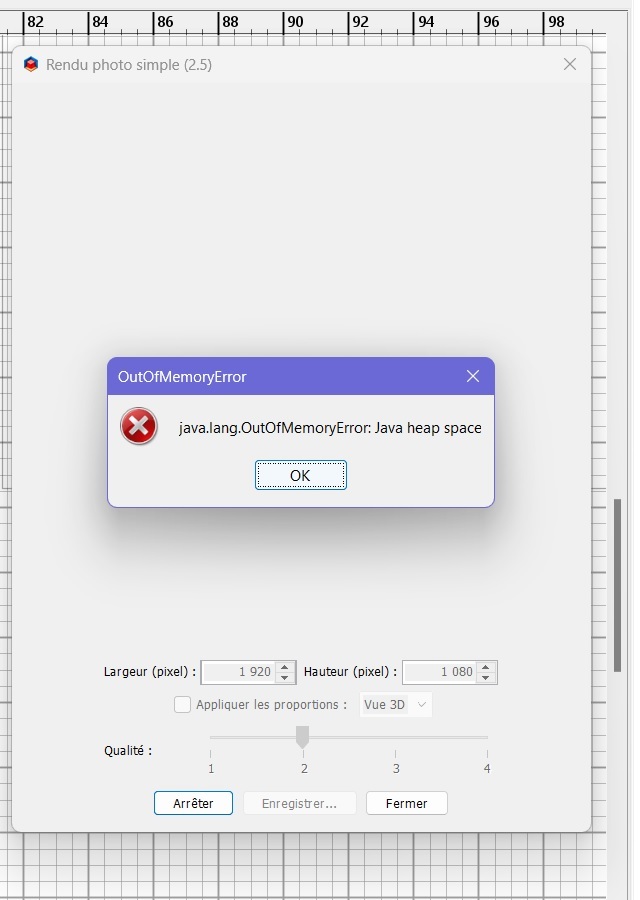
Why ?
FYI : my PC - Core i9, RAM = 32 Go, GC = RTX 2080
...
Version OpenJDK 11.0.18 - 64bit - 2,8 / 13,6 Go fournie par Azul Systems, Inc. Version Java 3D 1.6.2a - JOGL 2.4.0-rc-20221118 fournie
[:D]
.
Why ?
FYI : my PC - Core i9, RAM = 32 Go, GC = RTX 2080
...
Version OpenJDK 11.0.18 - 64bit - 2,8 / 13,6 Go fournie par Azul Systems, Inc. Version Java 3D 1.6.2a - JOGL 2.4.0-rc-20221118 fournie
[:D]
.
Evil progresses when good people do nothing!
---
SH3D 7.1 and nothing else - W11 64b in 4K
---
SH3D 7.1 and nothing else - W11 64b in 4K
Re: Photo-video rendering plug-in
@hansmex, @Vinci68,
The "light bars" observed with the YafaRay rendering engine are due to the light panels created when the [font=courier new]Add ceiling lights[/font] option is checked, so this is normal.
For information, the dlls used are those of the YafarayRendering-1.4.5 plug-in.
I just noticed the bug with SunFlow because these same light panels are no longer taken into account since compatibility with SH3D-7.0.
If this is not easily correctable and given that the option is not optimal according to the shape of the ceilings, the default behavior of SweetHome3D can be restored.
@bdfd,
This error message replaces the red cross of a default rendering. It appears when the memory allocated to SH3D is not sufficient to render an object which may have a certain complexity.
The "light bars" observed with the YafaRay rendering engine are due to the light panels created when the [font=courier new]Add ceiling lights[/font] option is checked, so this is normal.
For information, the dlls used are those of the YafarayRendering-1.4.5 plug-in.
I just noticed the bug with SunFlow because these same light panels are no longer taken into account since compatibility with SH3D-7.0.
If this is not easily correctable and given that the option is not optimal according to the shape of the ceilings, the default behavior of SweetHome3D can be restored.
@bdfd,
This error message replaces the red cross of a default rendering. It appears when the memory allocated to SH3D is not sufficient to render an object which may have a certain complexity.
EnkoNyito
-
bdfd
- Posts: 2614
- Joined: Sat Mar 29, 2014 7:17 am
- Country: LILLE, Les Hauts de France, Western Europa
Re: Photo-video rendering plug-in
TY.
Occasional problem that has not reappeared since!
To monitor...
[;)]
.
Occasional problem that has not reappeared since!
To monitor...
[;)]
.
Evil progresses when good people do nothing!
---
SH3D 7.1 and nothing else - W11 64b in 4K
---
SH3D 7.1 and nothing else - W11 64b in 4K
-
Daniels118

- Posts: 503
- Joined: Wed Nov 17, 2021 9:04 pm
- Country: Italy
Re: Photo-video rendering plug-in
The Photo-video rendering plug-in is now available through the Plugin manager!
Re: Photo-video rendering plug-in
PhotoVideoRendering-2.5.1 plug-in
- fixed a bug in ceiling light panels for SunFlow renderer
- improved shape of ceiling light panels (SunFlow & YafaRay renderers)
- taking into account the point of view renderer
EnkoNyito
Re: Photo-video rendering plug-in
PhotoVideoRendering-2.6 plug-in
- compatibility with SH3D-7.2 and higher
- taking into account of the new OtherLightTypes library
EnkoNyito
-
captaincook

- Posts: 403
- Joined: Fri Oct 20, 2017 3:16 pm
- Country: France
Re: Photo-video rendering plug-in
Bonjour enkonyito.
J'ai installé la nouvelle version du plug-in PhotoVideoRendering-2.6 et elle fonctionne bien.
Mais par contre sur mes fichiers précédents avec lesquels j'utilisais la version précédente 2.5.1 et les panneaux lumineux de la précédente OtherLighTypes library, ceux ci ne sont plus pris en compte.

Exemple ci dessous réalisée avec les anciens panneaux lumineux et la version 2.5.1

Et celle ci réalisée toujours avec les anciens panneaux lumineux mais avec la version 2.6 :

Il me faut donc, si je souhaite refaire des images dans mes anciens fichiers, soit remplacer tous les anciens panneaux lumineux par des nouveaux panneaux, soit réaliser ces images en ré installant provisoirement la version 2.5.1 .
Peut être n'ai je pas compris quelque chose.
Merci en tout cas pour tout le travail que vous faites et bonne journée.
J'ai installé la nouvelle version du plug-in PhotoVideoRendering-2.6 et elle fonctionne bien.
Mais par contre sur mes fichiers précédents avec lesquels j'utilisais la version précédente 2.5.1 et les panneaux lumineux de la précédente OtherLighTypes library, ceux ci ne sont plus pris en compte.
Exemple ci dessous réalisée avec les anciens panneaux lumineux et la version 2.5.1
Et celle ci réalisée toujours avec les anciens panneaux lumineux mais avec la version 2.6 :
Il me faut donc, si je souhaite refaire des images dans mes anciens fichiers, soit remplacer tous les anciens panneaux lumineux par des nouveaux panneaux, soit réaliser ces images en ré installant provisoirement la version 2.5.1 .
Peut être n'ai je pas compris quelque chose.
Merci en tout cas pour tout le travail que vous faites et bonne journée.
Re: Photo-video rendering plug-in
captaincook, let me answer in English.
Version 2.6 of the plug-in, takes into account these 2 updates of Sweet Home 3D 7.2:
For the new lights library, the [font=courier new]lightSourceDescription[/font] property is used for variable lights (daylight or automatic) instead of the Description field.
With version 2.5.1 of the plug-in, the risk was that these variable lights would no longer be taken into account if the user changed the Description field.
Non-variable lights from the old library can be used with version 2.6 of the plug-in.
Since version 2.5 of the plug-in, the lights library uses the [font=courier new]lightSourceMaterialName[/font] property.
Version 2.6 of the plug-in, takes into account these 2 updates of Sweet Home 3D 7.2:
- Fixed textures transparency in YafaRay rendering
- Managed user-defined properties defined in [font=courier new]com.eteks.sweethome3d.additionalFurnitureProperties[/font] System property
For the new lights library, the [font=courier new]lightSourceDescription[/font] property is used for variable lights (daylight or automatic) instead of the Description field.
With version 2.5.1 of the plug-in, the risk was that these variable lights would no longer be taken into account if the user changed the Description field.
Non-variable lights from the old library can be used with version 2.6 of the plug-in.
Since version 2.5 of the plug-in, the lights library uses the [font=courier new]lightSourceMaterialName[/font] property.
EnkoNyito
Who is online
Users browsing this forum: No registered users and 1 guest