- Added the ability to set in which projection mode the outline should be displayed
- Added a toolbar button to switch the projection mode
- Added a toolbar button to align the camera to the selection
- Hiding obstacles works for the outline too
- Added help
Pan tool in 3D and 2D view?
This topic has been viewed 221360 times and has 111 replies
-
Daniels118

- Posts: 503
- Joined: Wed Nov 17, 2021 9:04 pm
- Country: Italy
Re: Pan tool in 3D and 2D view?
Version 3.7.4
-
Daniels118
- Posts: 503
- Joined: Wed Nov 17, 2021 9:04 pm
- Country: Italy
Re: Pan tool in 3D and 2D view?
@Gildaniel
I don't face the same issue, however please update the 3D dimension lines plugin to the version 3.2, it has important bug fixes and enhancements.
I have created a basic video tutorial, a more advanced one will come in the next days, you will find the link on the 3D dimension lines thread. Please use the dedicated thread for furhter support.
Best regards
I don't face the same issue, however please update the 3D dimension lines plugin to the version 3.2, it has important bug fixes and enhancements.
I have created a basic video tutorial, a more advanced one will come in the next days, you will find the link on the 3D dimension lines thread. Please use the dedicated thread for furhter support.
Best regards
-
Daniels118
- Posts: 503
- Joined: Wed Nov 17, 2021 9:04 pm
- Country: Italy
Re: Pan tool in 3D and 2D view?
Version 4.0 beta
This version is compatible with SweetHome3D 7.2. It hasn't been tested with previous versions (anyway I don't see any reason to make it compatible with previous versions).
New features and fixes:
- You can change the way objects move when dragging in 3D view (from menu 3D view->Pan 3D View settings)
- You can edit the selection in 3D view using CTRL+E (other than double click)
- Reduced plugin size
Download from SourceForge.
This version is compatible with SweetHome3D 7.2. It hasn't been tested with previous versions (anyway I don't see any reason to make it compatible with previous versions).
New features and fixes:
- You can change the way objects move when dragging in 3D view (from menu 3D view->Pan 3D View settings)
- You can edit the selection in 3D view using CTRL+E (other than double click)
- Reduced plugin size
Download from SourceForge.

Re: Pan tool in 3D and 2D view?
And it works!!
Thank you very much.
Hans
Thank you very much.
Hans
-
Daniels118
- Posts: 503
- Joined: Wed Nov 17, 2021 9:04 pm
- Country: Italy
Re: Pan tool in 3D and 2D view?
Version 4.0 beta 2
New features:
- Implemented "smart" drag mode. See in in action on YouTube!
Fixes:
- Improved "better" drag mode in 3D view
- Improved pan functionality
- Implemented better support for centering the camera on 3D polylines
Download from SourceForge or using the Plugin Manager.
New features:
- Implemented "smart" drag mode. See in in action on YouTube!
Fixes:
- Improved "better" drag mode in 3D view
- Improved pan functionality
- Implemented better support for centering the camera on 3D polylines
Download from SourceForge or using the Plugin Manager.
-
Daniels118
- Posts: 503
- Joined: Wed Nov 17, 2021 9:04 pm
- Country: Italy
Re: Pan tool in 3D and 2D view?
Version 4.0 beta 3
- Compatible with SH3D 7.2 beta 9
- Support object rotation in 3D view
Note: doesn't work with previous versions of SweetHome3D.
Download from SourceForge or using the Plugin Manager
- Compatible with SH3D 7.2 beta 9
- Support object rotation in 3D view
Note: doesn't work with previous versions of SweetHome3D.
Download from SourceForge or using the Plugin Manager
-
Daniels118
- Posts: 503
- Joined: Wed Nov 17, 2021 9:04 pm
- Country: Italy
Re: Pan tool in 3D and 2D view?
Version 4.0
- Compatible with SweetHome3D 7.2
Download from SourceForge or using the Plugin Manager.
- Compatible with SweetHome3D 7.2
Download from SourceForge or using the Plugin Manager.

Re: Pan tool in 3D and 2D view?
Bug?
Changing the Outline setting also changes the obj export.
Example:
A wall with a box covering each end. Both boxes have the exact same color. The wall has the same color for both sides and the top.
Default Outline setting (None): Export results in one color for the wall and one set of colors (top, left, ect.) for the boxes.
Now set the Outline to perspective and export again. All materials are created for each part having individually named materials. So two sets of top, left, etc. for the boxes and two colors for the wall.
[s]ETA: it seems that select in 3Dview no longer works.[/s]
New preference setting in 7.2. Now switched on.
Changing the Outline setting also changes the obj export.
Example:
A wall with a box covering each end. Both boxes have the exact same color. The wall has the same color for both sides and the top.
Default Outline setting (None): Export results in one color for the wall and one set of colors (top, left, ect.) for the boxes.
Now set the Outline to perspective and export again. All materials are created for each part having individually named materials. So two sets of top, left, etc. for the boxes and two colors for the wall.
[s]ETA: it seems that select in 3Dview no longer works.[/s]
New preference setting in 7.2. Now switched on.
Dodecagon.nl
1300+ 3D models, manuals, and projects
1300+ 3D models, manuals, and projects
Re: Pan tool in 3D and 2D view?
Apologies if this is a silly question or answered elsewhere.
Have just begun to look at this amazing plugin [=D>] (in conjunction with an orthographic Wiki page) and wondering if i'm getting the hang of it correctly.
To that end, I wonder if it possible to say whether the virtual visit 3d view (having switched to parallel projection) really is an (axonometric) Isometric projection?
Link to that is here: https://i.postimg.cc/VNjM0NxP/axonometr ... -is-it.png
If it is, is it possible to set the camera head angle to further places of decimal (e.g. 35.264)?
For info:
Plugin manager reports the Pan in 3D view as 4.0
Sweet Home 3D version 7.2
Have just begun to look at this amazing plugin [=D>] (in conjunction with an orthographic Wiki page) and wondering if i'm getting the hang of it correctly.
To that end, I wonder if it possible to say whether the virtual visit 3d view (having switched to parallel projection) really is an (axonometric) Isometric projection?
Link to that is here: https://i.postimg.cc/VNjM0NxP/axonometr ... -is-it.png
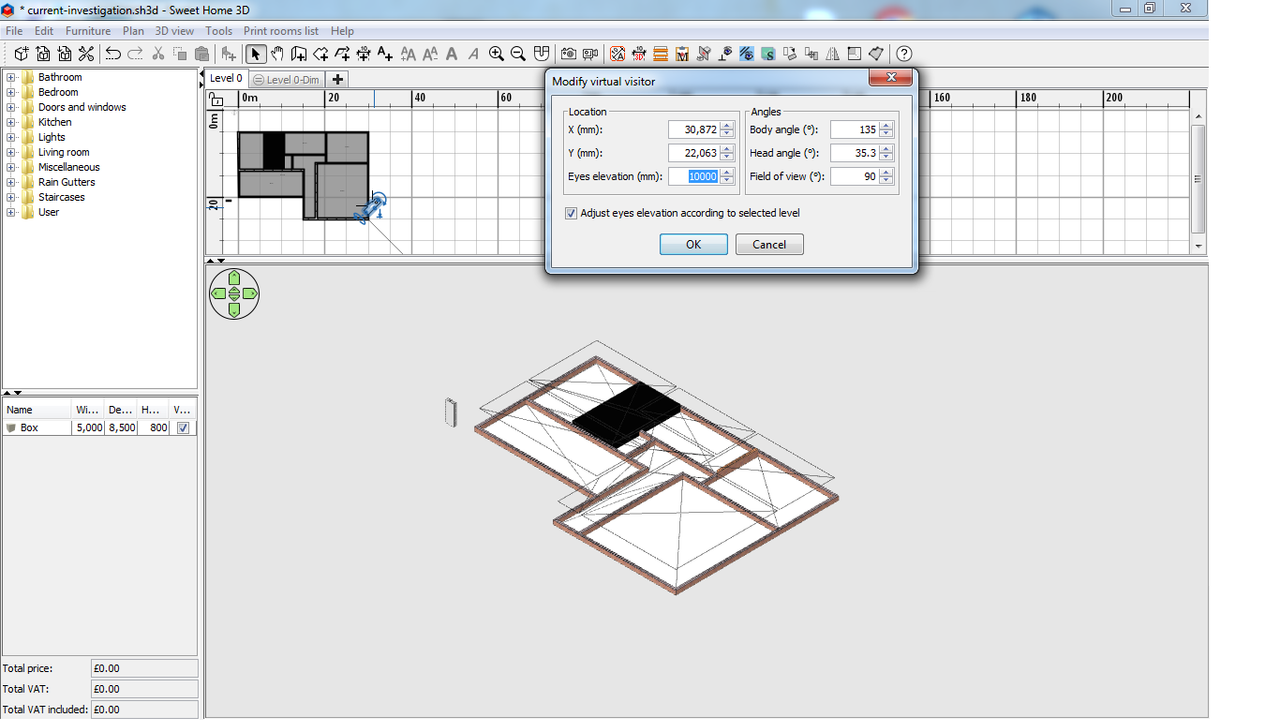
If it is, is it possible to set the camera head angle to further places of decimal (e.g. 35.264)?
For info:
Plugin manager reports the Pan in 3D view as 4.0
Sweet Home 3D version 7.2
-
Daniels118
- Posts: 503
- Joined: Wed Nov 17, 2021 9:04 pm
- Country: Italy
Re: Pan tool in 3D and 2D view?
Hi NIMAN,
the parallel projection mode is a real orthographic projection, so it can be used to get an isometric projection by choosing the proper view angles.
Entering more decimals digits works, they are rounded just for display purposes, so you can get exact angles.
Tip: you can place a cube somewhere, rotated with the angles required to get an isometric view; then, while having the cube selected, press CTRL+K to quickly align the camera to the cube, this way you can always return to the isometric view without opening the virtual visitor edit window, and it also works in aerial view mode.
Drag the cube to the point where you want to center the view and press CTRL+K again to align the camera to that point. You may also save the camera position to quickly return to specific positions.
Daniele
the parallel projection mode is a real orthographic projection, so it can be used to get an isometric projection by choosing the proper view angles.
Entering more decimals digits works, they are rounded just for display purposes, so you can get exact angles.
Tip: you can place a cube somewhere, rotated with the angles required to get an isometric view; then, while having the cube selected, press CTRL+K to quickly align the camera to the cube, this way you can always return to the isometric view without opening the virtual visitor edit window, and it also works in aerial view mode.
Drag the cube to the point where you want to center the view and press CTRL+K again to align the camera to that point. You may also save the camera position to quickly return to specific positions.
Daniele
Who is online
Users browsing this forum: No registered users and 1 guest