Advanced rendering plug-in

This topic has been viewed 280739 times and has 76 replies
Thread status: Active
Test the features and bug fixes of future versions [img]http://www.sweethome3d.com/images/flags/en_small.gif[/img]
db4tech
Posts: 223
Joined: Mon May 03, 2010 5:10 pm
Country: UK

Re: Simulate sun position and lights/shadows

Post by db4tech »

I never tried using multiple shaders per object. I'll have to test that. Thank you for the idea! [:)]
Just as long as you don't use Phong C1 [:D] even with Importance sampling turned on it still looks like a squashed ball compared to Uber shader.

Can't wait to test this and see the new render results!

Thanks,

db4tech
db4tech
Posts: 223
Joined: Mon May 03, 2010 5:10 pm
Country: UK

Re: Simulate sun position and lights/shadows

Post by db4tech »

Hi Emmanuel,

Firstly thank you for the interesting link on caustics.

Now that advanced rendering plug-in version 1.2 has been thoroughly tested (oh! Also not forgetting the BasicPlusExtraLights.sh3f package of course! [;)] He he) will you be updating the front page so people who don't visit the forum can know about them? Many may still be using version 1.1 and not even know about 1.2.

db4tech
User avatar
Puybaret
Posts: 9440
Joined: Mon Nov 07, 2005 12:00 pm
Country: Paris, France
Contact:

Re: Simulate sun position and lights/shadows

Post by Puybaret »

To db4tech and other interested testers,
Here are two temporary plug-ins that will let you test SunFlow's Uber and Phong Shader:
http://www.sweethome3d.com/plugins/Adva ... r-1.3.sh3p
These plug-ins create two new menu items in Tools menu, so you can distinguish them from each other.

To change the shininess of an object, you'll have to play with the shininess value and the specular color stored in the Ns et Ks parameters of its MTL file. If you're patient enough, try to render different existing homes in the galeries, and give us your opinion.

Please don't link these files in an other document, because I'll probably delete them once we decide which track to follow.

[Note]
2010/05/26: These two plug-ins were updated to support models at DAE/Collada format.
Emmanuel Puybaret, Sweet Home 3D creator
db4tech
Posts: 223
Joined: Mon May 03, 2010 5:10 pm
Country: UK

Re: Simulate sun position and lights/shadows

Post by db4tech »

To db4tech and other interested testers,
Here are two temporary plug-ins that will let you test SunFlow's Uber and Phong Shader:
http://www.sweethome3d.com/plugins/Adva ... r-1.3.sh3p
These plug-ins create two new menu items in Tools menu, so you can distinguish them from each other.

To change the shininess of an object, you'll have to play with the shininess value and the specular color stored in the Ns et Ks parameters of its MTL file. If you're patient enough, try to render different existing homes in the galeries, and give us your opinion.

Please don't link these files in an other document, because I'll probably delete them once we decide which track to follow.
Thank you Emmanuel already downloaded and can't wait to test them!!!!! [:)]

db4tech
db4tech
Posts: 223
Joined: Mon May 03, 2010 5:10 pm
Country: UK

Re: Simulate sun position and lights/shadows

Post by db4tech »

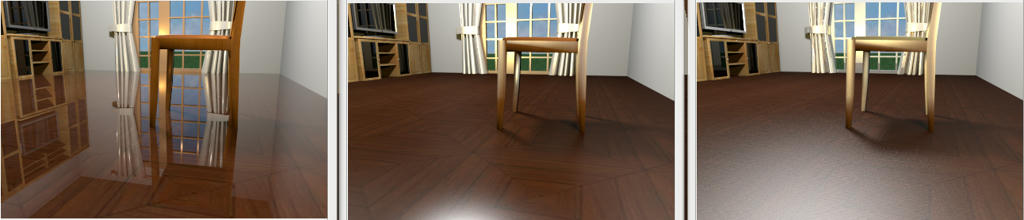
I've still not managed to get a slightly shiny floor yet.

Here is how the same scene renders with the 3 different shaders.

For reference. Normal Advanced photo render version 1.2 (Shiny shader)
Image

Phong shader
Image

Uber shader
Image

Uber shader seems to be badly affected by the room ceiling light, the problem disappears if the ceiling light is turned off (Emmanuel is this with Importance sampling turned on?) Phong shader is slightly affected by the ceiling light.

Here are my findings so far (apart from the floor) with Phong and Uber shaders all items that should be reflective are even more reflective, notice the knobs on the unit and strangely the curtains?

Apart from the obvious ceiling light issues, both Phong and Uber shaders render all lights used in a scene with a brighter intensity than Shiny shader, Phong slightly brighter and Uber very brightly, notice the window frame and chair reflecting brightly the lights illuminating the scene placed behind the virtual visitor.

Render speeds:
Shiny shader is the fastest
Phong and Uber about the same, sometimes Phong was faster, other times Uber was, it was too close to call without carrying out some accurately timed renders.

More tests to follow.
db4tech
User avatar
hansmex
Posts: 4027
Joined: Sat Sep 26, 2009 11:36 am
Country: Netherlands

Re: Simulate sun position and lights/shadows

Post by hansmex »

db4tech:

Could you make your file available? I would like to do some tests on exactly the same file as you are using.

Hans
Hans

new website - under constuction
hansdirkse.info
db4tech
Posts: 223
Joined: Mon May 03, 2010 5:10 pm
Country: UK

Re: Simulate sun position and lights/shadows

Post by db4tech »

Hi Hans,

Yes of course, it isn't a fully designed house or room, just a quick purposely built model for this test.

db4tech
Attachments
Reflection test room.sh3d
(712.83 KiB) Downloaded 420429 times
User avatar
hansmex
Posts: 4027
Joined: Sat Sep 26, 2009 11:36 am
Country: Netherlands

Re: Simulate sun position and lights/shadows

Post by hansmex »

Gentlemen:

It works. I get exactly the same results.

Hans

Image
Hans

new website - under constuction
hansdirkse.info
User avatar
fhoofman
Posts: 87
Joined: Thu Oct 15, 2009 3:49 am

Re: Simulate sun position and lights/shadows

Post by fhoofman »

To db4tech and other interested testers,
Here are two temporary plug-ins that will let you test SunFlow's Uber and Phong Shader:
http://www.sweethome3d.com/plugins/Adva ... r-1.3.sh3p
These plug-ins create two new menu items in Tools menu, so you can distinguish them from each other.

To change the shininess of an object, you'll have to play with the shininess value and the specular color stored in the Ns et Ks parameters of its MTL file. If you're patient enough, try to render different existing homes in the galeries, and give us your opinion.

Please don't link these files in an other document, because I'll probably delete them once we decide which track to follow.

mr Puybaret, i tried your http://www.sweethome3d.com/plugins/Adva ... r-1.3.sh3p
http://www.sweethome3d.com/plugins/Adva ... r-1.3.sh3p

and then my render become weird. unlike normal as the picture you mention above. and the i choose "tools => create advance photo".
the render still weird.
can you help me?
User avatar
hansmex
Posts: 4027
Joined: Sat Sep 26, 2009 11:36 am
Country: Netherlands

Re: Simulate sun position and lights/shadows

Post by hansmex »

fhoofman:

Can you show us the pictures of your renders?

Hans
Hans

new website - under constuction
hansdirkse.info
Post Reply New Topic

Who is online

Users browsing this forum: No registered users and 2 guests