Puybaret, I hope I haven't asked for too much, but I do want to say that having the light frame disappear when not selected is very hard to work with sometimes. I do alot of my scenes with lights, and as you can tell by some of the renders I did, lights are very important to my designing. Sometimes I need to be able to line them up, and it is hard to do when they disappear. I was so happy when db4tech made the first light frames, because it made it so much easier to place the lights exactly the first time. Please consider making it a choice to have the light frames visible all the time?
I appreciate your work on this free software, and think it's a great program!
EDIT:
Also, maybe a choice whether or not the sun is on? Now that transparent textures are fixed, and with more outside foliage, the sun casting such strong shadows at night time makes for some unrealistic renders. But I can understand the reasoning you gave for having the sun on.. [:)]
Sweet Home 3D 3.0
This topic has been viewed 378738 times and has 134 replies

Re: Sweet Home 3D 3.0
Emmanuel,
Just found out you released v3.0 b9
You're incredibly productive with almost daily new releases and new features!!
So far I've discovered in beta 9:
- Keep proportions - that changes all dimensions at the same time (very!! useful)
- Part of base plan - that locks a model to the ground and makes it unchangeable when the floorplan is locked. Great too!!
Thank you!
Hans
Just found out you released v3.0 b9
You're incredibly productive with almost daily new releases and new features!!
So far I've discovered in beta 9:
- Keep proportions - that changes all dimensions at the same time (very!! useful)
- Part of base plan - that locks a model to the ground and makes it unchangeable when the floorplan is locked. Great too!!
Thank you!
Hans

Re: Sweet Home 3D 3.0
Hans, you're right, I just released the version 3.0 Beta 9 with new features that you requested. [;)]
As the following capture shows, there's two new check boxes in the Furniture modification dialog:
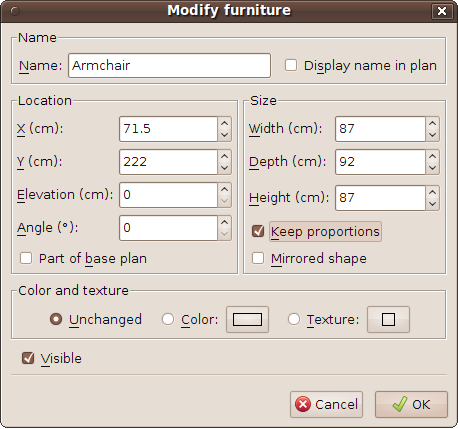
- When the Keep proportions check box is selected, width, depth and height are updated proportionally.
- A selected Part of base plan check box means that a piece of furniture will be considered as an item belonging to the base plan when locked and then won't be selectable (this new check box can't be unselected for doors and windows on purpose). This new option was discussed with Hans in this discussion.
This new option has an other side effect on locked plans too. From this version, all doors, windows and not movable furniture is considered to be part of the base plan (before only doors and windows were taken into account).
- I also improved color transparency rendering again for the 2 best qualities. Read my answer to db4tech below for more information.
@db4tech
Sweet Home 3D OpenGL rendering
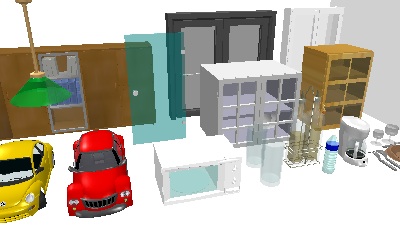
Advanced Rendering Plug-in 1.6 rendering
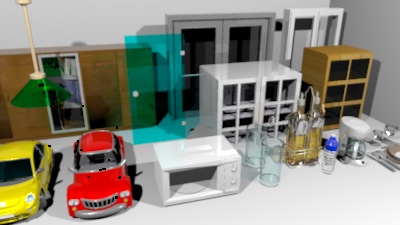
Sweet Home 3D v3.0 Beta 7 rendering
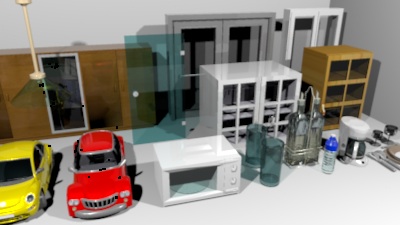
Sweet Home 3D v3.0 Beta 9 rendering
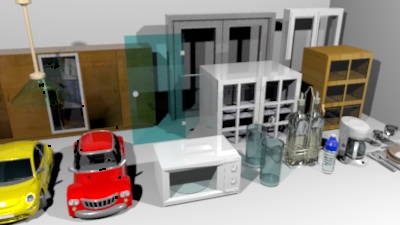
A detail under Beta 9 rendering
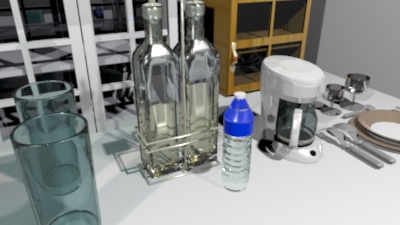
@whippetsleek
Finally, two questions:
- Does Matte should be spelled "Matt" or "Matte" in English?
- I really would like to add support for horizontal/vertical move of selected items + proportional resizing of the selected piece of furniture with the mouse. Most drawing software let the user perform this operation with the Shift key pressed, but in Sweet Home 3D the Shift key is reserved to temporarily toggle magnetism. [:(]
At this time, as version 3.0 will be a major version change, I wouldn't mind to introduce a little incompatibility in the mouse behavior compared to previous versions. My idea is to change the toggle magnetism short cut from the Shift key to Ctrl+Shift keys (or alt+Shift under Mac OS X), and use the Shift key for horizontal/vertical move + proportional resizing, instead of keeping the current Shift key and use Ctrl+Shift keys for the new behaviors.
What is your mind about this proposal (don't forget unadvanced users)?
As the following capture shows, there's two new check boxes in the Furniture modification dialog:
- When the Keep proportions check box is selected, width, depth and height are updated proportionally.
- A selected Part of base plan check box means that a piece of furniture will be considered as an item belonging to the base plan when locked and then won't be selectable (this new check box can't be unselected for doors and windows on purpose). This new option was discussed with Hans in this discussion.
This new option has an other side effect on locked plans too. From this version, all doors, windows and not movable furniture is considered to be part of the base plan (before only doors and windows were taken into account).
- I also improved color transparency rendering again for the 2 best qualities. Read my answer to db4tech below for more information.
@db4tech
Unless, you really have a very convincing proposal that would make me change my mind, I don't think I'll change it again (and it would oblige every beta tester to reset again their light power settings).The current factor is smaller than in the plug-in but I tried it at 100% with a light located in very large rooms and felt the value I finally chose was largely enough.. Remind that Sweet Home 3D isn't designed to draw stadiums...
Hmmm after doing some tests, still not bright enough at 100%. Actually it's funny that you make that second point, with you not knowing a feature I've already added to version 1.6.2!
The advanced rendering plug-in is used by... advanced users, who generally don't mind some more difficult concepts.There has been no misunderstanding so far about that feature added to 1.6.1.
The other 3D applications like AOI or Blender don't target the same kind of audience, and don't offer a printing function, so it's not that much comparable.I've been giving this some further thought, all other 3D applications (that I can think of) don't hide the lights place holder, when the lights aren't selected?
I'm going to think about it.All I ask is for a preference option to let a user choose, so they can make their own decision.
I had to change the way the transparency color was computed because the formula didn't take into account the transparency factor (SunFlow "absorbtion.color" is ignored when "absorbtion.distance" is equal to 0!). I changed it again and I hope this time it will satisfy everybody. Here are image tests I computed:[...] To my eyes the original glass colour (as seen in 1.6.1 render) is the most accurate to real life so far, and fairly closely matches OpenGL 3D and DirectX previews. Obviously this will vary slightly for people viewing this thread on uncalibrated screens.
Sweet Home 3D OpenGL rendering
Advanced Rendering Plug-in 1.6 rendering
Sweet Home 3D v3.0 Beta 7 rendering
Sweet Home 3D v3.0 Beta 9 rendering
A detail under Beta 9 rendering
@whippetsleek
There's no sun light at night, so your problem must come from something else. [:(]Also, maybe a choice whether or not the sun is on? Now that transparent textures are fixed, and with more outside foliage, the sun casting such strong shadows at night time makes for some unrealistic renders. But I can understand the reasoning you gave for having the sun on.
Finally, two questions:
- Does Matte should be spelled "Matt" or "Matte" in English?
- I really would like to add support for horizontal/vertical move of selected items + proportional resizing of the selected piece of furniture with the mouse. Most drawing software let the user perform this operation with the Shift key pressed, but in Sweet Home 3D the Shift key is reserved to temporarily toggle magnetism. [:(]
At this time, as version 3.0 will be a major version change, I wouldn't mind to introduce a little incompatibility in the mouse behavior compared to previous versions. My idea is to change the toggle magnetism short cut from the Shift key to Ctrl+Shift keys (or alt+Shift under Mac OS X), and use the Shift key for horizontal/vertical move + proportional resizing, instead of keeping the current Shift key and use Ctrl+Shift keys for the new behaviors.
What is your mind about this proposal (don't forget unadvanced users)?
Emmanuel Puybaret, Sweet Home 3D creator
Re: Sweet Home 3D 3.0
Emmanuel,
- 1 -
"matt" = without brilliance
"matte" = is a term from film making (wikipedia )
- 2 -
I'm not sure I understand what you mean with this behaviour. But, as you said, v3.0 introduces some major changes, so one more shouldn't be too big a problem. Means just more questions on the forum
Hans
- 1 -
"matt" = without brilliance
"matte" = is a term from film making (wikipedia )
- 2 -
I'm not sure I understand what you mean with this behaviour. But, as you said, v3.0 introduces some major changes, so one more shouldn't be too big a problem. Means just more questions on the forum
Hans
-
whippetsleek

- Posts: 121
- Joined: Sat Jul 31, 2010 11:54 pm
Re: Sweet Home 3D 3.0
Puybaret, Thanks for your answer. [:)] And maybe what I am seeing is only a difference of tweaks made between the two renderers. I only have time to show a very small sample of what I see as sun shadows unfortunately, but maybe it will give you an idea of what I see. It is a subtle difference, and I might be making a mountain out of a mole hill, and I do apologize if I am.
This is 3.0 v8 This time is 9pm with the sun at 120 degrees

This is 3AM Sun at 240 degrees which is as far as I could get the source of light away from the scene

This is 2.6 with the Advanced Renderer

The files are as close to the same as I could get. And I do have to say I am very happy and pleased at the Sunflow ability now to handle transparent textures, and thank you for adding this into SH3D. Almost all my trees have them. [:D]
This is 3.0 v8 This time is 9pm with the sun at 120 degrees
This is 3AM Sun at 240 degrees which is as far as I could get the source of light away from the scene
This is 2.6 with the Advanced Renderer
The files are as close to the same as I could get. And I do have to say I am very happy and pleased at the Sunflow ability now to handle transparent textures, and thank you for adding this into SH3D. Almost all my trees have them. [:D]


Re: Sweet Home 3D 3.0
I'm all for that! Sounds good to me. Yes, that's what other programs do and that is what I'm used to.change the toggle magnetism short cut from the Shift key to Ctrl+Shift keys (or alt+Shift under Mac OS X), and use the Shift key for horizontal/vertical move + proportional resizing,

I have yet to test the latest beta. Been kinda busy lately. I am eager to check it out though!
-
PtiNounours
- Posts: 42
- Joined: Thu Jul 08, 2010 4:32 pm
Re: Sweet Home 3D 3.0
Good evening,
Google Translation
Matte or glossy option for walls is really interesting. Is it possible to integrate it on the furniture? The interest would be to choose a color or texture of the furniture in SH3D and have a look painted or not.
Another topic. Is it possible to lock the base plane, which prevents accidental mishandling while leaving the possibility of having access to the parameters of a wall or object, without needing to unlock?
Sorry about this translation Google
FR:
L'option mat ou brillant pour les murs est vraiment intéressante. Est il possible d'intégrer cette option sur le mobilier? L'intérêt serait de pouvoir choisir une couleur ou une texture du meuble dans SH3D et d'avoir un aspect laqué ou non.
Autre sujet. Est il possible de pouvoir verrouiller le plan de base, qui empêche ainsi une mauvaise manipulation accidentel tout en laissant la possibilité d'avoir accès aux paramètres d'un mur ou d'un objet, sans avoir besoin de déverrouiller?
Google Translation
Matte or glossy option for walls is really interesting. Is it possible to integrate it on the furniture? The interest would be to choose a color or texture of the furniture in SH3D and have a look painted or not.
Another topic. Is it possible to lock the base plane, which prevents accidental mishandling while leaving the possibility of having access to the parameters of a wall or object, without needing to unlock?
Sorry about this translation Google
FR:
L'option mat ou brillant pour les murs est vraiment intéressante. Est il possible d'intégrer cette option sur le mobilier? L'intérêt serait de pouvoir choisir une couleur ou une texture du meuble dans SH3D et d'avoir un aspect laqué ou non.
Autre sujet. Est il possible de pouvoir verrouiller le plan de base, qui empêche ainsi une mauvaise manipulation accidentel tout en laissant la possibilité d'avoir accès aux paramètres d'un mur ou d'un objet, sans avoir besoin de déverrouiller?
Re: Sweet Home 3D 3.0
Hi Emmanuel,
While testing some ideas, with the new transparency, I've just discovered an interesting bug with 3.0 beta 9.
It should be easy to recreate.

First render, everything looks great! [:)]

Thought I'd take a look at the image on the wall/floor, so moved the point of view to the right.

It's then I discovered the bug.

As soon as the light source goes out of the frame, the centre of the image receives no photons to render.

It get progressively worse the further the light source goes out of the frame.

Tried it several times with different angles.
Then moved the view back to the centre and tried looking down. Here the centre fails to receive photons while the light is still in the edge of the frame.

Once the light goes out of the frame, (as before) it gets worse the further the light is out of the render frame.


It happens with both highest render settings and with yours or my lights.
By the way, thank you for adding the "Keep proportions" tick box! [:)]
Did you decide not to lock proportions, while editing light bulbs?
I've not had chance to try the tweaked glass colours yet.
db4tech
Edit: To attach file.
Update!
After some further tests I'm not so sure that it is the light source going out of the frame causing the problem.
It seems more connected with the Alpha mapped objects angle of view to camera.
While testing some ideas, with the new transparency, I've just discovered an interesting bug with 3.0 beta 9.
It should be easy to recreate.
- All I did was create a square building, added a floor/ceiling.
- Next added a simple rectangle obj with (a 50% Alpha blend) your cloudy sky texture.
- Turned off the ceiling light and added 1 light source behind the rectangle at the default 50% brightness.
First render, everything looks great! [:)]
Thought I'd take a look at the image on the wall/floor, so moved the point of view to the right.
It's then I discovered the bug.
As soon as the light source goes out of the frame, the centre of the image receives no photons to render.
It get progressively worse the further the light source goes out of the frame.
Tried it several times with different angles.
Then moved the view back to the centre and tried looking down. Here the centre fails to receive photons while the light is still in the edge of the frame.
Once the light goes out of the frame, (as before) it gets worse the further the light is out of the render frame.
It happens with both highest render settings and with yours or my lights.
By the way, thank you for adding the "Keep proportions" tick box! [:)]
Did you decide not to lock proportions, while editing light bulbs?
I've not had chance to try the tweaked glass colours yet.
db4tech
Edit: To attach file.
Update!
After some further tests I'm not so sure that it is the light source going out of the frame causing the problem.
It seems more connected with the Alpha mapped objects angle of view to camera.
- Attachments
-
- Alpha test.sh3d
- (429.27 KiB) Downloaded 591 times
Re: Sweet Home 3D 3.0
Another quick test and a different bug, or could this render problem be connected in someway?
Made a plain white image in GIMP, added an Alpha channel, then used the erasure tool set at different opacity levels, to remove areas from the image.
All levels (apart from full opacity) render with the same level of opacity, not sure if that is how it is meant to be? That's not the bug though! The bottom 2 left discs have 100% opacity yet they are the only discs that render as none translucent? [:(]

Here is the reduced size image produced in GIMP used as a test Alpha texture. I've had to add a beige background, so the different levels of opacity can been seen against the white background of the forum.

db4tech
Edit: Fix typos and improve readability.
Made a plain white image in GIMP, added an Alpha channel, then used the erasure tool set at different opacity levels, to remove areas from the image.
All levels (apart from full opacity) render with the same level of opacity, not sure if that is how it is meant to be? That's not the bug though! The bottom 2 left discs have 100% opacity yet they are the only discs that render as none translucent? [:(]
Here is the reduced size image produced in GIMP used as a test Alpha texture. I've had to add a beige background, so the different levels of opacity can been seen against the white background of the forum.
db4tech
Edit: Fix typos and improve readability.
- Attachments
-
- Alpha test2.sh3d
- (36.41 KiB) Downloaded 578 times
Re: Sweet Home 3D 3.0
Just a quick render. I finally saw the texture option for the furniture and tried it out on the corner desk:
I don't know if I can make that texture rotate so that it's not diagnal:
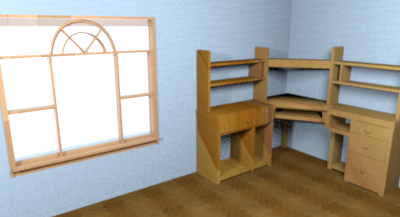
Looking good!
I don't know if I can make that texture rotate so that it's not diagnal:
Looking good!
Who is online
Users browsing this forum: No registered users and 1 guest