Photo-video rendering plug-in
This topic has been viewed 841547 times and has 225 replies
Re: Photo-video rendering plug-in
Thank you. Important part of the 6.0 launch. Quick test looks good. ok
Re: Photo-video rendering plug-in
Hi enkonyito.
Have to say i found these light sources far more user friendly, thanks for the work you put into them and 1.6
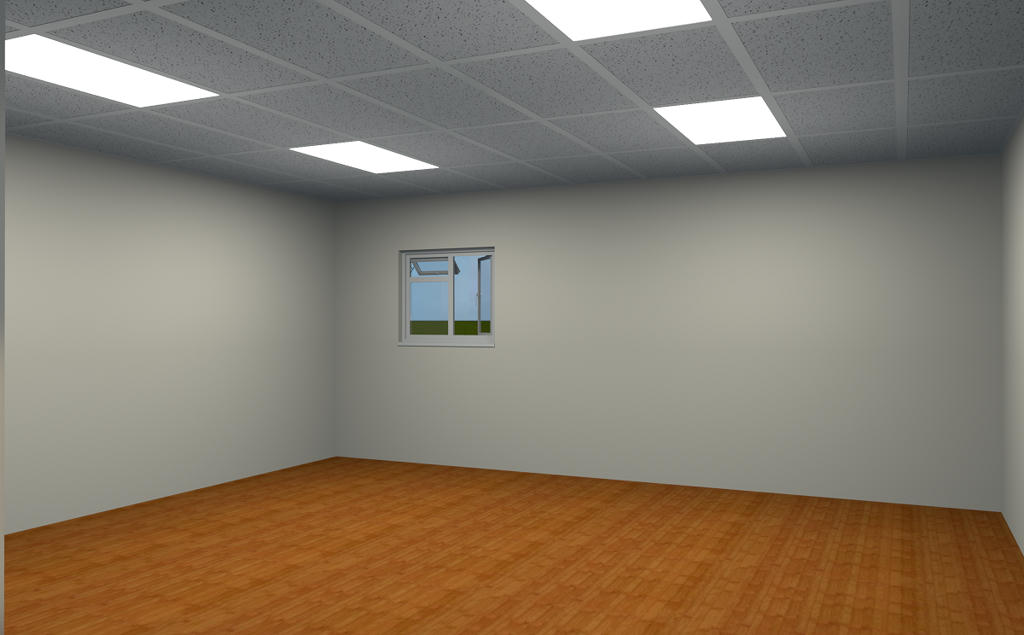
Here i have used 4 opaque panels @ 25% and 4 "unviewable" panels, these are elevated to 1100mm, set to 10% and light the ceiling.
Thanks again
Mike
Have to say i found these light sources far more user friendly, thanks for the work you put into them and 1.6
Here i have used 4 opaque panels @ 25% and 4 "unviewable" panels, these are elevated to 1100mm, set to 10% and light the ceiling.
Thanks again
Mike
-
bdfd

- Posts: 2614
- Joined: Sat Mar 29, 2014 7:17 am
- Country: LILLE, Les Hauts de France, Western Europa
Re: Photo-video rendering plug-in
None problem for me.Can not change the color of lights.PhotoVideoRendering-1.6 plug-in
- compatibility with Sweet Home 3D 6.0 and higher
- management of new light sources
- use of a light panel as room ceiling light
- added Speed and Frame Rate fields in the video panel
- possibility to choose the type of path in the video panel
OtherLightTypes-1.1 libraries compatible only with this plug-in
- PointLight_type: 1 light point with modifiable color
- SphereLight_type: 3 light spheres with modifiable color
- TrianglemeshLight_type: 3 light panels including 2 with modifiable color
Available in the Light sources category.
Automatic and color work fine ! [=D>]
.
Evil progresses when good people do nothing!
---
SH3D 7.1 and nothing else - W11 64b in 4K
---
SH3D 7.1 and nothing else - W11 64b in 4K
-
UbuntuBirdy

- Posts: 421
- Joined: Thu Aug 31, 2017 10:31 pm
- Country: Switzerland
- Contact:
Re: Photo-video rendering plug-in
Is this just imagination or does the new plug-in render much faster?
Pascal
SH3D 6.6 / Ubuntu 22.04 (Mainline-Kernel) / Radeon RX580 / Ryzen 7 5800x
SH3D 6.6 / Ubuntu 22.04 (Mainline-Kernel) / Radeon RX580 / Ryzen 7 5800x

Re: Photo-video rendering plug-in
Today I rendered 16 times to test the difference between the different items in "Advanced settings>Quality 4>samplerAlgorithm" option.

I found that "bucket" rendering is the best quality and takes up the least amount of GPU. "Fast" rendering is the fastest quality consuming GPU.

If you want GPU to take up a little more, I think there is only one way. Render with a fast rendered quadruple resolution. Then use software to reduce the screen size by 4 times.

Original image, not rendered

"bucket"-1000X500 Rendering time, 40 minutes

"fast"-4000X2000 Reduce size 1000X500 Rendering time, 26 minutes
The difference is only in the processing of light and shadow. Square rendering is more natural. But the rendering time for fast rendering is 40% less.
So I recommend
1.adding one in the option, 4x supersampling for fast rendering.
2.And render with smaller squares.
3.Support for rendering pauses.
4.And automatically save the file.
5.Allow rendering of 16000X8000 resolution
I found that "bucket" rendering is the best quality and takes up the least amount of GPU. "Fast" rendering is the fastest quality consuming GPU.
If you want GPU to take up a little more, I think there is only one way. Render with a fast rendered quadruple resolution. Then use software to reduce the screen size by 4 times.
Original image, not rendered
"bucket"-1000X500 Rendering time, 40 minutes
"fast"-4000X2000 Reduce size 1000X500 Rendering time, 26 minutes
The difference is only in the processing of light and shadow. Square rendering is more natural. But the rendering time for fast rendering is 40% less.
So I recommend
1.adding one in the option, 4x supersampling for fast rendering.
2.And render with smaller squares.
3.Support for rendering pauses.
4.And automatically save the file.
5.Allow rendering of 16000X8000 resolution
Re: Photo-video rendering plug-in
Another important thing to forget is to add a "pause" button after the rendering starts.
The rendering time is very long and uses 100% CPU. If you encounter individual things at this time, you can't do it.
The rendering time is very long and uses 100% CPU. If you encounter individual things at this time, you can't do it.
Re: Photo-video rendering plug-in
At this point, the plug-in will not evolve any more.
Compatibility with future versions of Sweet Home 3D will be maintained, as far as possible, for changes in rendering. (PhotoRenderer.java history )
Enko Nyito
Compatibility with future versions of Sweet Home 3D will be maintained, as far as possible, for changes in rendering. (PhotoRenderer.java history )
Enko Nyito
EnkoNyito
Re: Photo-video rendering plug-in
While waiting for the next version of Sweet Home 3D, here is the latest beta 1.7 of the plug-in. This allows you to test the ambient lighting panels by activating "Add all ceiling lights" in the standard version of SH3D.
To view the location of panels in the plan using polylines, you can use this utility.
To view the location of panels in the plan using polylines, you can use this utility.
EnkoNyito
Re: Photo-video rendering plug-in
Not sure, well no idea at all really, how much a plug can link with the main software, but, would it be possible to move the choice of having the ambient lighting on, and its slider, away from the render modification window and onto the room modification window.
This way each room could be controlled individually, on, off and brightness.
Mike
This way each room could be controlled individually, on, off and brightness.
Mike
Re: Photo-video rendering plug-in
It would be possible as here but it imposes some constraints.Not sure, well no idea at all really, how much a plug can link with the main software, but, would it be possible to move the choice of having the ambient lighting on, and its slider, away from the render modification window and onto the room modification window.
This way each room could be controlled individually, on, off and brightness.
Mike
Given the size of rooms modification panel, the slider would not be very readable.
The addition of such a feature is possible in a derived version but will require an update to each new version of Sweet Home 3D.
The plug-in will have to be compatible with these 2 versions (standard and derived).
The easiest way is to make an official request for the ceiling lights power feature to be integrated into the standard version of SH3D.
The plug-in will be able to retrieve this information and manage the ambient lighting panels.
Enko
EnkoNyito
Who is online
Users browsing this forum: No registered users and 1 guest