How to make the color and shape look the same

This topic has been viewed 1615 times and has 3 replies
Thread status: Active
How can I do this? [img]http://www.sweethome3d.com/images/flags/en_small.gif[/img]
Post Reply New Topic
Bill_L
Posts: 2
Joined: Mon Jun 08, 2020 1:23 pm

How to make the color and shape look the same

Post by Bill_L »

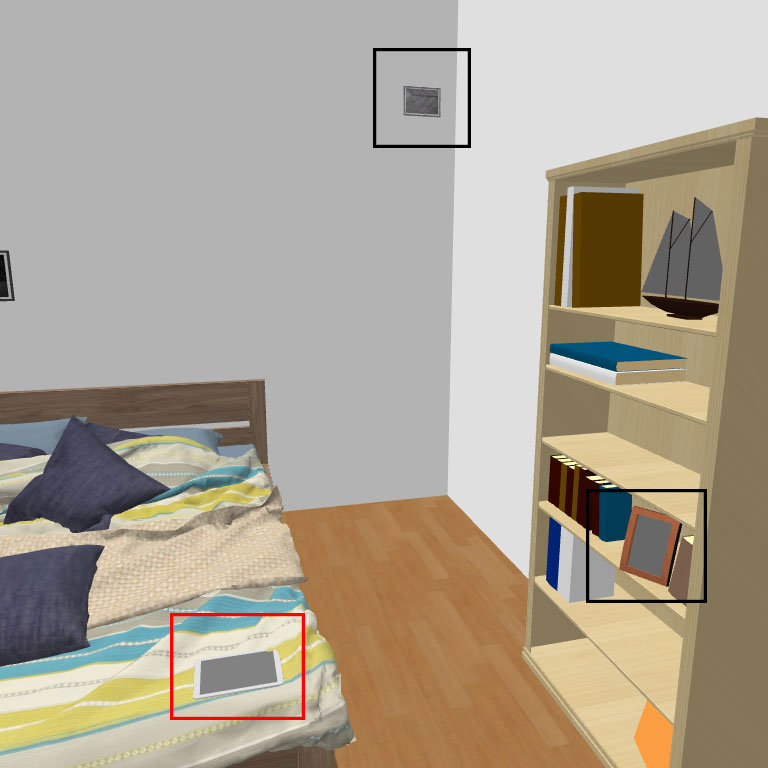
Hi, everyone, I am trying to use the software to create a set of pictures for my visual search experiment. I want the distractors to have the same shape but different color or have the same color but different shape as the target.

For the shape, I don't need the same shape/different color to be exactly the same shape, I only need it to look the same size as the target.

But due to the distance and lighting, I can't have the same shape or same color unless I use my owe eye to adjust it.

I attach a picture to illustrate, the tablet in the red rectangular is the target and the two frames in the black are the distractors.

Any suggestions about how I canget the same shape/color in a more systematic way, so I don't have to writhe "use my own eye" in my paper? Thanks in advance.
Image
User avatar
Puybaret
Posts: 9440
Joined: Mon Nov 07, 2005 12:00 pm
Country: Paris, France
Contact:

Re: How to make the color and shape look the same

Post by Puybaret »

If you don’t want that the lights of the scene alters the color of an object, you could use a 3D model at OBJ format with an associated MTL file containing materials with an [font=courier new]illum 0[/font] setting. See this thread for some examples (even if that thread is about how to make glowing lights with ray tracing renderers).
Emmanuel Puybaret, Sweet Home 3D creator
User avatar
Puybaret
Posts: 9440
Joined: Mon Nov 07, 2005 12:00 pm
Country: Paris, France
Contact:

Re: How to make the color and shape look the same

Post by Puybaret »

And about the fixed shapes, it’s not possible to avoid the resizing / deforming / hiding effect of the perspective projection.
Using OBJ spheres with an [font=courier new]illum 0[/font] setting could avoid the deforming effect (you would get a disc with a fixed color) but it still could be more or less large at screen according to its distance to the camera and possibly hidden by other objects in front of it.
Emmanuel Puybaret, Sweet Home 3D creator
Bill_L
Posts: 2
Joined: Mon Jun 08, 2020 1:23 pm

Re: How to make the color and shape look the same

Post by Bill_L »

Thank you. I will try to use the .obj format
Post Reply New Topic

Who is online

Users browsing this forum: No registered users and 2 guests