I stripped all furniture and non-essentials from the model and the issue is gone, it's obviously something to do with the objects, I'm trying to nail down the culprit. A lot of my objects are imported from Sketchup's 3D warehouse. I have a pretty beefy system (Intel Quad Core, 8GB DDR5 Video Card, 24GB memory, Windows 10 Pro) and I've updated SH3D and Java to the latest versions. Are there any troubleshooting tips/ideas on isolating the cause of the problem?
3D View, non-furniture turns white (loses all color)
This topic has been viewed 5191 times and has 3 replies
-
knotworking
- Posts: 3
- Joined: Mon Aug 03, 2020 3:08 pm
- Country: United States
3D View, non-furniture turns white (loses all color)
I started having this problem a few weeks ago, as my model became more complex (bloated) with imported objects, if I moved the view in either aerial or visitor view all walls and some other items would turn white. For awhile, when I reopened the saved model, everything renders fine, but when I move the view or display the rendering in a separate window, it happens again. Now it does it immediately upon opening the model. I've seen this issue referenced in another thread or two on here, but there was no solution or explanation for the issue. Here's a shot of the issue:

I stripped all furniture and non-essentials from the model and the issue is gone, it's obviously something to do with the objects, I'm trying to nail down the culprit. A lot of my objects are imported from Sketchup's 3D warehouse. I have a pretty beefy system (Intel Quad Core, 8GB DDR5 Video Card, 24GB memory, Windows 10 Pro) and I've updated SH3D and Java to the latest versions. Are there any troubleshooting tips/ideas on isolating the cause of the problem?
I stripped all furniture and non-essentials from the model and the issue is gone, it's obviously something to do with the objects, I'm trying to nail down the culprit. A lot of my objects are imported from Sketchup's 3D warehouse. I have a pretty beefy system (Intel Quad Core, 8GB DDR5 Video Card, 24GB memory, Windows 10 Pro) and I've updated SH3D and Java to the latest versions. Are there any troubleshooting tips/ideas on isolating the cause of the problem?
-
knotworking
- Posts: 3
- Joined: Mon Aug 03, 2020 3:08 pm
- Country: United States
Re: 3D View, non-furniture turns white (loses all color)
Link for the image didn't work, trying again:
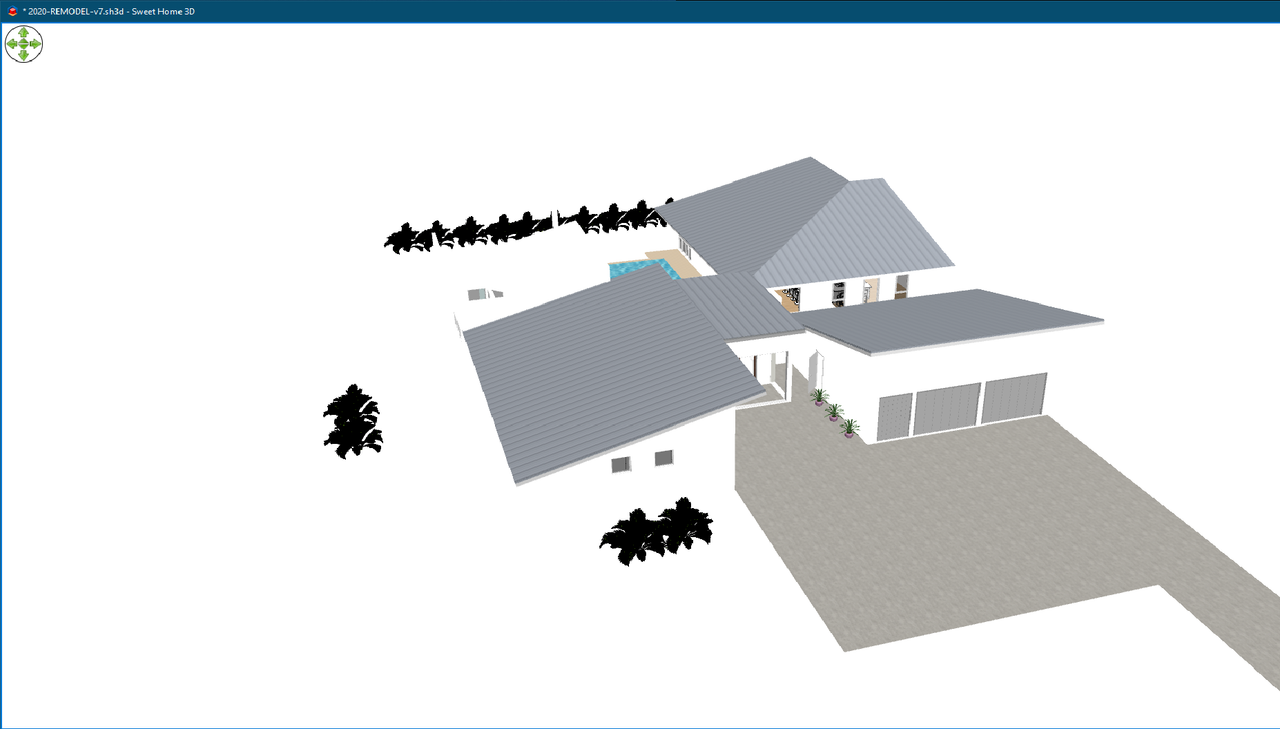

Re: 3D View, non-furniture turns white (loses all color)
Would it change something when you reduce light power in the 3D view modification panel?
Emmanuel Puybaret, Sweet Home 3D creator
-
knotworking
- Posts: 3
- Joined: Mon Aug 03, 2020 3:08 pm
- Country: United States
Re: 3D View, non-furniture turns white (loses all color)
If I take the light down to 3 or 4 ticks, I can see the walls fairly well, some objects become very dark, but it's tolerable. I found if I changed the floor textured setting for rooms from Shiny to Matt, I could see the floor clearly. Going on that, I checked to see if my (colored) walls were set to Matt or Shiny, they were already Matt; changing them to shiny just exacerbated the issue. Changing the wall to use a Matt texture had the same beneficial effect as it had on the floor, I could see the wall clearly again.
Who is online
Users browsing this forum: No registered users and 1 guest