I would like to add the topography from my surveyor's existing conditions survey map to my house plan and from there manipulate it into a grading plan.
I was hoping I could (perhaps using the "Add polylines" tool) freeform sketch a topo layer at say, 0' elevation then create an object 1 foot thick using its outline. Then, create a 1' elevation topo layer 1' thick and at 1' elevation and "stack" it on the 0' object. Repeat as necessary for elevations 2, 3, 4, etc. Thus, building up topo like architects do with sheets of cardboard or styrofoam.
I haven't found a way to do this... Hope I'm missing something because clearly, this is a necessary step in positioning a new house on a lot.
Add existing conditions topography and morph to grading map?
This topic has been viewed 3575 times and has 7 replies
-
granitehead
- Posts: 6
- Joined: Tue Jan 26, 2021 11:52 pm
- Country: United States
Re: Add existing conditions topography and morph to grading map?
Hello,
very interesting idea!
Did tou try creating stacked rooms with 1' floor thickness and 0.01 walls ?
very interesting idea!
Did tou try creating stacked rooms with 1' floor thickness and 0.01 walls ?
MacMini 3GHz Intel Core i5 6 cores 64Go macOS Big Sur 12.2.1
-
granitehead
- Posts: 6
- Joined: Tue Jan 26, 2021 11:52 pm
- Country: United States
Re: Add existing conditions topography and morph to grading map?
Denis... thank you!! You got me thinking about this from a different direction. You're right... the "polyline" tool that seems to work is "Create Walls". Just did a quick test: Create multiple levels each at increasing one foot elevation increments, each with one "room" with 1' high walls and very thin flors/ceilings/walls. Seems to do the trick!
-
granitehead
- Posts: 6
- Joined: Tue Jan 26, 2021 11:52 pm
- Country: United States
Re: Add existing conditions topography and morph to grading map?
The only issue thus far is that the "rooms" don't display their ceilings if the viewer's eyes are above ceiling height even though "Display ceiling" is checked in the room's attributes. Only if the viewer is in the room and eye level is below its ceiling height will the ceiling be visible from below. Of course, that's exactly what you want for real rooms so you can look into them, but for this purpose, I'd really like these "rooms" to be opaque objects from any viewing angle. That's why I was hoping I could draw free-form objects. It's still useful as-is imagining the "roof" of each topo room.
Maybe I can make another "room" at each level the shape of the one below it with minimal thickness and let its floor be the "roof" of the one below. Getting a bit complex and tedious...
Maybe I can make another "room" at each level the shape of the one below it with minimal thickness and let its floor be the "roof" of the one below. Getting a bit complex and tedious...
Re: Add existing conditions topography and morph to grading map?
If you export/import each room the ceilings of the importing objects will be visible, either solid or if you adjust the opacity prior to exporting you will be able to see through them
-
granitehead
- Posts: 6
- Joined: Tue Jan 26, 2021 11:52 pm
- Country: United States
Re: Add existing conditions topography and morph to grading map?
That's a great idea, Mike! I'll give it a try...
Re: Add existing conditions topography and morph to grading map?
Hello, I did what Mike described.(I think...)
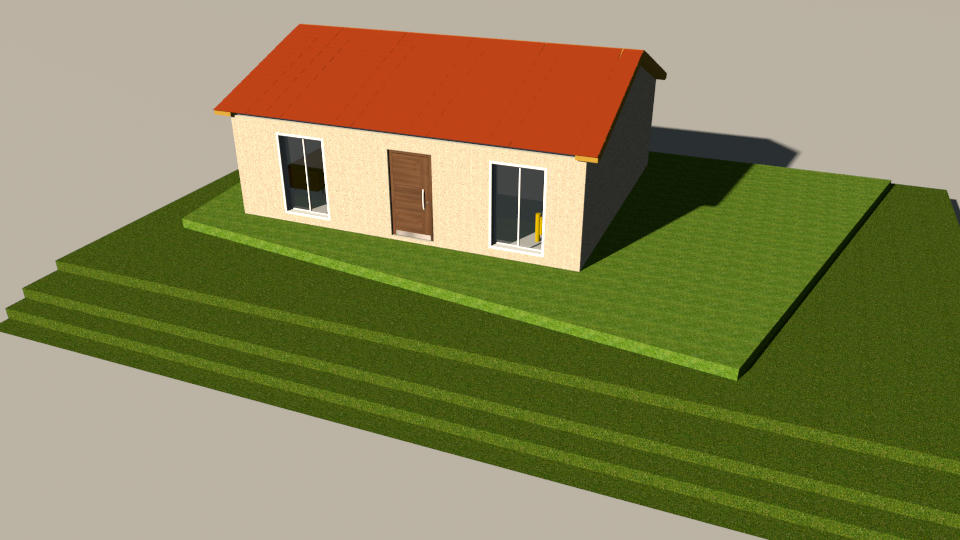
I set in preferences panel :
floor = 25 cm
height of new walls = 0,1 cm
then I made a stack of rooms.
export all of them in one unique OBJ format.
In a new project import the terrain as furniture. (and change the preferences to standard values)
Put the house at elevation corresponding to the height of terrain.
I would like to be able to make a bevel in order to avoid these stairs...but I don't know how...
I set in preferences panel :
floor = 25 cm
height of new walls = 0,1 cm
then I made a stack of rooms.
export all of them in one unique OBJ format.
In a new project import the terrain as furniture. (and change the preferences to standard values)
Put the house at elevation corresponding to the height of terrain.
I would like to be able to make a bevel in order to avoid these stairs...but I don't know how...
MacMini 3GHz Intel Core i5 6 cores 64Go macOS Big Sur 12.2.1
Re: Add existing conditions topography and morph to grading map?
HERE is a link to several different geo shapes that you may well find helpful.
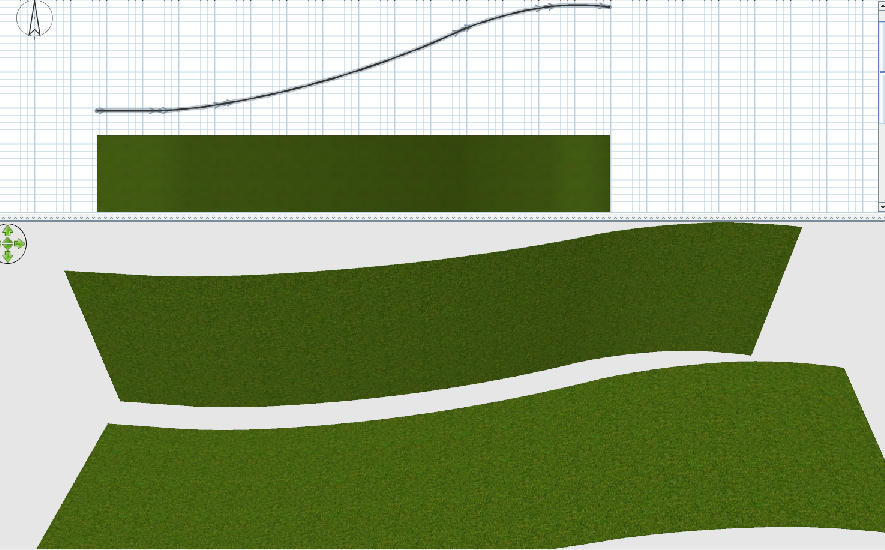
If you want a curved slope draw a wall the size of the grass area split it several times, give each section of wall the desired arc. Export/import lie it down.
If you want a curved slope draw a wall the size of the grass area split it several times, give each section of wall the desired arc. Export/import lie it down.
Who is online
Users browsing this forum: No registered users and 1 guest