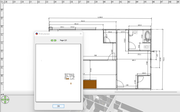
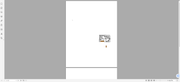
When doing a print to PDF the result is really small. Even with a print_preview does the plan show as a small rectangle on the overall preview. The plan is a 24ft x 41ft plan. How can I export this to a readable image as a PDF?
Link to images: https://postimg.cc/gallery/YtNNns2
or..
https://i.postimg.cc/vcGJjqcz/Sweet-Hom ... -Issue.png
https://i.postimg.cc/CzJ3VG8V/Sweet-Hom ... ue-PDF.png
Export_Too_Small
This topic has been viewed 3476 times and has 1 replies

Re: Export_Too_Small
You may have placed some very small objects at the borders of your plan that you should remove (use Edit > Select all menu item and zoom out to find them easily).
Or you created different levels, and one these levels is much larger than your home plan (maybe for the garden?). In that case, make the larger level unviewable to get a smaller print.
Or you created different levels, and one these levels is much larger than your home plan (maybe for the garden?). In that case, make the larger level unviewable to get a smaller print.
Emmanuel Puybaret, Sweet Home 3D creator
Who is online
Users browsing this forum: No registered users and 1 guest