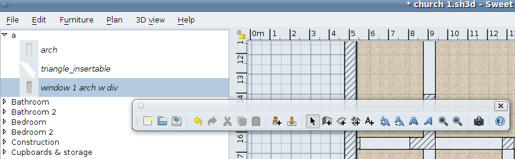
Floating toolbar

This topic has been viewed 4298 times and has 2 replies
Thread status: Active
How can I do this? [img]http://www.sweethome3d.com/images/flags/en_small.gif[/img]
Post Reply New Topic
User avatar
hansmex
Posts: 4027
Joined: Sat Sep 26, 2009 11:36 am
Country: Netherlands

Floating toolbar

Post by hansmex »

Hello :-)

While changing the batteries of my wireless mouse, I must -accidentally- have done something strange, because the toolbar is now detached and is floating on top of the screen.

Image

Is there a way to "undo" this?
Thanks for your help,

Hans
Hans

new website - under constuction
hansdirkse.info
User avatar
Puybaret
Posts: 9440
Joined: Mon Nov 07, 2005 12:00 pm
Country: Paris, France
Contact:

Re: Floating toolbar

Post by Puybaret »

You can attach the toolbar back to its window, simply by closing the toolbar window or with a drag and drop of the vertical line at left of the New icon to one of the borders of the main window.

Emmanuel Puybaret, Sweet Home 3D creator
User avatar
hansmex
Posts: 4027
Joined: Sat Sep 26, 2009 11:36 am
Country: Netherlands

Re: Floating toolbar

Post by hansmex »

Emmanuel:

Closing it worked for me.
Thanks!

Hans
Hans

new website - under constuction
hansdirkse.info
Post Reply New Topic

Who is online

Users browsing this forum: No registered users and 2 guests