How can I remove transparency from 'glass'?
I am working with the library furniture item 'Accordian fold doors'. I want to replace the transparent glass material with an opaque material (eg wood). I have tried various edits to; colour, texture and materials but the 'glass' sections always remain transparent, as if there is some inherent property that can't be edited through the UI.
Do I need to edit the underlying model?
How to replace glass with non-transparent material?
This topic has been viewed 3983 times and has 6 replies

Re: How to replace glass with non-transparent material?
Yes. Export the model. This will produce two files an .obj, and a .mtl file.Do I need to edit the underlying model?
Edit the mtl file. Search for the block that starts with "newmtl" followed by the name of the glass as you saw it when you modified the model in Sweet Home 3D. This block will have a (last) line starting with "d" followed by a number < 0. Either remove the d line or set the value to 1.0 to remove the transparency.
Save and import the model again by dragging the .obj file into your 2D pane. Remember to check "Door or window" in the import dialog if you want the model to act like a door that snaps into a wall.
Dodecagon.nl
1300+ 3D models, manuals, and projects
1300+ 3D models, manuals, and projects
Re: How to replace glass with non-transparent material?
Thanks. I have tried setting d=1.0 and also removed the line but transparency persistes. I have attempted various other things like delete the .mtl file before import and editing the .obj to remove references to the glass material but no luck. It seems to pickup some default 'glass' effect from somwhere.
Re: How to replace glass with non-transparent material?
I exported the model and checked the obj/mtl files.
The obj file has the "sweethome3d_window_" prefix for the glass which forces the transparency back to 0.5.
In the .obj file remove the "sweethome3d_window_" part on the two glass lines in the .obj file and remove the d line in the .mtl file.
Import and the transparency is gone.
The obj file has the "sweethome3d_window_" prefix for the glass which forces the transparency back to 0.5.
In the .obj file remove the "sweethome3d_window_" part on the two glass lines in the .obj file and remove the d line in the .mtl file.
Import and the transparency is gone.
Dodecagon.nl
1300+ 3D models, manuals, and projects
1300+ 3D models, manuals, and projects
-
captaincook

- Posts: 403
- Joined: Fri Oct 20, 2017 3:16 pm
- Country: France
Re: How to replace glass with non-transparent material?
Bonjour.
Autre solution possible par exemple.
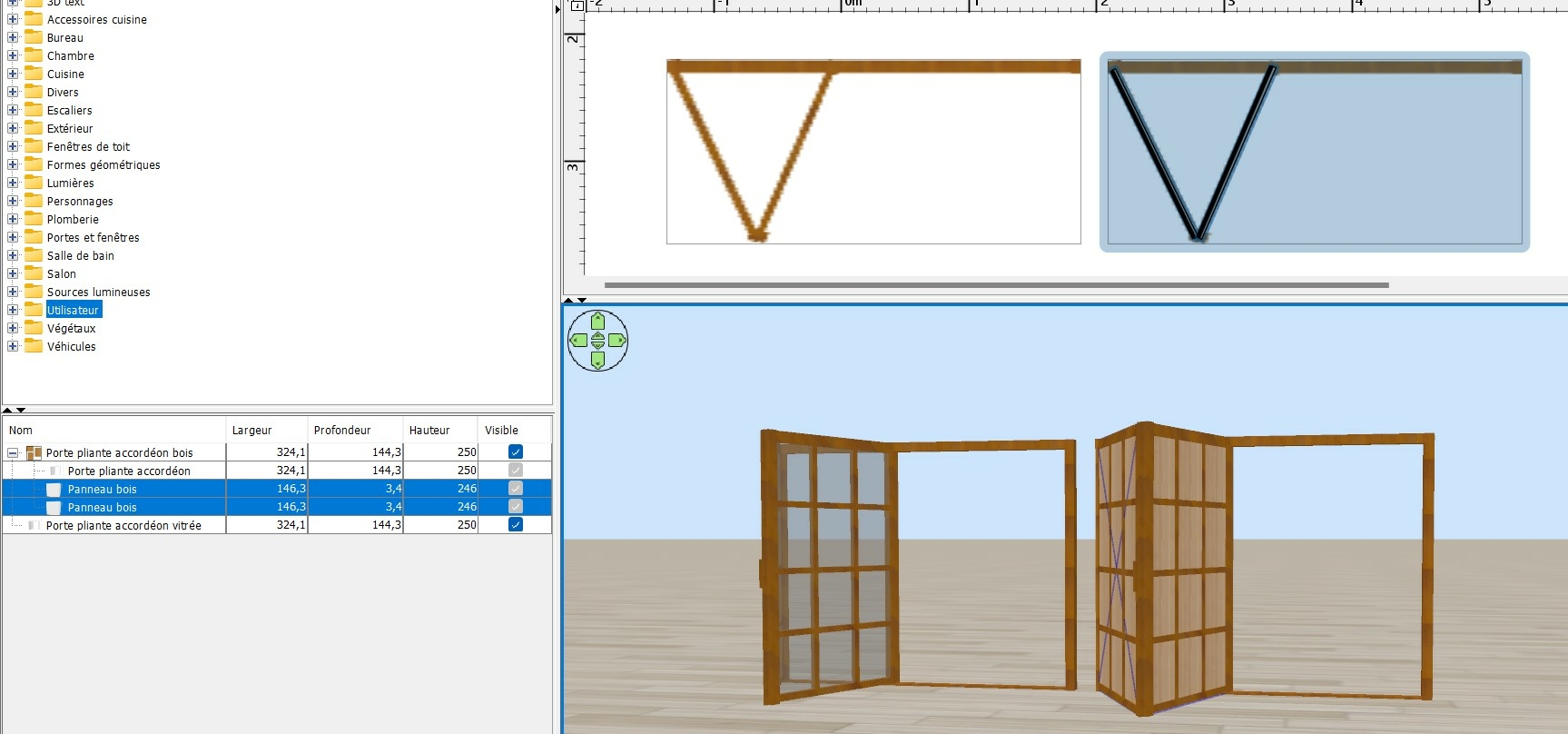
A gauche, une porte accordéon vitrée.
A droite, j'ai rendu les vitres invisibles et les ai remplacé par deux panneaux de bois (ceux plus clairs).
L'ensemble est exporté au format .obj puis ré importé dans la section "Portes et fenêtres".
Autre solution possible par exemple.
A gauche, une porte accordéon vitrée.
A droite, j'ai rendu les vitres invisibles et les ai remplacé par deux panneaux de bois (ceux plus clairs).
L'ensemble est exporté au format .obj puis ré importé dans la section "Portes et fenêtres".
Re: How to replace glass with non-transparent material?
Now solved. Thanks for your help!
After 10 years in SH3D I finally edited an obj file
After 10 years in SH3D I finally edited an obj file
Re: How to replace glass with non-transparent material?
Now that you have edited your first .obj file you should read the manual How to create BiFold doors on the Dodecagon Manuals page.
The doors created in the manual come very close to the accordion door but these will open and close.
The doors created in the manual come very close to the accordion door but these will open and close.
Dodecagon.nl
1300+ 3D models, manuals, and projects
1300+ 3D models, manuals, and projects
Who is online
Users browsing this forum: No registered users and 1 guest