tongue Change appearance of you furniture library

This topic has been viewed 3916 times and has 0 replies
Thread status: Active
How can I do this? [img]http://www.sweethome3d.com/images/flags/en_small.gif[/img]
Post Reply New Topic
User avatar
wrosun
Posts: 96
Joined: Wed Nov 17, 2010 8:44 am
Country: Pokhara, Nepal

Change appearance of you furniture library

Post by wrosun »

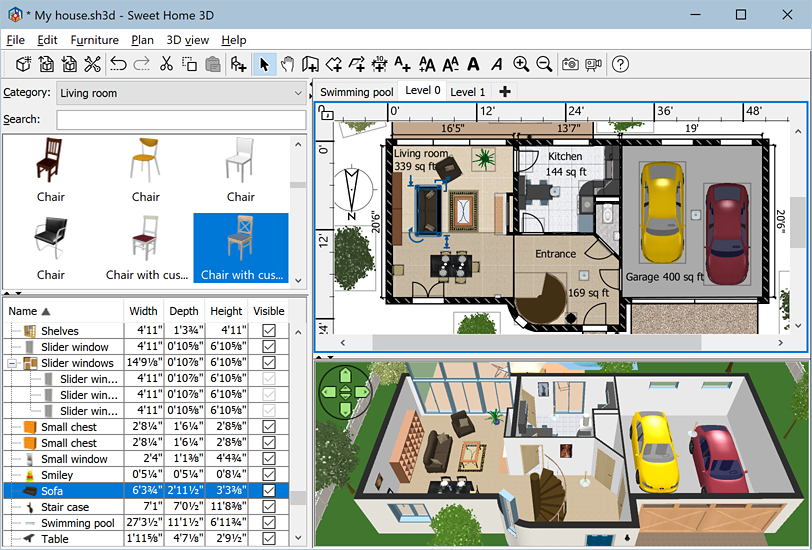
Image
Image from http://www.sweethome3d.com (Home page of sweet home 3d)

Want your furniture library to look like this and what about your 2d viewer....Want it to look cool like the one above

TO change just do the following
1. Go to FILE
2. Then Preferance

Then a dialogue box will appear like this one
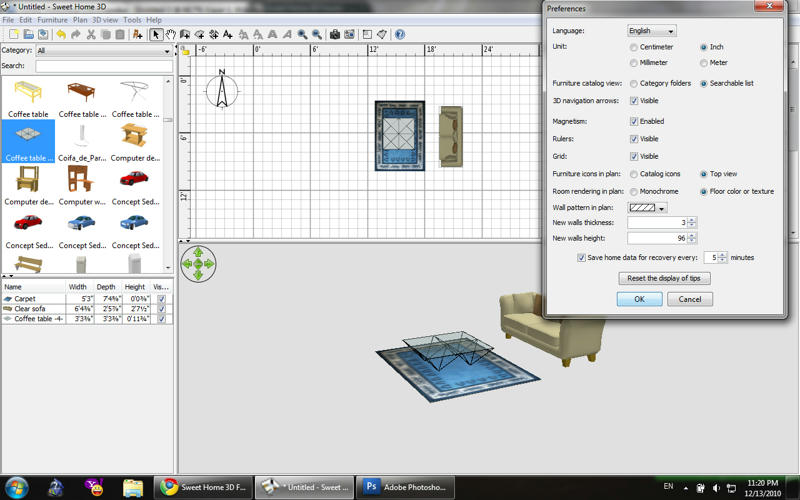
Image

change
Furniture catalogue view
to
searchable list
and
furniture icon in plan
to
top view
for amazing 2d view
Post Reply New Topic

Who is online

Users browsing this forum: No registered users and 1 guest