Problems creating a light

This topic has been viewed 8010 times and has 4 replies
Thread status: Active
Looking for a particular 3D model or texture? [img]http://www.sweethome3d.com/images/flags/en_small.gif[/img]
Post Reply New Topic
Finnithnel
Posts: 5
Joined: Sun Mar 20, 2016 4:55 pm

Problems creating a light

Post by Finnithnel »

Hi,

I'm trying to create a model for the Ikea Knappa lamp : http://www.ikea.com/fr/fr/catalog/products/50070651/

I created a Knappa.sh3f archive containing the file :
- PluginFurnitureCatalog.properties (code below)

Code: Select all

id#1=Knappa
name#1=Knappa
tags#1=Hanging
creationDate#1=2016-03-18
category#1=Lights
icon#1=/models/knappa.png
model#1=/models/knappa.obj
width#1=46.0
depth#1=46.0
height#1=35.9
dropOnTopElevation#1=-1
movable#1=true
doorOrWindow#1=false
multiPartModel#1=true
lightSourceX#1=23.0 23.0
lightSourceY#1=23.0 23.0
lightSourceZ#1=19.0 19.0
lightSourceColor#1=#b2b279 #b2b279
lightSourceDiameter#1=3.0 46
elevation#1=214.1
creator#1=Finnithnel
and the folder "models" containing 3 files :
- knappa.obj (from blender)
- knappa.png (rendered with blender)
- knappa.mtl (containing code below)

Code: Select all

newmtl Ampoule
Ka 1.0000 1.0000 1.0000 
Kd 1.0000 1.0000 1.0000 
Ks 1.0000 1.0000 1.0000 
Tf 1.0000 1.0000 1.0000 
Ns 40 
Ni 1.0000 
illum 2 
d 0.85

newmtl Fleur
Ka 1.0000 1.0000 1.0000 
Kd 1.0000 1.0000 1.0000 
Ks 1.0000 1.0000 1.0000 
Tf 1.0000 1.0000 1.0000 
Ns 800
Ni 0.1000 
illum 7 

newmtl Support
Ns 128.0
Ka 1.000000 1.000000 1.000000
Kd 0.640000 0.640000 0.640000
Ks 0.500000 0.500000 0.500000
illum 2
My main problem is that I'm unable to get a good render inside sweethome3d
=> When I use only 1 light source with 3.0 diameter, the lamp is rendered correctly (with shadows and so on) but the room get nearly no light (light is filtered by the lamp part)
=> When I "cheat" by adding another light source of 46 diameter (same as lamp size), then the room is correctly lighted, but the render of the lamp is awfull as it receive light from outside

I tried using Tf 1.0 to not filter anything, then a low Ni to let the light get through the lamp, but no matter how I change the settings, the only visible result is when the "illum" parameter is changed; and the result differ but is still not good

Any expert could help me to solve this ?
Finnithnel
Posts: 5
Joined: Sun Mar 20, 2016 4:55 pm

Re: Problems creating a light

Post by Finnithnel »

Well, it looks like there is no solution to this problem :s
User avatar
Puybaret
Posts: 9440
Joined: Mon Nov 07, 2005 12:00 pm
Country: Paris, France
Contact:

Re: Problems creating a light

Post by Puybaret »

Sweet Home 3D doesn't fully support OBJ format, and Tf is simply ignored in the current version. Anyway, I think the missing factor is light reflection, not light transmission. Your solution with a small light located within the light structure and one a outside seems a good trade-off. Using a smaller value lightSourceColor value for the small light source should be better though.
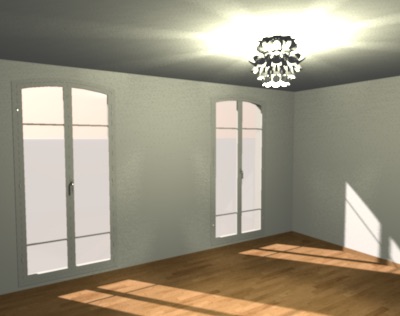
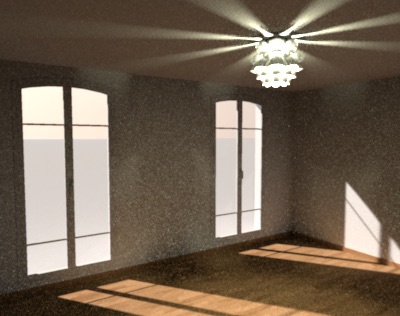
You could also try to compute an image with some light reflection, using Advanced settings of photo rendering plug-in described here. Setting globalIllumination with path value gives different results with only one source light placed at the center of the lamp but it takes much longer to compute with some noisy results.

Image
Double light source with default renderer setting

Image
One light source with path value for globalIllumination and 1 as diffusedBounces

By the way, when you create a sh3f file from an other one like you probably did, you should at least remove or change its id found in the PluginFurnitureCatalog.properties file, otherwise it could mislead the auto update system in Sweet Home 3D with the updates of existing libraries.
Emmanuel Puybaret, Sweet Home 3D creator
Finnithnel
Posts: 5
Joined: Sun Mar 20, 2016 4:55 pm

Re: Problems creating a light

Post by Finnithnel »

Bonjour Emmanuel,

Tout d'abord un grand merci pour ton logiciel qui est juste génial !
Et merci beaucoup d'avoir pris le temps de me répondre
Le rendu que tu obtiens avec ce plugin semble très proche de la réalité, je vais donc suivre ton conseil

Pour ce qui est des identifiants, je repars effectivement toujours de la même bibliothèque vide que j'édite pour chacun de mes modèles, sans savoir que cela poserait problème lors des mises à jours
Ne sachant pas vraiment quels id sont dispos, si je supprime la ligne id comme tu le suggère, cela solutionnera le problème ?
User avatar
Puybaret
Posts: 9440
Joined: Mon Nov 07, 2005 12:00 pm
Country: Paris, France
Contact:

Re: Problems creating a light

Post by Puybaret »

Dans ton cas, je pense que le mieux est de supprimer l'id en effet. Une bibliothèque sans id est ignorée du système de mise à jour.
Emmanuel Puybaret, Sweet Home 3D creator
Post Reply New Topic

Who is online

Users browsing this forum: No registered users and 1 guest