view problem
This topic has been viewed 4347 times and has 6 replies
view problem
How can I set view to deafult? After moving furniture my screen went white in 2d and 3d view. Couldnt see nothing from my project
-
bdfd

- Posts: 2614
- Joined: Sat Mar 29, 2014 7:17 am
- Country: LILLE, Les Hauts de France, Western Europa
Re: view problem
Perhaps a point of view too near of a wall ?
Try to update it...
Change between aerial and virtual mode...
[:)]
Try to update it...
Change between aerial and virtual mode...
[:)]
Evil progresses when good people do nothing!
---
SH3D 7.1 and nothing else - W11 64b in 4K
---
SH3D 7.1 and nothing else - W11 64b in 4K
Re: view problem
Ui looks very weird after that happend looks like bugged.
https://ibb.co/e9tFy5
https://ibb.co/e9tFy5
-
bdfd
- Posts: 2614
- Joined: Sat Mar 29, 2014 7:17 am
- Country: LILLE, Les Hauts de France, Western Europa
Re: view problem
Right click and choose 'see all levels'...
[:)]
[:)]
Evil progresses when good people do nothing!
---
SH3D 7.1 and nothing else - W11 64b in 4K
---
SH3D 7.1 and nothing else - W11 64b in 4K

Re: view problem
It looks like a bug that happens from time to time in multi level homes.
Please [url=mailto:[email protected]]send me[/url] your file, I'll fix it.
Please [url=mailto:[email protected]]send me[/url] your file, I'll fix it.
Emmanuel Puybaret, Sweet Home 3D creator
Re: view problem
It wasnt advanced project so I made new one and save every time after changes. Problem happend when I put furnitures like windows and drag them at the edge of 2d view window. "see all levels" option doesnt help. I have sent the file to puybaret.
Re: view problem
Thanks for the file which helped me to reproduce your issue. [:)]
The problem comes from the small walls you drew in some corners as shown in the following image:
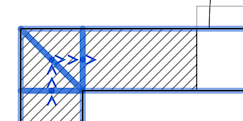
As you can see, it creates some walls that may have a null length side, and a part of the program that measures the distance between an object and wall side failed for a side equal to zero.
I fixed this bug and the correction will be available in the next version.
Meanwhile, you should avoid these small walls and connect directly walls while drawing them.
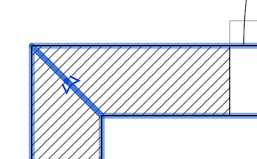
The problem comes from the small walls you drew in some corners as shown in the following image:
As you can see, it creates some walls that may have a null length side, and a part of the program that measures the distance between an object and wall side failed for a side equal to zero.
I fixed this bug and the correction will be available in the next version.
Meanwhile, you should avoid these small walls and connect directly walls while drawing them.
Emmanuel Puybaret, Sweet Home 3D creator
Who is online
Users browsing this forum: No registered users and 2 guests