Appreciate that Emmanuel. Understood - i'm actually looking at the little portions of 45 degree wall at intersections with the rear walls.
That probably puts me in a bit of a pickle but will scratch my head a bit over a cup of tea

Thanks again.
|
Sweet Home 3D Forum » List all forums » » Forum: New versions » » » Thread: Side view plug-in |
||
| Print at Sep 23, 2026, 12:34:38 PM |
|
|
| Posted by Puybaret at Nov 24, 2023, 11:41:38 AM |
|
Re: Side view plug-in Walls cut by the section aren't visible when their axis is parallel to the section normal , because objects are not double faced in Sweet Home 3D. You may think you can see it, but what you see is actually the face joining the cut wall and the other perdendicular wall. If you remove the joined wall, the cut wall won't appear anymore in the side view plug-in. ---------------------------------------- Emmanuel Puybaret, Sweet Home 3D creator |
| Posted by NIMAN at Nov 24, 2023, 12:26:20 PM |
|
Re: Side view plug-in Appreciate that Emmanuel. Understood - i'm actually looking at the little portions of 45 degree wall at intersections with the rear walls. That probably puts me in a bit of a pickle but will scratch my head a bit over a cup of tea Thanks again. |
| Posted by sjb007 at Nov 24, 2023, 11:25:47 PM |
|
Re: Side view plug-in This is a bit hacky. Do your section, then save to a bitmap image. I think the side view plugin only does images, not SVG. Then open the saved image up in an image editor (Gimp and Krita are free open source if you need suggestions) and just block out those wall ends with a simple filled rectangle. |
| Posted by NIMAN at Nov 25, 2023, 8:50:19 AM |
|
Re: Side view plug-in This is a bit hacky. I know what you mean. Yes, have heard of Gimp but never used it though. I also imagine that the Sweet Home bitmap could be inserted into an MS Excel chartsheet (I have an old 2007 version). If I have an appropriately sized/scaled box waiting in it the bitmap could be fitted into it exactly (the proportions of the bitmap can be maintained by holding down SHIFT while dragging its handle size) - of a little interest, to keep the centre of a picture in the same place and maintain its proportions CTRL+SHIFT while dragging the size handle works. Drawn pictures in that version of Excel (also called vector drawings) are created from lines, curves, rectangles etc - those could be used to block the wall ends too. I guess an easier way might just be to set up a series of 1 mm thick full wall width black boxes, within the appropriate walls, right in front of the Sweet Home 3D camera in the first place. We'll see. Thanks for your hint  |
| Posted by Puybaret at Nov 25, 2023, 11:01:58 AM |
|
Re: Side view plug-in Another workaround could be to split the walls, setting the separation of walls in front of the camera. ---------------------------------------- Emmanuel Puybaret, Sweet Home 3D creator |
| Posted by sjb007 at Nov 25, 2023, 7:43:47 PM |
|
Re: Side view plug-in I've worked in IT all my life, and we have a saying that Excel is the wrong tool for every job, because it is so often misused for doing the strangest of tasks. It seems you have decided to embrace Excel and make it the only tool for every job! Seriously, I can't imagine trying to do plans in Excel My brain hurts even thinking about it. Bitmap graphics in GIMP or Krita, vector graphics in Inkscape. Excel?... it's like using a chainsaw to trim your nose hair. It might get the job done, but it'll be a bloody mess. As you are retired and abusing a very old version of Excel, is it fair to say that you are reluctant to learn new software? At the end of the day, use what works for you, but... I do have to put my IT lecturing hat on for a moment though, and wag my finger at using such old, outdated applications (and possibly operating system). General support for Office 2007 ended in 2012. That is a more than a decade of potential exposure with zero security updates. If you insist on using a spreadsheet tool to create plans, perhaps look into the free LibreOffice suite of applications. It will install on Windows, and it operates much like Excel. More importantly, you can keep it up to date at no cost, minimizing your risks. And yes... you can draw into the spreadsheet there too. |
| Posted by sjb007 at Nov 25, 2023, 7:52:06 PM |
|
Re: Side view plug-in Looking again at the image you posted, you are using either Windows Vista or Windows 7. Both also at least a decade out of support. And you are on the internet. You are playing Russian Roulette. I really, really hope you do not use that machine for anything even remotely sensitive. |
| Posted by NIMAN at Nov 26, 2023, 2:28:47 PM |
Re: Side view plug-in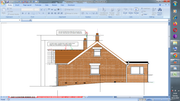 sjb007 wrote: I've worked in IT all my life, and we have a saying that Excel is the wrong tool for every job, because it is so often misused for doing the strangest of tasks. Excel is a fantastic tool for many jobs - even to create perfectly adequate planning permission plans/elevations (example image attached). Many people reach, first, for the tools they're familiar with. sjb007 wrote: It seems you have decided to embrace Excel and make it the only tool for every job! You mustn't have read what I wrote earlier in this discussion, here it is again: After having produced reasonable external planning elevations in Excel it became apparent (a bit too late) just how horrendously complicated the task of producing a series of vertical sections within Excel would be. sjb007 wrote: Seriously, I can't imagine trying to do plans in Excel My brain hurts even thinking about it. You could try it someday. As you can see from my image, basic plans/elevations are not enough to hurt most brains. After that it does though. sjb007 wrote: but it'll be a bloody mess I hope you are not referring to my image - the local planning officer said they are the basis for an entirely adequate application. Out of a little interest, Excel 2016 included support insertion/editing of SVG so I may splash out on a copy sjb007 wrote: As you are retired and abusing a very old version of Excel, is it fair to say that you are reluctant to learn new software? At the end of the day, use what works for you, but... I've spent that last few days taking a relatively deep dive into Sweet Home 3D. sjb007 wrote: I do have to put my IT lecturing hat on for a moment though, and wag my finger at using such old, outdated applications That was enjoyable - Sweet Home 3D is currently purring along on this Intel(R) Core(TM)i5-3320M CPU @2.60GHZ 4GB RAM and Win7 pro is, pretty much, solid as a rock. sjb007 wrote: General support for Office 2007 ended in 2012. That is a more than a decade of potential exposure with zero security updates.  If you imagine M_S is not harvesting all that ou_tloo_kdo_tcom info for, godonlyknows what, well... in any case, I haven't, er, wasted, a penny on a new machine for 11 years. Some heavy duty photogrammetry calculations could cause me to update somewhat if I ever choose to look into that fascinating topic more thoroughly but, equally, if that was the case I might just look into M_S Azure (or similar) in a bit more detail and rent out a host of remote CPU's for as short a time as possible If you imagine M_S is not harvesting all that ou_tloo_kdo_tcom info for, godonlyknows what, well... in any case, I haven't, er, wasted, a penny on a new machine for 11 years. Some heavy duty photogrammetry calculations could cause me to update somewhat if I ever choose to look into that fascinating topic more thoroughly but, equally, if that was the case I might just look into M_S Azure (or similar) in a bit more detail and rent out a host of remote CPU's for as short a time as possiblesjb007 wrote: If you insist on using a spreadsheet tool to create plans As it is, i'd prefer to get everything done in Sweet Home 3D but suspect that will not happen. I'd also like not to have to put the effort into learning FREECAD (which I imagine could do it all) but, if possible, do not wish to expend the energy to do that. So, if sucking a few bitmaps out of here into the old familiar (Excel) for a bit of finishing work/tidy up gets the job done, let's see. sjb007 wrote: perhaps look into the free LibreOffice suite of applications. It will install on Windows, and it operates much like Excel. Appreciate that (I hope I don't need to though). sjb007 wrote: ... you can draw into the spreadsheet there too. That somehow reminds me, out of a little interest, FREECAD has a very interesting/useful Spreadsheet Workbench. sjb007 wrote: You are playing Russian Roulette We all are - TCP/IP encapsulation (and/or whatever follows) makes that so. I'm amazed everytime I login to online banking and there's still a positive balance. In summary - that "Excel is the wrong tool for every job" is patently untrue. I've used it to great effect over several decades even though the last version of VB / VBA was released in March 2017. All of what you said was very enjoyable though - so thanks for the comment(s)  Emmanuel Puybaret wrote: Another workaround could be to split the walls, setting the separation of walls in front of the camera. Excellent. Nice and easy too - always like those Thanks Emmanuel |
| Posted by sjb007 at Nov 26, 2023, 5:04:32 PM |
|
Re: Side view plug-in sjb007 wrote: but it'll be a bloody mess I hope you are not referring to my image - the local planning officer said they are the basis for an entirely adequate application. sjb007 wrote: As you are retired and abusing a very old version of Excel, is it fair to say that you are reluctant to learn new software? At the end of the day, use what works for you, but... I've spent that last few days taking a relatively deep dive into Sweet Home 3D. sjb007 wrote: I do have to put my IT lecturing hat on for a moment though, and wag my finger at using such old, outdated applications That was enjoyable - Sweet Home 3D is currently purring along on this Intel(R) Core(TM)i5-3320M CPU @2.60GHZ 4GB RAM and Win7 pro is, pretty much, solid as a rock. sjb007 wrote: General support for Office 2007 ended in 2012. That is a more than a decade of potential exposure with zero security updates. If you imagine M_S is not harvesting all that ou_tloo_kdo_tcom info for, godonlyknows what, well... in any case, I haven't, er, wasted, a penny on a new machine for 11 years. Some heavy duty photogrammetry calculations could cause me to update somewhat if I ever choose to look into that fascinating topic more thoroughly but, equally, if that was the case I might just look into M_S Azure (or similar) in a bit more detail and rent out a host of remote CPU's for as short a time as possible
sjb007 wrote: If you insist on using a spreadsheet tool to create plans As it is, i'd prefer to get everything done in Sweet Home 3D but suspect that will not happen. I'd also like not to have to put the effort into learning FREECAD (which I imagine could do it all) but, if possible, do not wish to expend the energy to do that. sjb007 wrote: You are playing Russian Roulette We all are - TCP/IP encapsulation (and/or whatever follows) makes that so. I'm amazed everytime I login to online banking and there's still a positive balance.  You must have one of these You must have one of these  In summary - that "Excel is the wrong tool for every job" is patently untrue. I've used it to great effect over several decades even though the last version of VB / VBA was released in March 2017. All of what you said was very enjoyable though - so thanks for the comment(s)  |
| Posted by NIMAN at Nov 26, 2023, 8:13:41 PM |
|
Re: Side view plug-in I wasn't insulting the end result, more pointing out that it will be painful. A simple example... In Excel you have all your drawn elements on the top of the spreadsheet as just one big collection of drawn objects. My previous Excel elevation has several "groups". Unsophisticated but perfectly straightforward to achieve, relatively, useful results relatively quickly. The previous image gable wall elevation darker brick portion being built from a single (rectangular) brick/copied twice / both selected / copied twice etc to form a single course. The course grouped / copied x 10. This copied x 2 and a wall is constructed in a minute or two. Layer management (of these groups) is also unsophisticated via Excel "send to front/send forward/send to back/send backward" but for a, relatively, small number of layers it is fairly straightforward to manage (while the "select objects" menu item and a little VBA permits identification of hidden objects in a straightforward fashion also). By the way, if you draw on a worksheet and print - the output scale is distorted. You must print from a chartsheet to maintain that not to mention that a print size must be chosen before the dimension property of the chartsheet can be set to the desired size (A3/A2 etc) It is a lot of overhead compared to Sweet Home 3D but familiarity, of course, breeds speed Your screenshot looks good Cheers  then Excels abilities as a technical drawing tool. I haven't looked into it in any detail but it seems that VBA can be used to produce relatively sophisticated results (see commercial "Excel Draw" for example) Getting them all onto a standard A2 at proper 1:50 scale with a proper info block is a lot more work and requires other software. This is an Excel A3 chartsheet draft pdf used as the basis for a building notice application a few months ago - I hope you like that too? https://i.postimg.cc/DyQmHwZ4/A3-Excel.png This is not about the relative power of your PC, or Microsoft having God mode on your PC. This is about old unsupported software having unpatched vulnerabilities that malicious 3rd parties can exploit. They want three things from you:
If we think we are ahead in the evening it'll be reversed by the next morning - for the foreseeable I will, nervously, rely on scheduled AOMEI disc image backup and 2 step authentication everywhere else. From my pespective, this is not the place to have further discussion on who is the bigger thief (Big IT/Small crook). On an application difficulty rating of 1-10 with SH3D being a 3 or 4, FreeCAD I'd put at a 10. Learning to use it to create final plans would be a huge time sink. Hence my current Sweet Home 3D focus. But then, you are retired Yes, but the real goal must be success in the physical project You must have one of these With upcoming Global CBDC implementations you'll have something  it is a bit of hyperbole, but I've seen people use Excel for managing a large project instead of MS Project when they already had access to the real thing! As dates moved they would sit in meetings painstakingly colouring in the cells of their gantt chart styled spreadsheet as everyone else waited... And don't get me started on "critical" business processes being coded up in Excel and saved on that one "computer genius" persons local hard drive... A reminder here of that last migration project from an MM3000 to SAP ERP. Thanks for reminding me just how happy I am to be out of that "rat race" |
|

|
Current timezone is GMT Sep 23, 2026, 12:34:38 PM |