@enkonyito
Can the dark level options be included in the resizable?
It would be nice if it could


|
Sweet Home 3D Forum » List all forums » » Forum: New versions » » » Thread: Photo-video rendering plug-in |
||
| Print at Sep 23, 2026, 11:52:15 AM |
|
|
| Posted by okh at Feb 27, 2018, 9:33:14 AM |
|
Re: Photo-video rendering plug-in Congratulations, very nice. Thanks. The settings explanation in configureSunflowRenderingEngine.pdf from thread,6122 is quite necessary for me to grasp the advanced settings. If you consider updating it, do not hesitate to spell out in some more detail what the different settings mean. Even if I could find out for myself, some of the options slow down the rendering process quite a bit - and then it can be hard to find out when a setting is worth the trouble. But that is a detail, very nice work. ok |
| Posted by Ceciliabr at Feb 27, 2018, 8:38:02 PM |
|
Re: Photo-video rendering plug-in @enkonyito Can the dark level options be included in the resizable? It would be nice if it could |
| Posted by enkonyito at Feb 28, 2018, 4:41:01 AM |
|
Re: Photo-video rendering plug-in @bdfd I don't see anything : To install the plug-in and replace the old version, simply double-click on the PhotoVideoRendering.sh3p file included in the PhotoVideoRendering-1.4.1.zip folder.1. in the options menu 2. in librairies list 3. but plugin is in the good sub-directory (green Arrow) An idea ? Maybe I should display the current version in the Photo-video rendering menu? @okh The settings explanation in configureSunflowRenderingEngine.pdf from thread,6122 is quite necessary for me to grasp the advanced settings. If you consider updating it, do not hesitate to spell out in some more detail what the different settings mean. It is true that this document on the setting of the SunFlow rendering engine is a bit dated and that an update would be necessary following the understanding of the interaction between certain parameters (managed by the plug-in).@Ceciliabr Can the dark level options be included in the resizable? The minimum night brightness (dark level 2) is included since version 1.4 of the plug-in.It would be nice if it could  ---------------------------------------- EnkoNyito |
| Posted by bdfd at Feb 28, 2018, 7:24:30 AM |
|
Re: Photo-video rendering plug-in To install the plug-in and replace the old version, simply double-click on the PhotoVideoRendering.sh3p file included in the PhotoVideoRendering-1.4.1.zip folder. @enkonyito : YES !Maybe I should display the current version in the Photo-video rendering menu? It was the GOOD method.  I did an extraction by double-click from the zipped file... and after a double-click from the sh3p file by explorer...  but I have to leave the default PVR to see the new plugin...  ---------------------------------------- Evil progresses when good people do nothing! --- SH3D 7.1 and nothing else - W11 64b in 4K |
| Posted by okh at Feb 28, 2018, 3:49:02 PM |
|
Re: Photo-video rendering plug-in Have tried the rendering plugin some more and really like the way it looks/feels/behaves. Maybe especially that the interface is clean and easy, but with a button for the advanced settings. ..document on the setting of the SunFlow rendering engine is a bit dated and that an update would be necessary... Actually, there may be nothing wrong with the document. I suspect that in my case I may be the shortcoming as I am not patient enough to find out more about the terminology Thanks again for nice work. ok |
| Posted by Ceciliabr at Mar 2, 2018, 3:47:47 PM |
|
Re: Photo-video rendering plug-in @enkonyito The minimum night brightness (dark level 2) is included since version 1.4 of the plug-in. That's fine, but how about the selectable options? 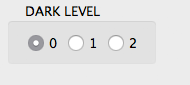 Is it possible? Cec |
| Posted by enkonyito at Mar 3, 2018, 7:23:26 PM |
|
Re: Photo-video rendering plug-in @Ceciliabr That's fine, but how about the selectable options? In the public version of the plug-in, the selectable dark level option has been removed in favor of code integration. This allows to have a simple and practical interface. By default, the dark level 2 is chosen but it is possible to have the dark level 0 (at night hours) by selecting diffusedBounces = 0. If you still want the selectable dark level option, I can make this beta test version of the plug-in resizable. ---------------------------------------- EnkoNyito |
| Posted by enkonyito at Mar 5, 2018, 12:57:56 AM |
|
Re: Photo-video rendering plug-in Update of the document "Configure the SunFlow rendering engine ". This version 2 describes the parameters and their interactions, with examples of rendering and an indication of the duration. ---------------------------------------- EnkoNyito |
| Posted by hansmex at Mar 5, 2018, 7:24:14 AM |
|
Re: Photo-video rendering plug-in Thank you, Enko!!! This may be useful for many people. H ---------------------------------------- Hans new website - under constuction hansdirkse.info |
| Posted by Ceciliabr at Mar 5, 2018, 9:13:26 PM |
|
Re: Photo-video rendering plug-in it is possible to have the dark level 0 (at night hours) by selecting diffusedBounces = 0. Perfect! Then that's all I need Cec |
|

|
Current timezone is GMT Sep 23, 2026, 11:52:15 AM |