España
Joined: Feb 2, 2025
Post Count: 2
Status:
Offline
Issue with 3d virtual tour (textures)
Hi guys! I have a little issue with the program that im not sure if u can help me with
My father use it sometimes as a distraction, creating a "dream house" (a bit silly i know, its not a videogame but ... whatever, he is 70 years old, he needs a hobby) and recetly he told me that 3d view is not working as always, he cant see textures and things like he did earlier
Im not familiar with SH, and I couldnt find why this happens, objects are visible and I updated drivers and windows "in case of".
Netherlands
Joined: Sep 26, 2009
Post Count: 4027
Status:
Offline
Re: Issue with 3d virtual tour (textures)
The outside layer of aan object is only visible if a color of texture is applied. It looks as if these models have only one side textured, and that texture is on the inside, making the part invisible from the outside.
Either use a different program to apply textures to the outside, or (easier) look for different models.
----------------------------------------
Hans
España
Joined: Feb 2, 2025
Post Count: 2
Status:
Offline
Re: Issue with 3d virtual tour (textures)
Those models were visible in 3D mode when he made the plan in the first place, and I have even tried to export it to pdf and there you see the perfect 3D, as if the display problem was while using the program....
Netherlands
Joined: Sep 26, 2009
Post Count: 4027
Status:
Offline
Re: Issue with 3d virtual tour (textures)
There are certain models from Sketchup/Trimble Warehouse that confuse SH3D. They have been textured or coloured on only one face. After importing SH3D has trouble deciding which face to show. One render the left face is shown with colour/texture, next render the right face is shown without colour or invisible. Maybe that's what's happening with your models.
The solution is to use Sketchup and give all faces of the model a colour or texture on both sides.
----------------------------------------
Hans
new website - under constuction hansdirkse.info
----------------------------------------
[Edit 1 times,
last edit by hansmex at Feb 7, 2025, 3:28:06 PM]
Netherlands
Joined: Apr 8, 2022
Post Count: 1807
Status:
Offline
Re: Issue with 3d virtual tour (textures)
The solution is to use Sketchup and give all faces of the model a colour or texture on both sides.
That is one solution that should work.
If you have a model with many "problem faces" you can also try to import the model in Blender and export it again as obj/mtl. You don't need to know anything special about Blender, just import/export, which should be easy. If you're lucky that fixes the problem. If not, then another option is to import in Blender and flip the normals of the problem faces and export. (Flipping normals turns the displayed side of a face to the other side.) Both options using Blender avoid creating double faces as you would do by using Sketchup to give both sides a color, you are effectively creating a second face. With many faces that can significantly increase the size of your model.
---------------------------------------- Dodecagon.nl 1300+ 3D models, manuals, and projects
France
Joined: Oct 20, 2017
Post Count: 403
Status:
Offline
Re: Issue with 3d virtual tour (textures)
La solution d'utiliser Sketchup fonctionne bien, effectivement.
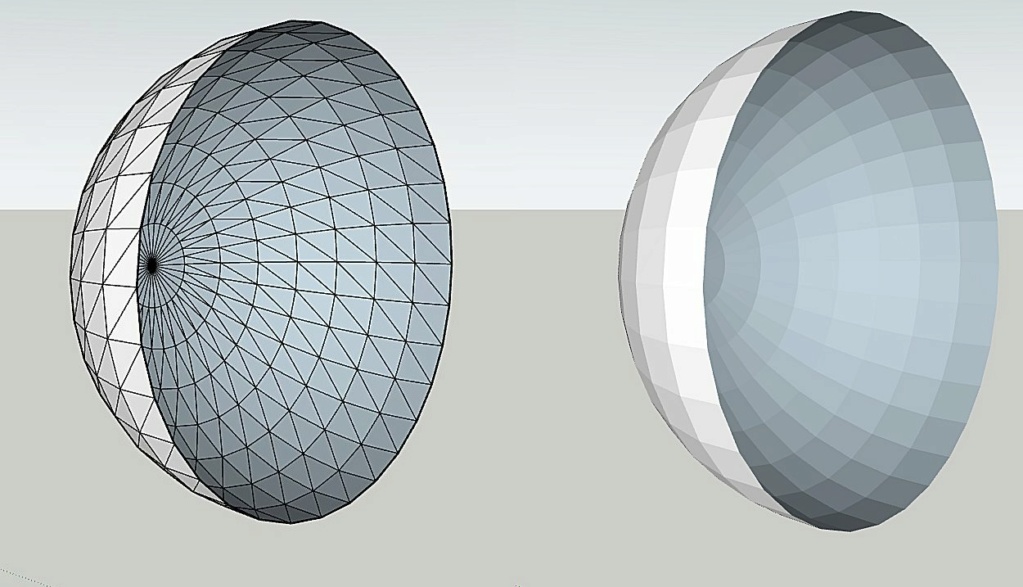
J'ai placé dans Sweet Home une demi sphère (en bleu) proposée par Keet par exemple. On voit sur l'image 3D que sa parties concave n'est pas visible, mais en créant une photo, elle l'est.
J'ai importé cette demi sphère dans Sketchup puis ré exporté en tant qu'objet dans SH3D ( en rouge) sans aucune modif, excepté l'effacement de tous les traits noirs (mais le résultat aurait été le même dans les deux cas).
Et là, la face concave est visible, aussi bien sur l'image 3D que sur la photo.
Netherlands
Joined: Apr 8, 2022
Post Count: 1807
Status:
Offline
Re: Issue with 3d virtual tour (textures)
J'ai placé dans Sweet Home une demi sphère (en bleu) proposée par Keet par exemple. On voit sur l'image 3D que sa parties concave n'est pas visible, mais en créant une photo, elle l'est.
Cela n'est pas censé se produire. La vue intérieure est intentionnellement "transparente". Un visage ne peut avoir une couleur ou une texture que d'un seul côté. Pour avoir une couleur ou une texture sur les deux faces, il faut deux faces au même endroit, chacune avec la direction de la face peinte dans des directions opposées. La façon dont le moteur de rendu affiche encore la couleur "intérieure" est un mystère pour moi. Cela n'est PAS censé se produire. Sur les deux niveaux inférieurs de la génération de photos, cela fonctionne comme prévu, mais les deux niveaux supérieurs montrent l'intérieur. Je ne sais pas pourquoi. La demi-sphère est créée de cette manière spécifiquement pour éviter d'avoir des faces doubles. Cela permet de réduire la taille de l'objet et d'obtenir un rendu plus rapide.
Traduit avec DeepL.com (version gratuite)
[English]
In Sweet Home, I've placed a half-sphere (in blue) proposed by Keet, for example. You can see from the 3D image that the concave part is not visible, but by creating a photo, it is.
That is not supposed to happen. The inside view is intentionally "transparent". A face can only have a color or texture on one side. To have a color or texture on both sides you need two faces in the same place, each with the direction of the painted side in opposite directions. How the renderer still shows the "inside" color is a mystery to me. It is NOT supposed to happen. On the two lower levels of the photo generation that works as intended but the two highest levels do show the the inside. I have no idea why. The half sphere is created that way specifically to avoid having double faces. That keeps the object smaller, and supposedly render faster.
---------------------------------------- Dodecagon.nl 1300+ 3D models, manuals, and projects
France
Joined: Oct 20, 2017
Post Count: 403
Status:
Offline
Re: Issue with 3d virtual tour (textures)
Bonjour Keet. Juste pour info, le fichier .obj de votre demi sphère d'origine (bleue) fait 29,2 ko et le fichier .mtl correspondant fait 199 ko. Pour la sphère rouge passée par Sketchup donc la partie concave est visible, le fichier.obj fait 102 ko et le .mtl fait 200 ko. Les deux objets ont les même dimensions. Le rouge est effectivement plus lourd.
Netherlands
Joined: Apr 8, 2022
Post Count: 1807
Status:
Offline
Re: Issue with 3d virtual tour (textures)
Bonjour Keet. Juste pour info, le fichier .obj de votre demi sphère d'origine (bleue) fait 29,2 ko et le fichier .mtl correspondant fait 199 ko. Pour la sphère rouge passée par Sketchup donc la partie concave est visible, le fichier.obj fait 102 ko et le .mtl fait 200 ko. Les deux objets ont les même dimensions. Le rouge est effectivement plus lourd.
C'est normal puisque Sketchup double le nombre de faces. Pour chaque face existante, il en ajoute une à l'intérieur pour créer un intérieur visible. Ce qui n'est PAS prévu, c'est que le moteur de rendu photo rende un intérieur visible avec ma demi-sphère d'origine. L'intérieur ne devrait pas être rendu puisqu'il n'est pas là. C'est comme s'il montrait l'envers de la couleur/texture de l'extérieur. La même chose se produit avec la boîte par défaut du catalogue. Si vous rendez l'avant invisible, vous ne pouvez pas voir l'intérieur de la boîte dans la vue 3D. Mais si vous effectuez le rendu avec l'un des deux niveaux les plus élevés, l'intérieur est visible. Les deux niveaux les plus bas donnent le résultat escompté.
[English] That is expected since Sketchup doubles the number of faces. For every existing face it adds one on the inside to create a visible inside. What is NOT expected is that the photo renderer renders a visible inside with my original half sphere. The inside should not render since it's not there. It is as if it shows the backside of the color/texture of the outside. The same thing happens with the default box from the catalog. If you make the front invisible you can't see the inside of the box in the 3D view. But if you render with one of the two highest levels it renders a visible inside. The two lowest levels render as expected.
---------------------------------------- Dodecagon.nl 1300+ 3D models, manuals, and projects