
Glad to know. I'm wondering it too. May be Emmanuel can explain it, although I'm not sure whether it's a SH3D or SunFlow issue.Easy and simple idea - and it totally works!!!
For me this is a workaround and I can live with this as a solution, but I'm still wondering what's the issue with the colour...
massive color-difference
This topic has been viewed 35015 times and has 30 replies
Re: massive color-difference
If a long walk every day were healthy, mailmen would be immortal. [:p]

Re: massive color-difference
Nobody complained until now but it's clearly an issue that should be fixed if possible, particularly if the rendering is different with a similar texture.
Please, open a bug ticket.
Please, open a bug ticket.
Emmanuel Puybaret, Sweet Home 3D creator
-
UbuntuBirdy

- Posts: 421
- Joined: Thu Aug 31, 2017 10:31 pm
- Country: Switzerland
- Contact:
Re: massive color-difference
...done.Please, open a bug ticket.
Pascal
SH3D 6.6 / Ubuntu 22.04 (Mainline-Kernel) / Radeon RX580 / Ryzen 7 5800x
SH3D 6.6 / Ubuntu 22.04 (Mainline-Kernel) / Radeon RX580 / Ryzen 7 5800x

Re: massive color-difference
There's really no issue:but I'm still wondering what's the issue with the colour...
The reflected colours change as the light changes – just as in real life.

To best manage colours, the first thing you should do is to calibrate the brightness of your 3d view,
if you haven't done that already:
Apply a completely white texture to the sky.
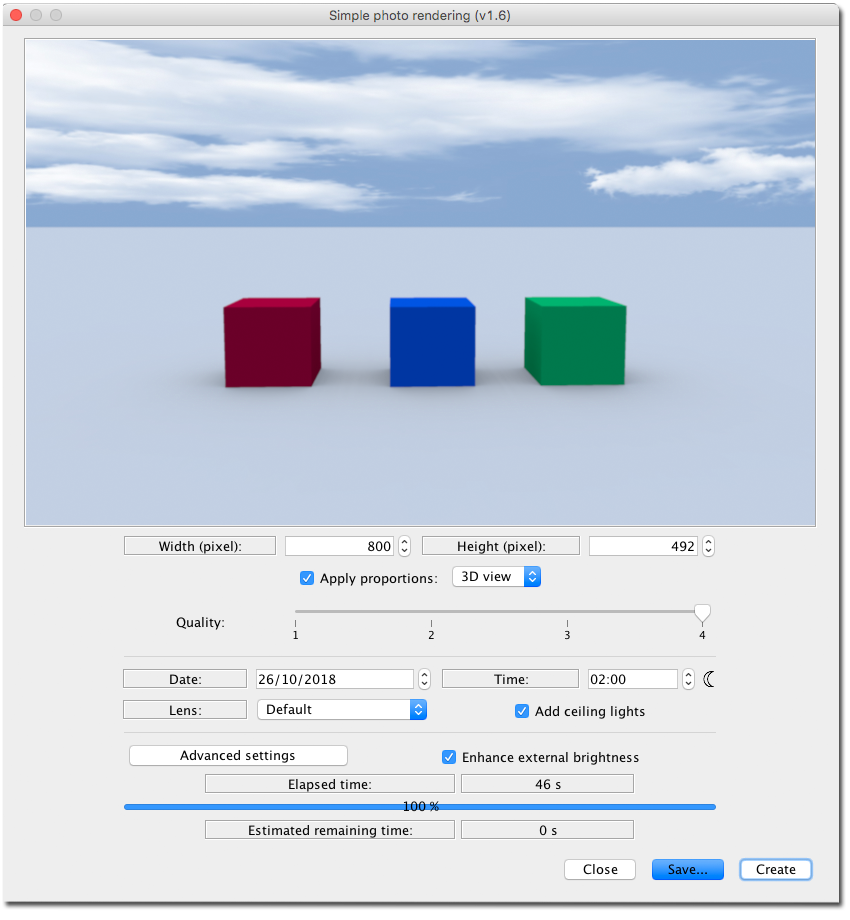
Render different coloured objects with [font=courier new]enhance external brightness[/font] checked, and no sunlight.
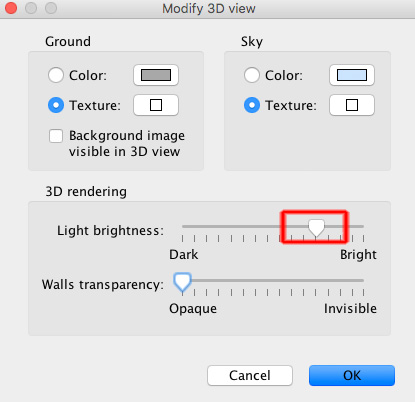
Adjust the brightness of the 3D view until the brightness is as close to the rendered image as possible.
_______
I find that applying a white top to a partly clouded sky image, is a good way to get nice daylight colours when using the enhanced brightness option.
cec
-
UbuntuBirdy
- Posts: 421
- Joined: Thu Aug 31, 2017 10:31 pm
- Country: Switzerland
- Contact:
Re: massive color-difference
Sorry cec, but this IS an issue! Such massive differences are NOT like in real life.
Of course I have tried to adjust all the params, but none of them has improved the condition.
And why are texture colours not the same as only colours?
Of course I have tried to adjust all the params, but none of them has improved the condition.
And why are texture colours not the same as only colours?
Pascal
SH3D 6.6 / Ubuntu 22.04 (Mainline-Kernel) / Radeon RX580 / Ryzen 7 5800x
SH3D 6.6 / Ubuntu 22.04 (Mainline-Kernel) / Radeon RX580 / Ryzen 7 5800x
-
UbuntuBirdy
- Posts: 421
- Joined: Thu Aug 31, 2017 10:31 pm
- Country: Switzerland
- Contact:
Re: massive color-difference
This picture shows what's wrong in my opinion:
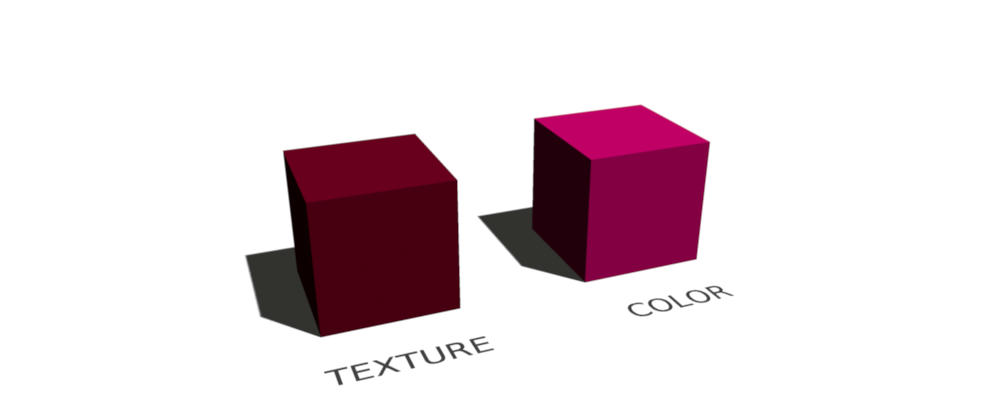
- The left cube has a texture which is only colored as #520015
- The right cube has the color #520015 directly
In my opinion both cubes should look the same, we should see exactly the same color. But only the textured cube shows the color #520015 as it should be.
- The left cube has a texture which is only colored as #520015
- The right cube has the color #520015 directly
In my opinion both cubes should look the same, we should see exactly the same color. But only the textured cube shows the color #520015 as it should be.
Pascal
SH3D 6.6 / Ubuntu 22.04 (Mainline-Kernel) / Radeon RX580 / Ryzen 7 5800x
SH3D 6.6 / Ubuntu 22.04 (Mainline-Kernel) / Radeon RX580 / Ryzen 7 5800x
Re: massive color-difference
You are absolutely right!
I totally misunderstood the problem.
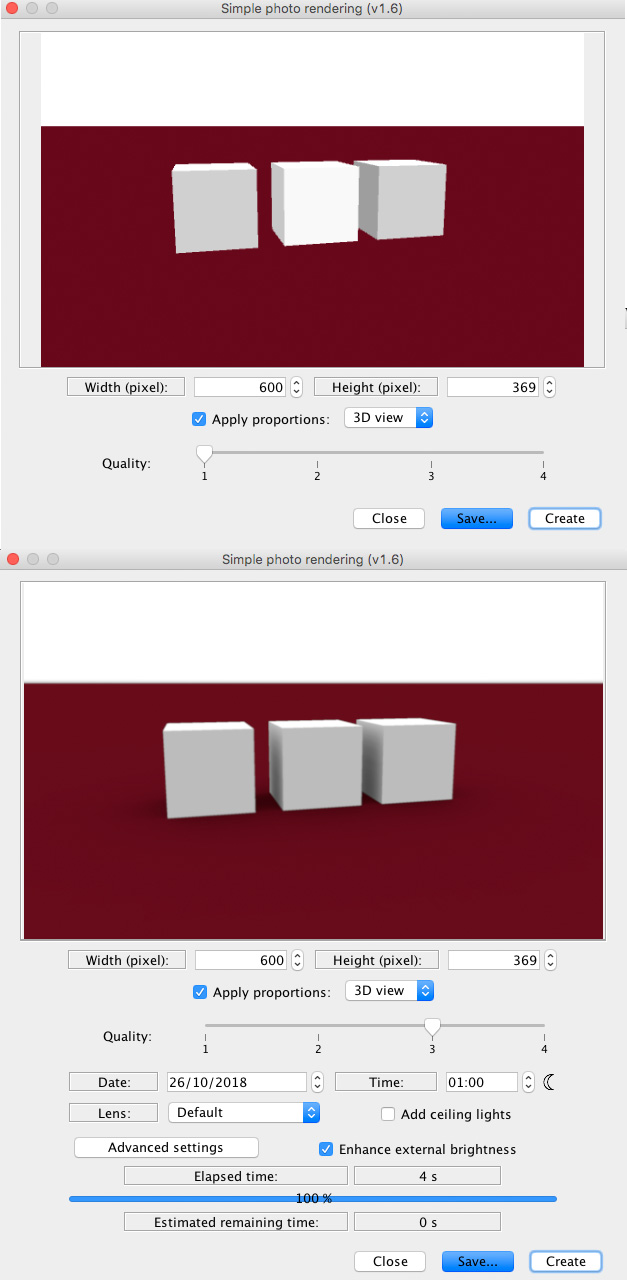
Here is a test with white, showing the opposite effect between the preview and the rendered image.
cec
I totally misunderstood the problem.
Here is a test with white, showing the opposite effect between the preview and the rendered image.
cec
-
UbuntuBirdy
- Posts: 421
- Joined: Thu Aug 31, 2017 10:31 pm
- Country: Switzerland
- Contact:
Re: massive color-difference
I think it makes sense to post the link to the bug ticket.
This way anyone can add further informations regarding the problem.
This way anyone can add further informations regarding the problem.
Pascal
SH3D 6.6 / Ubuntu 22.04 (Mainline-Kernel) / Radeon RX580 / Ryzen 7 5800x
SH3D 6.6 / Ubuntu 22.04 (Mainline-Kernel) / Radeon RX580 / Ryzen 7 5800x
-
Superpippo
- Posts: 10
- Joined: Fri Nov 16, 2018 2:22 pm
- Country: Italia
Re: massive color-difference
Problema simile ... Cielo costantemente rosso anche se cambio colori o Texture se faccio foto in modalità 3 o 4 ... parzialmente risolto : 1) mettere in modalità visita virtuale 2) alzare la testa dell'omino e inquadrare solo il cielo 3) fare una foto in modalità 3 o 4 e vedere se il colore si è resettato e il cielo è tornato blu 4) abbassare gradualmente la testa continuando a verificare che tutto sia tornato a posto 5) vedere con l'inquadratura giusta gli sfondi sono tornati normali 6) fare la stessa verica con l'inquadratura 3d aerea 7) cambiare i punti cardinali o inserire una luce bianca se alcune Texture danno sul giallo
Who is online
Users browsing this forum: No registered users and 1 guest