Sweet Home 3D 3.0

This topic has been viewed 378573 times and has 134 replies
Thread status: Active
Test the features and bug fixes of future versions [img]http://www.sweethome3d.com/images/flags/en_small.gif[/img]
User avatar
Puybaret
Posts: 9440
Joined: Mon Nov 07, 2005 12:00 pm
Country: Paris, France
Contact:

Re: Sweet Home 3D 3.0

Post by Puybaret »

Tonight, the Beta 19 brings Bulgarian and Italian translations, and a small improvement in the rendering engine at the best quality setting. In fact, it was a problem that db4tech noticed a while ago and wasn't fixed yet.
As you can see in the following image, it's about the reflect of windows that won't let appear the sky and other things behind the windows pane:
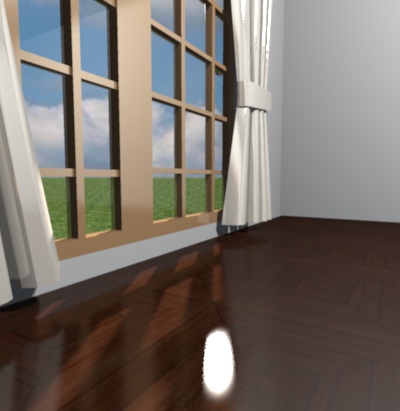
Image

Now it works better as you can see here:

Image

If this fix fortunately implies just a little more processing time, it might miserably introduce some white spots on shiny reflects as the reflect of the curtains shows in the previous image. I could reduce these scattered spots by program but this would imply a much longer processing time. Instead, I prefer to consider that this won't happen often, and anyway curtains generally don't shine! [;)]
Since furniture dialog now offers the ability to cancel the shininess of a 3D model, these white spots can be easily removed in this example by changing curtains shininess:
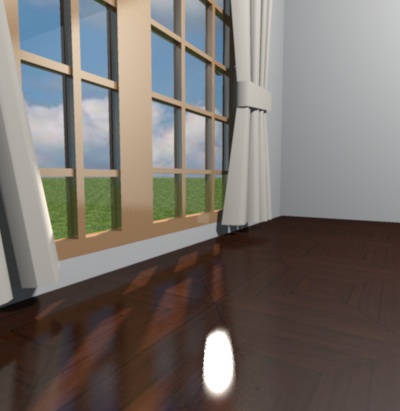
Image


Here are some other examples where the new settings worked correctly out of the box.
A dustbin with incorrect reflect then correct reflect:
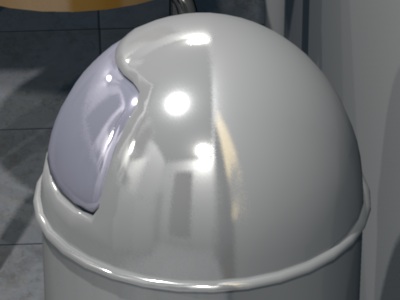
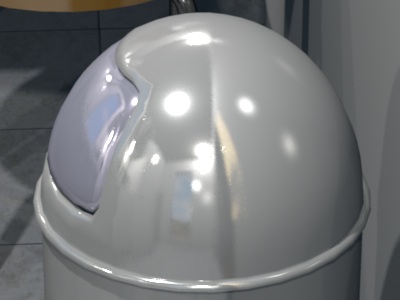
Image

Image


pencilart's sink with incorrect reflect then correct reflect (a tree behind the window hides partially the sky):
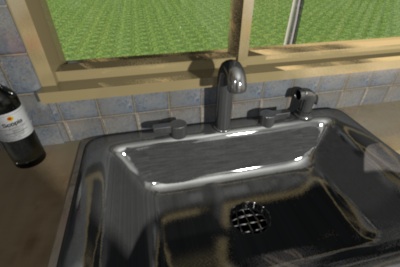
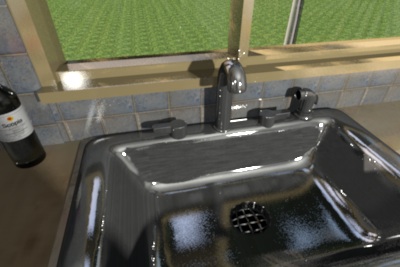
Image

Image


Please could you test in the coming days, if this new setting works correctly on your models too, before 3.0 release? I know that you won't have a way to compare between the old version and the new version of the rendering engine, but in a way, I prefer this, because I want your global feeling about this new setting, without being tempted to pixel peep. In case you find a case that doesn't work correctly, please report it here. I can rollback to the previous version of the renderer easily.

Thanks to the author of SunFlow who helped me to fix this problem. [:)]

Emmanuel Puybaret, Sweet Home 3D creator
User avatar
Puybaret
Posts: 9440
Joined: Mon Nov 07, 2005 12:00 pm
Country: Paris, France
Contact:

Re: Sweet Home 3D 3.0

Post by Puybaret »

The Beta 21 brings Hungarian, Spanish and German translations and a correction to an annoying bug that prevented overlapping floors from being correctly displayed. I thought I fixed it last May, but in a certain way, it was worse because many videos made with OpenGL quality were blinking at ground level because of the fix.
This version brings also two small improvements:
- Photo and video creation dialogs are reopened at their last location if they won't be partially hidden,
- Modified status of a home is switched to true when you change point of view list and parameters in photo and video dialogs.

By the way, I might have forgotten to post a Java library required to test the new settings of rendering quality mentioned in my previous message. Sorry, and I still hope to read your thoughts about it.
Emmanuel Puybaret, Sweet Home 3D creator
User avatar
hansmex
Posts: 4027
Joined: Sat Sep 26, 2009 11:36 am
Country: Netherlands

Re: Sweet Home 3D 3.0

Post by hansmex »

Emmanuel,

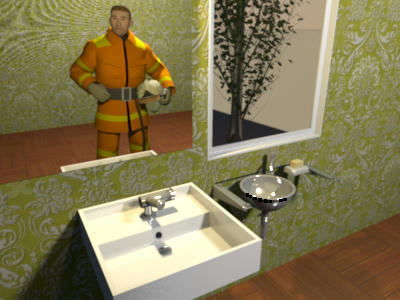
A quick test shows that v3b21 performs VERY well.

Image 1: glass is transparent, mirror reflection is good, shiny surfaces show correct. Only a bit of moire in top-left corner of mirror, but that's why I picked that green texture. I'll see if I can make some more scenes for further testing.

Image

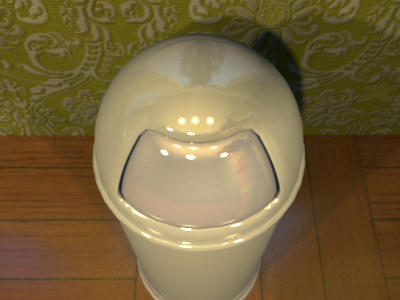
Image 2: visible are the window and tree, the firefighter, three light bulbs that illuminate the scene.

Image

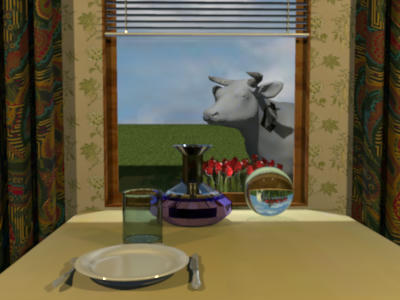
Image 3: here too everything seems just fine. I only see one problem: the tulips looks so nice, that I'm afraid they won't last long...

Image


Hans
Hans

new website - under constuction
hansdirkse.info
User avatar
Puybaret
Posts: 9440
Joined: Mon Nov 07, 2005 12:00 pm
Country: Paris, France
Contact:

Re: Sweet Home 3D 3.0

Post by Puybaret »

Thank you Hans for your feedback.
the tulips looks so nice, that I'm afraid they won't last long...
Then you should take that cow away from them! [;)]
Emmanuel Puybaret, Sweet Home 3D creator
User avatar
hansmex
Posts: 4027
Joined: Sat Sep 26, 2009 11:36 am
Country: Netherlands

Re: Sweet Home 3D 3.0

Post by hansmex »

But I'm in Holland... where do I get my milk??
A devil's dilemma!!
Hans

new website - under constuction
hansdirkse.info
User avatar
Puybaret
Posts: 9440
Joined: Mon Nov 07, 2005 12:00 pm
Country: Paris, France
Contact:

Re: Sweet Home 3D 3.0

Post by Puybaret »

I'd like to post some details about PtiNounours bug seen earlier in this thread.
I looked at the Wall_test.dae.obj file defined in test_wall.sh3d contained in the file he posted, and found why this imported part caused a problem. This OBJ file contains 2 shapes:
- the exterior of the wall object with normals pointing towards the exterior of the object and with a wall texture,
- the interior of the wall object with normals pointing towards the interior of the object; this second part is white.

It's a similar bug to this one where SunFlow didn't handle correctly the double sided triangles of one shape, but this time the bug is at a higher level. Instead of having twice the same triangle (one oriented in a clockwise order, the other one oriented in a counter clockwise order) in one shape, you have two shapes with the same triangles oriented differently; one of the shape uses a texture and the other one is white.
OpenGL handles these two shapes nicely because it ignores the faces with a normal that doesn't point towards the observer. At the opposite, SunFlow renders all the faces without taking into account whether its normal points towards the observer or not. So sometimes it chooses the textured face, sometimes the white face. Fixing this isn't easy because it's two separated shapes and not twice the same triangles within a shape.
But you can also avoid the problem by following PtiNounours' suggestion.

This thread created by Hans is about the same bug.
Emmanuel Puybaret, Sweet Home 3D creator
User avatar
hansmex
Posts: 4027
Joined: Sat Sep 26, 2009 11:36 am
Country: Netherlands

Re: Sweet Home 3D 3.0

Post by hansmex »

Hello Emmanuel,

Just found that beta 23 is out.
When doing a render of a model made with a previous version, I noticed something strange. With Q0 and Q1 the model renders white, but with Q2 and Q3 all textures render the way they should.

Maybe you made a typo somewhere?

Hans
Hans

new website - under constuction
hansdirkse.info
User avatar
Puybaret
Posts: 9440
Joined: Mon Nov 07, 2005 12:00 pm
Country: Paris, France
Contact:

Re: Sweet Home 3D 3.0

Post by Puybaret »

The Beta 25 brings more translations and new help pages about photo creation, video creation and compass modification in English and French. I think that miserably, these new pages won't be translated to other languages in the coming version 3.0, and users of other languages will have to wait a little longer to get this new information in their language.
This beta fixes also the wrong rendering of compass under OpenJDK reported by Pencilart (it's not perfect but it's better though).
Emmanuel Puybaret, Sweet Home 3D creator
User avatar
Puybaret
Posts: 9440
Joined: Mon Nov 07, 2005 12:00 pm
Country: Paris, France
Contact:

Re: Sweet Home 3D 3.0

Post by Puybaret »

Hans,
Sometimes textures are not rendered correctly in offscreen images (used during printing and Q0 / Q1 rendering). [:(]
As this bug happens randomly, I'm afraid it's not a bug in Sweet Home 3D but in Java 3D but I should investigate it better.
It's probably the same bug as this one.
Emmanuel Puybaret, Sweet Home 3D creator
User avatar
wrosun
Posts: 96
Joined: Wed Nov 17, 2010 8:44 am
Country: Pokhara, Nepal

Re: Sweet Home 3D 3.0

Post by wrosun »

I dont understand any thing i also wouls like to render pictures like these but i dont understand what Q0,Q1,Q2,Q3 are.....i am not new in sweethome 3d but rescently started to use the forums........would like to learn more and interacte more wid guys like you....
Post Reply New Topic

Who is online

Users browsing this forum: No registered users and 1 guest