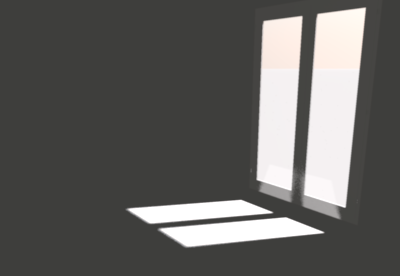
HQ rendering issue

This topic has been viewed 18887 times and has 17 replies
Thread status: Active
Still a problem with your graphic card? [img]http://www.sweethome3d.com/images/flags/en_small.gif[/img]
trankilou
Posts: 14
Joined: Wed May 29, 2013 11:05 am

HQ rendering issue

Post by trankilou »

Hi,

First I want to say I really love your programm, it is almost perfect.
I am planning to build my house from my own plan and I want to know how the rooms will be unlighted.

This drive to our problem :

I think the top HQ rendering is not realistic regarding the condition and the architeture of course.

For instance lets take the living room. I join the plan and a hq picture.
Image

The condition are 21 June, 2:00pm
Image
Image

I think the living rooms seems too dark and we can see blue spotlight (set to 20% brightness) => I think there is a problem

What do you think I should do to have something more realistic ?

Julien

User avatar
hansmex
Posts: 4027
Joined: Sat Sep 26, 2009 11:36 am
Country: Netherlands

Re: HQ rendering issue

Post by hansmex »

Julien,

The best way to get realistic lighting is to insert one (or more) really large lights in your design. Let's say 100x100x100 cms at 25% with 75 cms elevation. This lights up the room without causing unwanted shadows. Also, make sure that ceiling lights are turned off.

Hans
Hans

new website - under constuction
hansdirkse.info
trankilou
Posts: 14
Joined: Wed May 29, 2013 11:05 am

Re: HQ rendering issue

Post by trankilou »

Hello,

Thanks for the workaround!
I assume it is not possible to have realistic reflexion of the sunflare inside the room ? It is too complicated (I have no idea it is a true question) ?

J-
User avatar
Puybaret
Posts: 9440
Joined: Mon Nov 07, 2005 12:00 pm
Country: Paris, France
Contact:

Re: HQ rendering issue

Post by Puybaret »

Since the version 4, you can set some properties of the rendering engine with the SweetHome3D.l4j.ini file (or the Linux launch script) to get some reflection effect as shown as in this thread. I plan to write an article about it but you can already try it yourself with the following lines:

Code: Select all

-Dcom.eteks.sweethome3d.j3d.PhotoRenderer.lowQuality.globalIllumination=path
-Dcom.eteks.sweethome3d.j3d.PhotoRenderer.lowQuality.diffusedBounces=3
-Dcom.eteks.sweethome3d.j3d.PhotoRenderer.lowQuality.causticsPhotons=1000000

-Dcom.eteks.sweethome3d.j3d.PhotoRenderer.highQuality.globalIllumination=path
-Dcom.eteks.sweethome3d.j3d.PhotoRenderer.highQuality.diffusedBounces=3
-Dcom.eteks.sweethome3d.j3d.PhotoRenderer.highQuality.causticsPhotons=1000000
See this file for little more explanations about these properties, and expect a much longer rendering process.
Emmanuel Puybaret, Sweet Home 3D creator
User avatar
hansmex
Posts: 4027
Joined: Sat Sep 26, 2009 11:36 am
Country: Netherlands

Re: HQ rendering issue

Post by hansmex »

Emmanuel,

I made a copy of the 880 byte start script, then added those six lines at the end of the text, starting on a new line.
I then ran the script and SH3D started normally.

However, when I try to make a test render in Q3 or Q4, the render times seem to be the same as always, as is the quality.

Did I do something wrong?
Maybe you could publish a working start script, so that we can experiment with these improved quality settings?

Hans
Hans

new website - under constuction
hansdirkse.info
trankilou
Posts: 14
Joined: Wed May 29, 2013 11:05 am

Re: HQ rendering issue

Post by trankilou »

hi,

I will try this and I will give a try to lumion 3D rendering also (as they are proposing a free version).

I ll give you the comparison :)

Ju-
User avatar
Puybaret
Posts: 9440
Joined: Mon Nov 07, 2005 12:00 pm
Country: Paris, France
Contact:

Re: HQ rendering issue

Post by Puybaret »

Hans, I talked about the Linux script because I guessed you would like to try it too. [;)]
But you're right, I didn't give enough details. Consider the each line starting by -D as a parameter you should add between exec "$PROGRAM_DIR"/jre1.6.0_43/bin/java and -Xmx... in SweetHome3D launch script, and separate each parameter by spaces (not line returns).
Hope you can handle it. [:)]
Emmanuel Puybaret, Sweet Home 3D creator
User avatar
hansmex
Posts: 4027
Joined: Sat Sep 26, 2009 11:36 am
Country: Netherlands

Re: HQ rendering issue

Post by hansmex »

Emmanuel,

I updated my file as you instrcuted. After a short wait I get perfectly black pictures...
Please, see the attached file. Did I do something wrong?

Hans

Linux hi-res start script
Hans

new website - under constuction
hansdirkse.info
User avatar
Puybaret
Posts: 9440
Joined: Mon Nov 07, 2005 12:00 pm
Country: Paris, France
Contact:

Re: HQ rendering issue

Post by Puybaret »

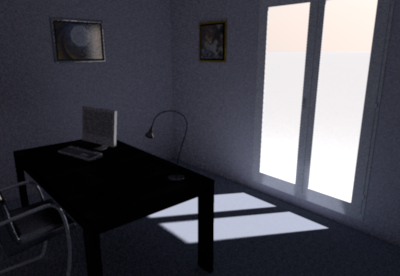
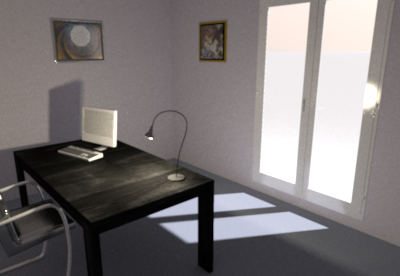
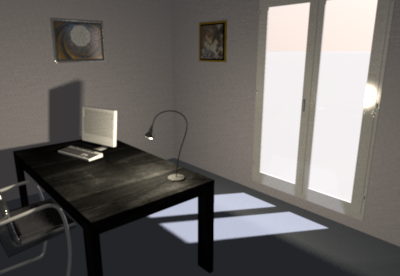
I tested the two following parameters on a small file:

Code: Select all

-Dcom.eteks.sweethome3d.j3d.PhotoRenderer.highQuality.globalIllumination=path
-Dcom.eteks.sweethome3d.j3d.PhotoRenderer.highQuality.diffusedBounces=3
and got the following results:

Image

compared to a rendering with default parameters:

Image


If you turn on the light on the desk, I got the following results:

Image

compared to a rendering with default parameters:

Image

As you can see, if it doesn't give miracle results, the reflection of the outside light on the blue ground has some visible effect, but still an interior light gives correct results much faster.

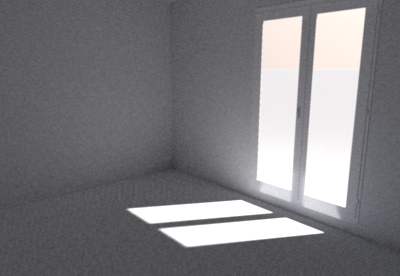
For your information, here are also two images of the same empty room with default color on the walls and the floor:

Image

again compared to a rendering with default parameters:

Image

Did I do something wrong?
I don't know how complex can be the rendered scene. If you're ready to spend some time on this very time consuming task, I'll be pleased to read your report. [:)]
Attachments
SimpleRoom.sh3d
(482.28 KiB) Downloaded 774061 times
Emmanuel Puybaret, Sweet Home 3D creator
trankilou
Posts: 14
Joined: Wed May 29, 2013 11:05 am

Re: HQ rendering issue

Post by trankilou »

Hi,

As I told you , I tried to export my work in Lumion.
It works great. I just export the house with the minimum of objects in obj format and the import was perfect.

The rendering is just awesome, it is better than the sh3D photo plugin set to maximum but..in realtime !
I will post a link to the video I made
The only cons: this soft dosen't exist on OSX (need bootcamp, burk)

J-
Post Reply New Topic

Who is online

Users browsing this forum: No registered users and 1 guest