How to Delete Textures
This topic has been viewed 5547 times and has 2 replies
-
myfathersson
- Posts: 1
- Joined: Thu Apr 13, 2017 4:31 pm
How to Delete Textures
How do I delete textures I no longer want? I can see how to import them and how to use them, I can even see how to delete at least furniture I've imported, but I can't find anyway to delete textures that I do not want anymore.

Re: How to Delete Textures
Display the dialog box that allows you to choose a texture, for example by selecting 3D view > Modify 3D view menu item and clicking on the texture button for the ground.
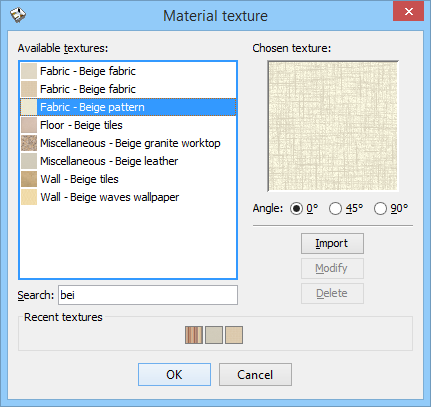
Then select an imported texture you want to delete and click on the Delete button.
Then select an imported texture you want to delete and click on the Delete button.
Emmanuel Puybaret, Sweet Home 3D creator

Re: How to Delete Textures
If you want to delete textures that come with the program, open the texture library with the TexturesLibraryEditor.
Using this tool you can delete unwanted textures.
H
Using this tool you can delete unwanted textures.
H
Who is online
Users browsing this forum: No registered users and 2 guests