I am a new user of SH-3D and have an issue that has probably been asked many times.I want to add textures to my plan (mainly floor and roof). I have tried importing the eTeksScopia files from the import link. The download is good, I unzip the sh3t file and double click on it, the program seems to do something but no texture library is visible.
If I repeat the process I am told the file is already there, do I want to replace it? I have done an internet search and this problem has been posted but none of the simple solutions(update software, try again etc.) have worked for me. There are some complex solutions that involve messing around with files with names I can't even find!
I am strictly an "Amateur Architect" trying to come up with ideas for a house that I eventually hope to have built! I am using a HP laptop with Windows 10. Thanks for your help.
Unable to see Texture library
This topic has been viewed 3956 times and has 2 replies
-
bdfd

- Posts: 2614
- Joined: Sat Mar 29, 2014 7:17 am
- Country: LILLE, Les Hauts de France, Western Europa
Re: Unable to see Texture library
You cannot see directly the textures.
In belowed picture, I show you how see them.
First, with any object in your project, you click twice (A1),
a window appears (A2),
click on 'texture' button and a second window appears (A3) with all available textures.
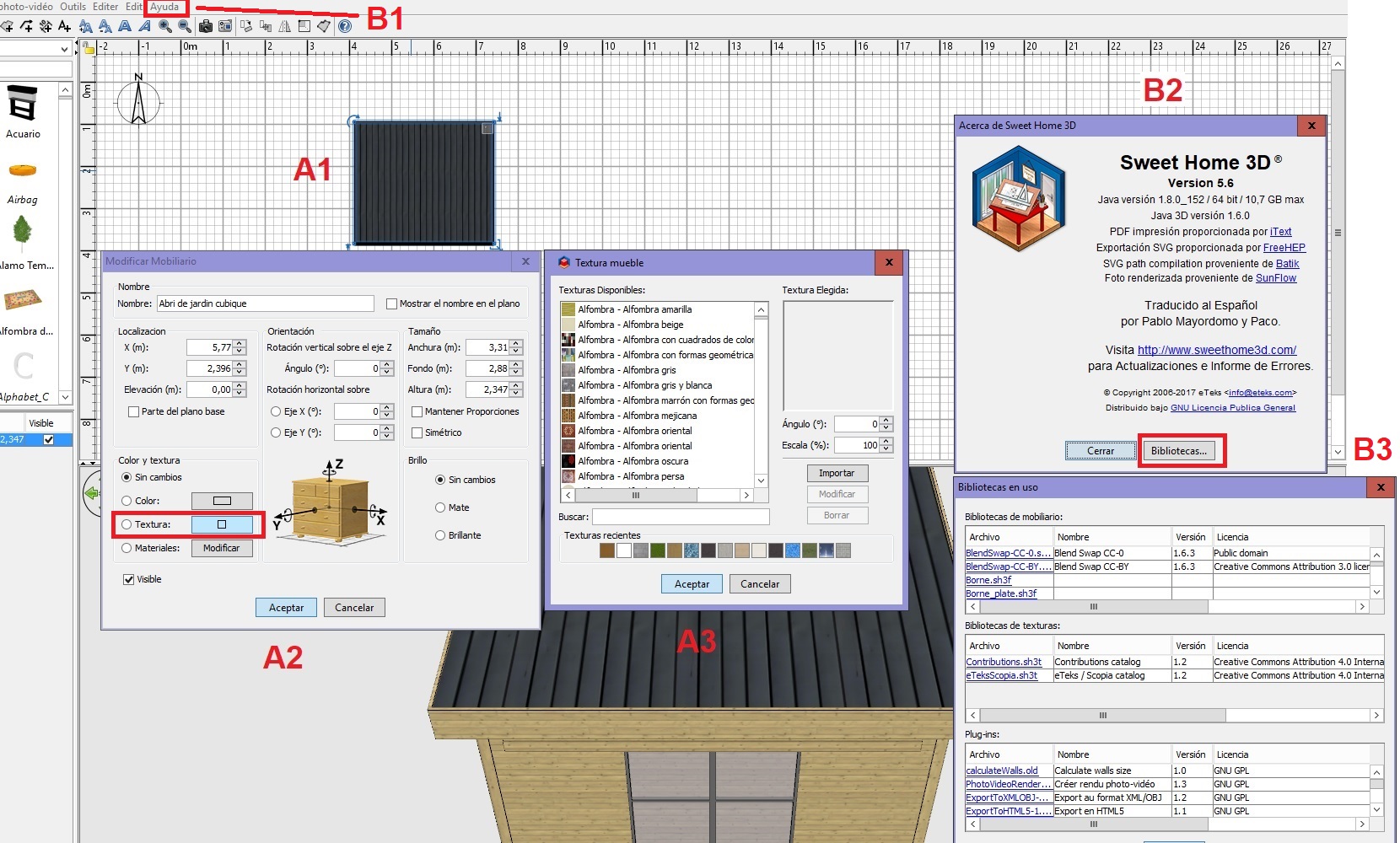
Second, with the top menu click on 'Ayuda' option (spanish mode) - B1,
a window appears (B2), click on 'bibliotécas' button,
a second window appears with all loaded librairies in your sh3d (B3).
Happy new year.
[:)]
In belowed picture, I show you how see them.
First, with any object in your project, you click twice (A1),
a window appears (A2),
click on 'texture' button and a second window appears (A3) with all available textures.
Second, with the top menu click on 'Ayuda' option (spanish mode) - B1,
a window appears (B2), click on 'bibliotécas' button,
a second window appears with all loaded librairies in your sh3d (B3).
Happy new year.
[:)]
Evil progresses when good people do nothing!
---
SH3D 7.1 and nothing else - W11 64b in 4K
---
SH3D 7.1 and nothing else - W11 64b in 4K
Re: Unable to see Texture library
Thank you. I thought the texture library would be shown in the library list the same as furniture etc. I feel like an idiot!!!
Happy New year to you.
Happy New year to you.
Who is online
Users browsing this forum: No registered users and 1 guest