I have created a model in Poser and was wondering if there is any way to export it into sweethome3D so I can place it into my 3d plan.
If anyone has any knowledge on this subject it would be a great help.
Many Thanks. [:)]
 Exporting from Poser into Sweethome 3D
This topic has been viewed 4273 times and has 2 replies

Re: Exporting from Poser into Sweethome 3D
I have been doing this for some years, and have found a method that works:
First of all: Make a new directory for the export.
Then export a Collada file ([font=courier new]dae[/font] ),using the default mode. Be sure to select the preset:[font=courier new]default[/font] . Left unchecked, Poser will most likely crash.
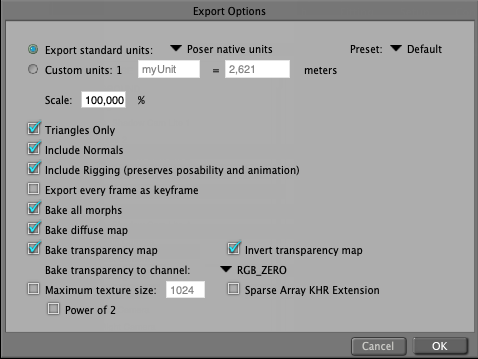
After exporting the [font=courier new]dae[/font] , export an [font=courier new]obj[/font] file, into the same directory.

Importing the [font=courier new].obj[/font] file to SH3D, the textures will be "sort of" correct.
You will most likely have to edit the eyelashes of human models, replacing white with transparent.
If you're lucky, the body part names will be displayed correctly in the Modify furniture window, but don't count on it. Poser is a great piece of software, but it sometimes performs a bit unpredictable when exporting files.
The [font=courier new]dae [/font] export creates all the textures, so you can create various poses and save only the [font=courier new].obj[/font] file to the same directory and re-use the textures.
If this doesn't work the first time, try again.
AND BE SURE TO SAVE YOUR POSER PROJECT PRIOR TO EXPORTING!
Courage!
Cec
First of all: Make a new directory for the export.
Then export a Collada file ([font=courier new]dae[/font] ),using the default mode. Be sure to select the preset:[font=courier new]default[/font] . Left unchecked, Poser will most likely crash.
After exporting the [font=courier new]dae[/font] , export an [font=courier new]obj[/font] file, into the same directory.
Importing the [font=courier new].obj[/font] file to SH3D, the textures will be "sort of" correct.
You will most likely have to edit the eyelashes of human models, replacing white with transparent.
If you're lucky, the body part names will be displayed correctly in the Modify furniture window, but don't count on it. Poser is a great piece of software, but it sometimes performs a bit unpredictable when exporting files.
The [font=courier new]dae [/font] export creates all the textures, so you can create various poses and save only the [font=courier new].obj[/font] file to the same directory and re-use the textures.
If this doesn't work the first time, try again.
AND BE SURE TO SAVE YOUR POSER PROJECT PRIOR TO EXPORTING!
Courage!
Cec
Re: Exporting from Poser into Sweethome 3D
Just mentioning:
If you are patient and willing to experiment, there should be a possibility to use" hinging" to change the posing of a character in SH3D. I have spent some days trying to make it work, but so far I have not had much luck.
I have not given up though – just given it a rest.
Cec
If you are patient and willing to experiment, there should be a possibility to use" hinging" to change the posing of a character in SH3D. I have spent some days trying to make it work, but so far I have not had much luck.
I have not given up though – just given it a rest.
Cec
Who is online
Users browsing this forum: No registered users and 1 guest