|
Sweet Home 3D Forum » List all forums » » Forum: New versions » » » Thread: Sweet Home 3D 5.5 |
||
| Print at Dec 15, 2025, 7:36:33 PM |
|
|
| Posted by jdab at Aug 24, 2017, 6:25:38 PM |
|
Re: Sweet Home 3D 5.5 May I also suggest : - Smoothen transitions between 2 camera moves - and elliptical camera trajectory Regards |
| Posted by Puybaret at Aug 30, 2017, 9:52:10 PM |
|
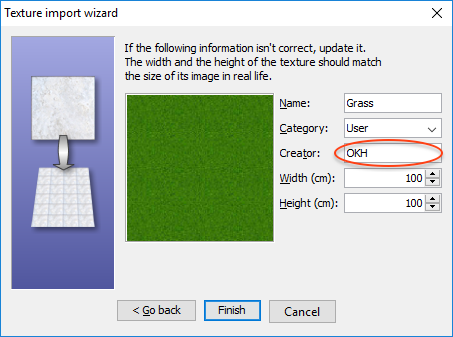
Re: Sweet Home 3D 5.5 The version 5.5 beta 13 (Java Web Start, Windows installer, macOS installer and Linux 64 installer) comes with updated translations and a more complete management of content creators. It's now possible to enter the creator of imported furniture and texture images in the wizards, and the Creator column displays the creator of a 3D model + the creators of textures applied to the object. The Java 3D version and architecture used by the Windows installer can be also modified with the following additional parameters: /os.arch=x86 will force the installation of the 32 bit version of Sweet Home 3D under Windows 64 bit /j3d.version=1.5.2 will force the installation of Java 3D 1.5.2 /j3d.version=1.6 will force the installation of Java 3D 1.6. As Java 3D 1.6 seemed to cause some problems for some users under Windows 7 and older versions, I also modified the behavior of the installer in such a way that Java 3D 1.5.2 will be installed by default under Windows XP, Vista and 7. To use these options, simply execute the installer in a cmd window followed by the options of your choice separated by spaces. I should release Sweet Home 3D 5.5 in the coming days. Just wait for some feedback from users to be sure that the new options and Java 8u144 work correctly for them. ---------------------------------------- Emmanuel Puybaret, Sweet Home 3D creator |
| Posted by okh at Aug 31, 2017, 8:53:43 AM |
|
Re: Sweet Home 3D 5.5 Good, again no issues discovered so far. Congratulations. .. It's now possible to enter the creator of imported furniture and texture images in the wizards... Have a feeling this is a silly question, but exactly where in the import wizards can you add creator? ok PS, BTW, the console log shows, not sure whether the insecure properties mean anything: Java Web Start 11.131.2.11 x86 Using JRE version 1.8.0_131-b11 Java HotSpot(TM) Client VM User home directory = C:\Users\ok ... ---------------------------------------------------- CacheEntry[http://www.sweethome3d.com/SweetHome3D.5.5.beta.jnlp]: updateAvailable=true,lastModified=Sun Jul 30 14:08:09 CEST 2017,length=3555 CacheEntry[http://www.sweethome3d.com/lib/SweetHome3D.5.5.beta.jar]: updateAvailable=true,lastModified=Fri Aug 04 16:52:09 CEST 2017,length=13181730 Insecure property: (com.eteks.sweethome3d.applicationId, SweetHome3D#JavaWebStart) specified in unsigned jnlp file will not be set. Insecure property: (com.eteks.sweethome3d.deploymentInformation, Java Web Start) specified in unsigned jnlp file will not be set. |
| Posted by Puybaret at Aug 31, 2017, 10:14:39 AM |
|
Re: Sweet Home 3D 5.5 As images may talk better than words, here are screenshots of the new creator text fields in wizards: I wouldn't bother about the report about the insecure properties in the Beta version. I know the Beta versions in Java Web Start are configured less securely than in releases. ---------------------------------------- Emmanuel Puybaret, Sweet Home 3D creator |
| Posted by okh at Aug 31, 2017, 10:37:33 AM |
|
Re: Sweet Home 3D 5.5 Thanks, yes, now I see it. I must have started 5.4 or beta 10 by mistake. Felt it was silly. Nice feature! ok |
| Posted by hansmex at Aug 31, 2017, 3:14:13 PM |
|
Re: Sweet Home 3D 5.5 Emmanuel, There seems to be some kind of a regression in beta 13. Using Mint 18 (=Ubuntu) I double-click the java3d-1.5.2. option. I see the window where I choose Run or Run-In-Terminal, but nothing happens. Checking beta 10, all is normal. Hans ---------------------------------------- Hans new website - under constuction hansdirkse.info |
| Posted by Puybaret at Aug 31, 2017, 4:05:20 PM |
|
Re: Sweet Home 3D 5.5 Very strange, Hans. I don't remember programming a change that could cause a launch issue, and it works on my Ubuntu 14 system ![]() ---------------------------------------- Emmanuel Puybaret, Sweet Home 3D creator |
| Posted by hansmex at Aug 31, 2017, 4:10:54 PM |
|
Re: Sweet Home 3D 5.5 I restarted my computer and tried again. Same result unfortunately... ---------------------------------------- Hans new website - under constuction hansdirkse.info |
| Posted by UbuntuBirdy at Aug 31, 2017, 10:35:04 PM |
|
Re: Sweet Home 3D 5.5 No problems on Ubuntu 17.04 @Hans seems to be a Mint problem or a individual one. ---------------------------------------- Pascal SH3D 6.6 / Ubuntu 22.04 (Mainline-Kernel) / Radeon RX580 / Ryzen 7 5800x |
| Posted by Ceciliabr at Sep 1, 2017, 3:07:56 AM |
|
Re: Sweet Home 3D 5.5 @Puybaret + ![]() |
|
|
|
Current timezone is GMT Dec 15, 2025, 7:36:33 PM |