Print at Dec 15, 2025, 7:36:39 PM
Posts: 98   Pages: 10   [ Previous Page | 1 2 3 4 5 6 7 8 9 10 ]
View all posts in this thread on one page
Posted by Simon_Franke at Sep 14, 2017, 5:38:18 PM
Re: Sweet Home 3D 5.5
I don´t know, that there is much new to translate. I tought it was a bugfix release - so the translation whould have been the same.

Posted by Simon_Franke at Sep 14, 2017, 5:44:43 PM
Re: Sweet Home 3D 5.5
Why its not possible to edit my own posts, at least for a few minutes ? Thats a security problem, If somebody post wrong things, not for public.

What I wanted to ask you, too - why there is a difference between full installer an the portable version relating to the language translation ? The full installer is available in german.

Posted by Ceciliabr at Sep 14, 2017, 11:55:28 PM
Re: Sweet Home 3D 5.5
@Puybaret
In case of need, I published a patch for this issue that was reported by another user. See Bug #780.

Perfect! Thank you!

cec

Posted by Puybaret at Sep 15, 2017, 12:25:41 AM
Re: Sweet Home 3D 5.5
I tought it was a bugfix release
Hum, you should look closer. The version 5.5 is much more than a bugfix release! sad crying

Why its not possible to edit my own posts, at least for a few minutes ? Thats a security problem.
You're right, it's for security reasons but not the ones you had in mind. It's mainly to avoid spammers to publish nice messages then change them once moderated. Forums are nice but they require some moderation work as soon as they are successful.

why there is a difference between full installer an the portable version relating to the language translation ?
The portable version comes also with all the contributed translations (full or outdated).

But be patient, let's hope that more translation updates will arrive soon.
----------------------------------------
Emmanuel Puybaret, Sweet Home 3D creator

Posted by Puybaret at Sep 20, 2017, 10:56:53 PM
Re: Sweet Home 3D 5.5
I released tonight the version 5.5.2 which fixes some bugs reported since version 5.5 and includes the portable version.

To ensure Sweet Home 3D can run under the upcoming macOS 10.13 High Sierra, I had also to update the Java 3D version used in the installer (DMG) and portable distributions, to Java 3D 1.6.0 (the same one used under Java 8). Unfortunately, this obliges to give up support to Java 5 and PowerPC which are the only option to run Sweet Home 3D for some users under Mac OS X 10.4 and 10.5. Nevertheless, if these few users still want to use the latest version of Sweet Home 3D, they can still run the JAR Exectutable distribution.
Anyway, keep in mind that giving up support to Java 5 will happen sooner or later because the compiler of upcoming Java 9 won't be able to generate files compatible with Java 5 anymore (for Java programmers, the smallest value for -target option in javac is 1.6 in Java 9). But there's no need to hurry!
Speaking about Java 9, note that I also tried successfully Sweet Home 3D with the last Beta of Java 9 under Windows and Linux, but had trouble under Mac OS X, where it doesn't run yet (except if you use the -Dcom.eteks.sweethome3d.no3D=true Java option to run the program as Sweet Home 2D).

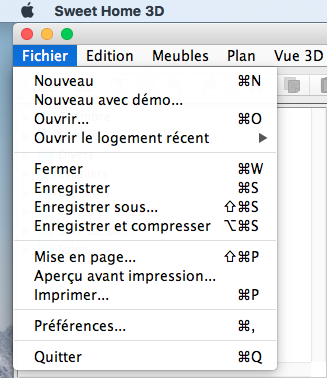
One last thing: there's still a bug in macOS High Sierra that prevents to display the menu bar of Sweet Home 3D at the top of the screen on non-English systems. In version 5.5.2, I programmed a workaround that attaches the menu bar at the top of each window (like under Windows), and as soon as Apple will have fixed this bug, the menu bar should go back to screen top. Please, don't beat me, I really did all my best to avoid this bug! wink


You may also use the JAR Executable file or the Java Web Start version which don't show this bug.

Hope you'll enjoy this update smile
----------------------------------------
Emmanuel Puybaret, Sweet Home 3D creator

Posted by hansmex at Oct 26, 2017, 4:45:57 PM
Re: Sweet Home 3D 5.5
COPY-PASTE doesn't work under Mint 18

I made a drawing (walls and floors) and then tried to copy everything from level 1 to level 2. Unfortunately that wasn't possible.
- I tried CTRL-A then CTRL-C then CTRL-V without success.
- I tried select with mouse, then using the menu Copy and Paste without success.

Copy-Paste only works when selecting one or more items (but not ALL) at a time and copy-paste it to the new level.

NB: this is about walls and floors only, it's a design so far without furniture.

System: Mint 18, based on Ubuntu 16.04, SH3D version 5.5a

Hans
----------------------------------------
Hans

new website - under constuction
hansdirkse.info

Posted by Puybaret at Oct 28, 2017, 11:52:23 AM
Re: Sweet Home 3D 5.5
Sorry Hans, I just tried some demos of Sweet Home 3D 5.5a and 5.6 under a fresh image of Mint 18.2 64 bit, and could copy paste the selected items after a Ctrl + A.
One thing I noticed is that when the compass is visible, it's also selected with Ctrl + A, but as the compass can't be duplicated, it's not part of the pasted items. Thus, as the copied items and pasted items are different, they are pasted at the same place with no visual feedback (except the compass which becomes unselected if it's displayed in the plan area). This may give the feeling that nothing happened. Wouldn't it be what you actually experienced?
----------------------------------------
Emmanuel Puybaret, Sweet Home 3D creator

Posted by bdfd at Oct 28, 2017, 7:28:34 PM
Re: Sweet Home 3D 5.5
...This may give the feeling that nothing happened. Wouldn't it be what you actually experienced?
if that's true, Hans should have seen his items list dubbed in lower-left frame, right ? d oh
----------------------------------------
Evil progresses when good people do nothing!
---
SH3D 7.1 and nothing else - W11 64b in 4K

Posts: 98   Pages: 10   [ Previous Page | 1 2 3 4 5 6 7 8 9 10 ]