confused .JPEG not supported?

This topic has been viewed 3820 times and has 9 replies
Thread status: Active
How can I do this? [img]http://www.sweethome3d.com/images/flags/en_small.gif[/img]
Post Reply New Topic
truffe2miel
Posts: 15
Joined: Thu Jan 10, 2013 9:00 am
Country: Paris, France

.JPEG not supported?

Post by truffe2miel »

Hi there!

I've been successfully using this easy and very clean software for a couple a months, and now stuck on a new problem of non-supported files.

I've always been able to download files from the data banks linked in this site, which mostly appear as .jpg when they're Textures. But my SH suddenly seems to have decided it won't work any more.
I get this error screen when trying:
Image


Has anyone a clue about what's going on there?
(sorry for the errors, English isn't my native language).
User avatar
Puybaret
Posts: 9440
Joined: Mon Nov 07, 2005 12:00 pm
Country: Paris, France
Contact:

Re: .JPEG not supported?

Post by Puybaret »

I'm not completely sure about this, but I recently discovered in recent versions that some issues could arise when the folder name (or its parents) contains some accentuated letters. Would it be your case?
Emmanuel Puybaret, Sweet Home 3D creator
truffe2miel
Posts: 15
Joined: Thu Jan 10, 2013 9:00 am
Country: Paris, France

Re: .JPEG not supported?

Post by truffe2miel »

Thank you for your quick answer! :)

Checked, and there's no accent anywhere in this folder or it's parents :(
I wonder why it did work before and bugs now? As far as I know, the settings are the same and I haven't changed anything to the folders...
User avatar
Puybaret
Posts: 9440
Joined: Mon Nov 07, 2005 12:00 pm
Country: Paris, France
Contact:

Re: .JPEG not supported?

Post by Puybaret »

With which particular file did you encounter this problem?
Emmanuel Puybaret, Sweet Home 3D creator
truffe2miel
Posts: 15
Joined: Thu Jan 10, 2013 9:00 am
Country: Paris, France

Re: .JPEG not supported?

Post by truffe2miel »

With any .jpeg.
I tried with at least 50 different ones, to no avail. The last one was "Patterrific_DamagedWood02".
User avatar
hansmex
Posts: 4027
Joined: Sat Sep 26, 2009 11:36 am
Country: Netherlands

Re: .JPEG not supported?

Post by hansmex »

The screen shown in the first message of this thread, is for importing 3D models, and NOT for importing images.

If you want to import a JPG (to use as a texture?), then you should
- select a model
- select Modify furniture
- select Texture
- select Import texture.

Read the section in the User Guide about editing walls. This works the same for walls and furniture.

Hans
Hans

new website - under constuction
hansdirkse.info
truffe2miel
Posts: 15
Joined: Thu Jan 10, 2013 9:00 am
Country: Paris, France

Re: .JPEG not supported?

Post by truffe2miel »

Gosh... Very big shame on me..... It does work that way! Thank you VERY much, Hansmex!

Remains only the problem of importing a new floor texture as a JPEG image. When clicking on the room surface in the 2D-plan, one should be able to change the color or texture of floor and ceiling, and if needed add new ones.
I can't do that. Is it also a stupid "click-error", do you think?
User avatar
hansmex
Posts: 4027
Joined: Sat Sep 26, 2009 11:36 am
Country: Netherlands

Re: .JPEG not supported?

Post by hansmex »

Importing new textures works the same for walls, floors and furniture models.

Hans
Hans

new website - under constuction
hansdirkse.info
User avatar
Puybaret
Posts: 9440
Joined: Mon Nov 07, 2005 12:00 pm
Country: Paris, France
Contact:

Re: .JPEG not supported?

Post by Puybaret »

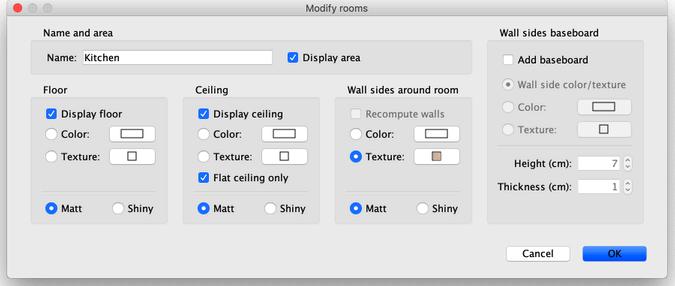
Double click on the room you want to change, and change the texture of its floor in its Room panel.

Image
Emmanuel Puybaret, Sweet Home 3D creator
truffe2miel
Posts: 15
Joined: Thu Jan 10, 2013 9:00 am
Country: Paris, France

Re: .JPEG not supported?

Post by truffe2miel »

Hum... I'd like to say it still doesn't work, just not to appear as the complete idiot I am, but I'd be lying.
Works perfectly.

OOOOPS.

Thanks.


Hum.
* shame *
Post Reply New Topic

Who is online

Users browsing this forum: No registered users and 2 guests